1. Intro
Morloc is a strongly-typed functional programming language where functions are imported from foreign languages and unified under a common type system. This language is designed to serve as the foundation for a universal library of functions. Each function in the library has one general type and zero or more implementations. An implementation may be either a function sourced from a foreign language or a composition of such functions. All interop code is generated by the Morloc compiler.
2. Why Morloc?
2.1. Compose functions across languages under a common type system
Morloc allows functions from polyglot libraries to be composed in a simple functional language. The focus isn’t on classic interoperability (e.g., calling Python from C) or serialization (e.g., sending data between applications via protobufs) — though morloc implementations may use these under the hood. Instead, you define types, import implementations, and build complex programs through function composition. The compiler invisibly generates any required interop code.
2.2. Write in your favorite language, share with everyone
Do you want to write in language X but have to write in language Y because everyone in your team does or because your expected users do? Love C for algorithms, R for statistics, but don’t want to write full apps in either? Morloc lets you mix and match, so you can use each language where it shines, with no bindings or boilerplate.
2.3. Run benchmarks and tests across languages
Tired of learning new benchmark and testing suites across all your languages? Is it hard to benchmark similar tools wrapped in applications with varying input formats, input validation costs, or startup overhead? In Morloc, functions with the same general type signature can be swapped in and out for benchmarking and testing. The same test suites and test cases will work across all supported languages because inputs/output of all functions of the same type share equivalent Morloc binary forms, making validation and comparison easy.
2.4. Design universal libraries
With Morloc, we can build abstract libraries using the general types as a logical framework. Then we can import implementations of these functions from one or more of the supported languages and easily test and benchmark them. These libraries are the foundation for an ecosystem where functions may be verified, organized/searched by type, and used to build rigorous programs.
2.5. Make composable and deployable tools
A Morloc module can be compiled directly into a CLI tool with rich subcommands and automatically generated usage statements. These CLI tools can be composed with just a few lines to make custom toolboxes. They can also be compiled as daemons serving over UNIX sockets, TCP or HTTP.
2.6. Make better scientific workflows
Within the scientific programming space, Morloc can serve as a replacement for the brittle application/file paradigm of workflow design. Replace heavy CLI applications with pure function libraries, ad hoc textual file formats with explicit data structures, and workflow specifications with function compositions. See the first Morloc paper for details (here).
3. Getting Started
3.1. Installing Morloc
The easiest way to run Morloc is through containers in a UNIX environment. Linux will work natively. MacOS and Windows are more complicated and I’ll deal with their special cases later on. For Windows, you will need to install through the Windows Subsystem for Linux.
3.1.1. Installing mim
The mim utility streamlines the management of Morloc
environments. The binaries can be downloaded directly from GitHub
(here) or you can follow
the script below can be followed to install the latest binary:
$ sys="linux-x86_64"  # or "linux-arm64" / "macos"
$ mim_url=$(curl -s https://api.github.com/repos/morloc-project/morloc-manager/releases/latest | grep browser_download_url | grep mim-${sys} | grep -v sha256 | grep -o 'https[^"]*')
$ curl -Lo mim "$mim_url"
$ chmod +x mim
$ mv mim ~/.local/bin/
On macOS you may need to clear the quarantine attribute:
$ xattr -d com.apple.quarantine mimmim relies on containers, so you will also need a container
engine. Three are supported: Podman, Docker, and Apptainer (also known as
Singularity, the common engine on HPC clusters). I recommend Podman for
rootless local work; pick Apptainer if you are targeting an HPC environment
or a shared filesystem deployment. If more than one is installed, you tell
mim which to use with --engine on your first new; the
choice is remembered for later environments:
$ mim new --engine podman--engine accepts docker, podman, apptainer, or singularity (or
none for the native backend).
Podman instructions
Unlike Docker, podman runs rootless by default, so no sudo is required. On
Linux, it also runs natively with no daemons.
On MacOS and Windows (even through WSL), a virtual machine is required. So you
will need to initialize podman as so:
$ podman machine init
$ podman machine start
You can confirm that podman is running by entering
$ podman --version
podman version 5.4.1   # version on my current setup
Apptainer / Singularity instructions
Apptainer (formerly Singularity) is the default container engine on HPC
clusters. It runs rootless, has no daemon, and uses a single-file image
format (.sif) that lives on the host filesystem — which makes it a
natural fit for shared filesystems and SLURM-style job dispatch. The
historical fork Singularity (now SingularityCE) is treated as equivalent;
either binary is detected automatically.
mim reuses the same OCI images that the Docker/Podman
engines use, converting them to .sif on first pull. No additional setup
is required beyond installing Apptainer itself. Any reasonably recent
release should work:
$ apptainer --version
apptainer version 1.4.5   # version on my current setup
See the Installation, Versions, and Deployment chapter for the
Apptainer-specific workflow (native .def recipes and per-engine
container flags).
The mim utility usage information can be accessed with the -h option:
$ mim -h
mim - container lifecycle manager for Morloc

Usage: mim [OPTIONS] [COMMAND]

Development
  new        Build a new morloc environment
  run        Run a command in an environment
  shell      Open an interactive shell in an environment
  ls         List morloc environments
  info       Show configuration and installed environments
  doctor     Check environment health and diagnose issues
  update     Rebuild an environment (optionally move its morloc version)
  modify     Change an environment's settings (packages, dotfiles, default)
  rm         Remove a morloc environment
  nuke       Remove all morloc environments

Serving
  install    Build and install a module into an environment
  expose     Choose which installed modules are served (MCP/API/eval)
  start      Serve an environment over the network
  eval       Evaluate a morloc expression against a serve container
  status     List running serve containers
  stop       Stop a running serve container
  logs       Stream logs from a running serve container

Deployment
  freeze     Export installed state as a frozen artifact
  unfreeze   Build a portable serve image from frozen state

Options
  -v, --verbose  Print container commands to stderr before executing
      --json     Output machine-readable JSON instead of human-readable text
      --version  Print version and exit
  -h, --help     Print help (see more with '--help')
To get started with Morloc, we will only need subcommands from the Development
section of the usage statement above.
3.1.2. Creating environments
An environment is a named, self-contained Morloc installation: a
container image, a data directory for modules and binaries, and optionally
a custom build-recipe layer with extra dependencies — a Dockerfile under
Docker/Podman, or a Singularity .def file under Apptainer.
We can create a new environment and name it base with the command below:
$ mim new --non-interactive base
Pulling ghcr.io/morloc-project/morloc/morloc-full:latest...
Created environment: base
Initializing morloc (this may take several minutes)...
Environment 'base' is ready.
Set 'base' as the default environment.
By default, the new subcommand pulls the latest Morloc release. The first
environment you create becomes the default — the one every command targets
when you do not pass --env — so base is ready to use immediately. There are
many additional options, but this default environment will be sufficient for
running nearly everything in the Morloc docs.
We can check that the new environment is available with ls. You might see
something like this (your environments will differ from mine):
$ mim ls
Local environments:
  base [0.85.0] (default)
  edge [0.79.0]
To point the default at a different environment later, use modify:
$ mim modify --env edge --set-default
Set 'edge' as your default environment.
everthing is set up correctly with info:
$ mim info
Default:        edge
Local engine:   podman
System engine:  podman
SELinux:        not detected

Directories:
  Config (local)       /home/weena/.config/morloc (exists)
  Data (local)         /home/weena/.local/share/morloc (exists)
  Config (system)      /etc/morloc (exists)
  Data (system)        /usr/local/share/morloc (not found)

Local environments:
  base [0.85.0] (default)
  edge [0.79.0]
You can get details on a particular environment as well:
$ mim info base
Name:           base
Scope:          local
Default:        yes
Base image:     ghcr.io/morloc-project/morloc/morloc-full:0.85.0
Morloc version: 0.85.0
Engine:         podman
SHM size:       512m
Dockerfile:     none
Flags:          /home/username/.config/morloc/environments/base/env.flags.yaml
Data dir:       /home/username/.local/share/morloc/environments/base
3.1.3. The Morloc shell and first runs
You can run commands inside the environment:
$ mim run -- morloc --version
0.85.0
This confirms that that the morloc compiler is installed and shows its version.
Alternatively you can create an interactive session inside the Morloc container:
$ mim shellYou are now inside a shell in the container. You can check that the Morloc compiler installed in the container is indeed the latest version:
$ morloc --version
0.85.0  # you may have a later version
The current working directory from your system is mounted. All changes you make in this directory will persist. The Morloc module directory for this environment from your home system is mounted as well, so any Morloc modules you install will persist. That beind the case, let’s install the Morloc standard library:
$ morloc install stdlibThe Morloc stdlib module is a re-exporter of all the Morloc individual
standard library modules. So installing it is a shortcut for explicit
installation.
You are now ready to run almost any code in the docs.
3.2. Setting up IDEs
We are currently working on expanding the editor support for Morloc.
Below are the editors that are supported or under development.
vim
If you are working in vim, you can install Morloc syntax highlighting as follows:
$ mkdir -p ~/.vim/syntax/
$ mkdir -p ~/.vim/ftdetect/
$ curl -o ~/.vim/syntax/loc.vim https://raw.githubusercontent.com/morloc-project/vimmorloc/main/loc.vim
$ echo 'au BufRead,BufNewFile *.loc set filetype=loc' > ~/.vim/ftdetect/loc.vim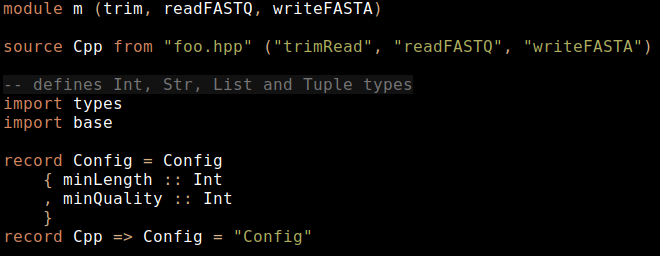
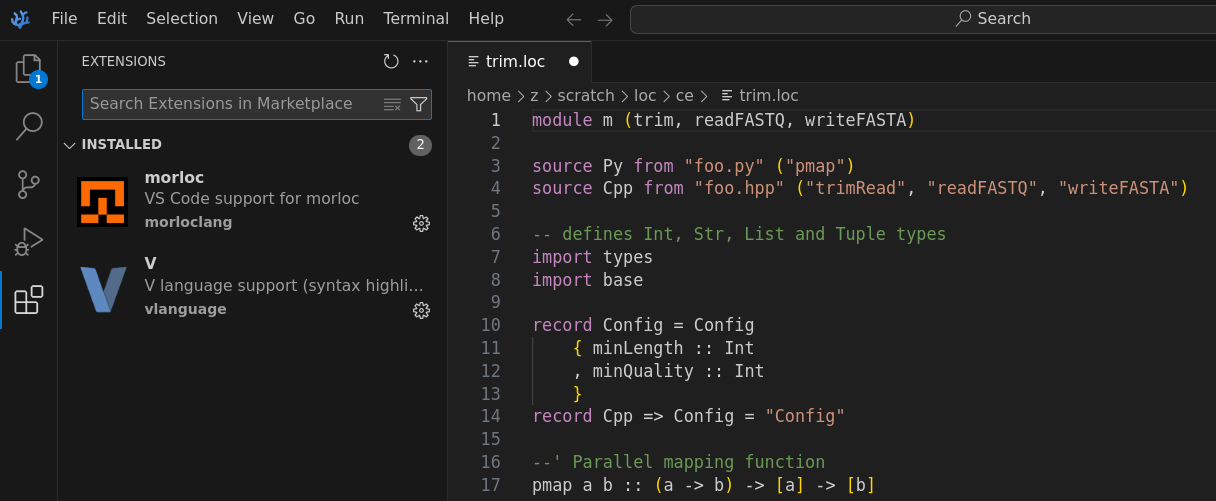
VS Code / VSCodium / Cursor
We have a publicly available "morloc" extension with support for highlighting and snippet expansion.
Zed
This is currently under development, see repo here.
The extension is mostly written, and the required Tree-sitter grammar is written, but there are bugs to be resolved. I’m happy to accept pull requests!
I’ve also written several syntax highlighting and static analysis tools:
Pygmentize
A repo with the Pygmentize parser can be found here. This parser is used to highlight code here in the manual. It can be easily integrated into Python code, e.g., in the Weena discord bot.
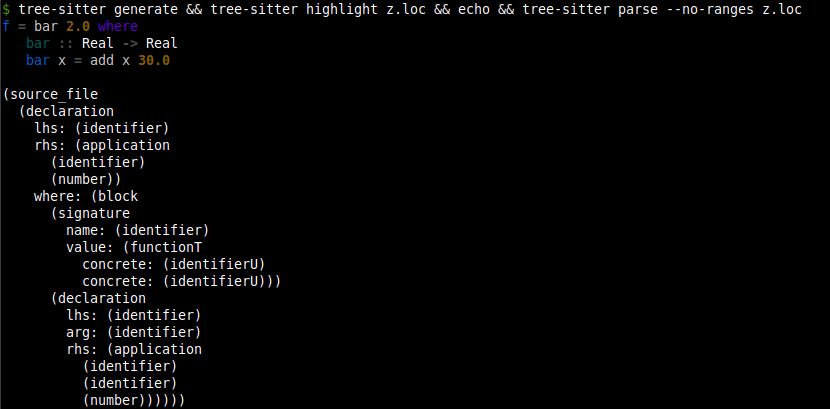
Tree-sitter
Tree-sitter is a program for defining parsers and using them to query languages and add advanced grammatical understanding to editors. These grammars require a complete lexer and parser specification for the language. This grammar is available for Morloc, see repo here. Tree-sitter allows general purpose syntax highlighting (e.g., over the command line) and parses a full concrete syntax tree from the code:
3.3. First Morloc programs
The inevitable "Hello World" case is implemented in Morloc like so:
module hw (hello)

--' A Morlock's hello world
hello = "Hello up there"
The module named hw exports the term hello which is assigned to a literal
string value. The --' syntax adds a docstring that describes the term.
Paste this code into a file (e.g. "hello.loc") and then it can be imported by other Morloc modules or directly compiled into an executable program.
$ morloc make hello.locThis command produces a launcher script named after the module (in this case,
hw) alongside a hw-build/ directory. The build directory holds the
program’s manifest.json and the compiled pool files for each language used,
grouped under pools/<language>/ (e.g., pools/python3/pool.py,
pools/cpp/pool-cpp.out, pools/R/pool.R). The launcher is the command line
interface (CLI) to the concrete commands exported from the module; it execs the
shared morloc-nexus runtime against the manifest.
Calling the executable with the -h flag prints an auto-generated help
message listing the exported commands, their inferred input and return
types, and the available nexus options. The exported command here is
hello, which takes no input and returns a string.
The same morloc make can also emit dedicated daemon and MCP server
executables (--daemon-out / --mcp-out); the multi-program router is a
morloc-nexus subcommand — see Building API interfaces.
Because hw exports exactly one function, the COMMAND name is optional: you
can either write it explicitly or omit it.
$ ./hw hello
"Hello up there"
$ ./hw           # equivalent: the only exported command is the implicit one
"Hello up there"
3.4. Unit conversion example
To introduce Morloc programming, let’s develop a simple unit conversion program.
Let’s define a few unit conversions in C++ and write it to the file units.hpp:
#pragma once

double cels2fahr(double cels){
  return 1.8 * cels + 32.0;
}

double meters2feet(double meters){
  return meters * 3.28084;
}
Now let’s source the C++ code in the Morloc file units.loc:
module units (cels2fahr, meters2feet)

source Cpp from "units.hpp" ("cels2fahr", "meters2feet")

type Cpp => Real = "double"

--' Convert from Celsius to Fahrenheit
cels2fahr :: Real -> Real

--' Convert from meters to feet
meters2feet :: Real -> Real
Here we define a new module and its exports. The source statement reads
foreign language code and specifies the terms that should be imported from the
source code. The type phrase maps the general Morloc type Real to the
concrete C++ type double. The remaining lines define the type signatures for
the two unit conversion functions. Both map a Real input to a Real output.
We can compile and run it as below:
$ morloc make units.loc
$ ./units cels2fahr 100
212
The Morloc compiler will build a C++ program from the Morloc script. The compiler also generates help statements:
$ ./units -h./units -h lists the two exported commands (cels2fahr and
meters2feet) under a General Options section. -h and --help
are position-based synonyms: the long form additionally appends a
"Nexus Options:" block covering the standard run options (output
format, run directory, pretty-printing, and so on), and
./units -h @ renders that same nexus-run help. Per-command help
is available with ./units cels2fahr -h.
3.4.1. Defining language-agnostic functions
This C++ definition for unit conversions is fine, but it would be helpful to be able to do conversions natively in any language without needing to define new helpers or make foreign calls to the C++ functions. In Morloc we can write code that is language independent, like so:
module units (cels2fahr, meters2feet)

import root

--' Convert from Celsius to Fahrenheit
cels2fahr cels = 1.8 * cels + 32.0

--' Convert from meters to feet
meters2feet meters = meters * 3.28084
If you get the error that the root is not installed, you can install all the
Morloc standard library modules with:
$ morloc install stdlibThe root module is a language independent Morloc module that defines the
typeclasses for arithmetic among other things. Since our new module is fully
language-agnostic, we cannot directly compile it, but we can typecheck it:
$ morloc typecheck units2.loc
cels2fahr :: Real -> Real
meters2feet :: Real -> Real
Now to actually compile this program into something we can execute, we need to
import a module that contains sourced implementations. Let’s define a main.loc
module that imports the types module.
module main (cels2fahr, meters2feet)
import .units
import root-cpp
The .units specifies the relative path to a local Morloc module. The module,
root-cpp, stores C++ implementations of root terms, here we just need the
arithmetic operator definitions.
If we instead wanted to build in Python, we could substitute the root-cpp
import for root-py. Alternatively, we could import both root-cpp and
root-py and let the compiler decide which implementations to use.
3.5. Polyglot programs
Morloc can freely mix languages. Suppose we have a function in Python for writing reports:
# format.py
def report(ctemp, c2f):
  return f"The current temperature is {ctemp}°C ({c2f(ctemp)}°F)"
This function takes a temperature in Celsius and a Celsius-to-Fahrenheit converting function as arguments. It returns a string describing the temperature.
Now let’s source this function and our old C++ function into a Morloc program.
module main (report)

import root-py
import root-cpp

source Py from "format.py" ("report" as report_wrapper)
report_wrapper :: Real -> (Real -> Real) -> Str

source Cpp from "units.hpp" ("cels2fahr")
cels2fahr :: Real -> Real

--' Write a cute string about the temperature
report t = report_wrapper t cels2fahr
The report function passes a C++ function to a Python function. All the
wiring for this is done under the hood by the Morloc compiler.
We could also import the language-agnostic morloc definitions from before and
import root-py. Then the language-agnostic definitions would collapse to
native python and the report function would be pure Python.
3.6. Parallelism example
Here is an example showing a parallel map function written in Python that calls cpp functions.
module m (sumOfSums)

import root-py
import root-cpp

source Py from "foo.py" ("pmap")
source Cpp from "foo.hpp" ("sum")

pmap :: (a -> b) -> [a] -> [b]
sum :: [Real] -> Real

sumOfSums = sum . pmap sum
This Morloc script exports a function that sums a list of lists of real numbers. Here we use the dot operator for function composition. The type signature for pmap uses lowercase type variables (a and b) to indicate that the function is generic — it works for any types a and b. The sum function is implemented in cpp:
// cpp header sourced by morloc script
#pragma once
#include <vector>

double sum(const std::vector<double>& vec) {
    double sum = 0.0;
    for (double value : vec) {
        sum += value;
    }
    return sum;
}
The parallel pmap function is written in Python:
# Python3 file sourced by morloc script
import multiprocessing as mp

def pmap(f, xs):
    with mp.Pool() as pool:
        results = pool.map(f, xs)
    return results
The inner summation jobs will be run in parallel. The pmap function has the same signature as the non-parallel map function, so can serve as a drop-in replacement.
This can be compiled and run with the lists being provided in JSON format:
$ morloc make main.loc
$ ./m sumOfSums '[[1,2],[3,4,5]]'
15
4. Syntax and Features
4.1. Functions
Functions are defined with arguments separated by whitespace:
foo x y z = g x (f y z)Here foo is the Morloc function that takes the arguments x, y, and
z. Using whitespace to separate arguments may be unfamiliar if you have a
background in the Algol family of languages (such as C and Python).
The Morloc internal module, which is re-exported from the root module, defines
the composition (.) and application ($) operators.
The . operator composes two functions. Consider the two definitions below.
foo1 x = g (f x)
foo2 = g . f
The first shows an explict function call where the function g takes the output
of f x as input. The second represents the same operation as a composition of
the two functions g and f.
Composition chains can build multi-stage pipelines:
process = format . transform . validate . parseThe $ operator is the application operator. It has the lowest precedence, so
it can be used to avoid parentheses:
foo1 x = h (g (f x))
foo2 x = h $ g $ f x
Morloc supports partial application of arguments. If you take a function that
requires N arguments, and provide it one argument, you will get a new function
of (N-1) arguments. Let’s take the fold function which takes three arguments:
a reducing function, an initial value, and a list of values. Here
are a few examples of partial application:
# concat things to an initial value
concatTo = fold (<>)

# extend an initial list
extend = fold (<>) [1,2,3]

# append a list of values to an initial value
append xss ys = map (fold (<>) ys) xss
Partial application works with binary operators as well, the example below
divides every element in a list of Real values by 2. Numeric literals are
not polymorphic across Int and Real, so write 2.0 to keep the operator
on Real, and give the binding a signature so map’s `Functor instance
can be resolved:
divideByTwo :: [Real] -> [Real]
divideByTwo = map (/ 2.0)
Binary operators can be applied in the reverse order as well:
divideTwoBy :: [Real] -> [Real]
divideTwoBy = map (2.0 /)
The / operator is defined only on Real and other Numeric types. For
integer division, use // instead:
halvedInts :: [Int] -> [Int]
halvedInts = map (// 2)
4.1.1. Lambdas
Anonymous functions are written with a backslash, one or more parameters, and
→. They capture free variables from the enclosing scope, so a lambda can
refer to bindings defined outside it:
addBias :: Real -> [Real] -> [Real]
addBias bias = map (\x -> x + bias)
Here bias is captured from the outer parameter list. Lambdas must take at
least one argument: the zero-argument form \ → 5 is a parse error. To wrap
a value as a "function with no arguments", use the effect system (see
Effects and delayed evaluation) rather than a lambda.
4.2. Foreign functions
In Morloc, you can import functions from many languages and compose them under a common type system. The syntax for importing functions from source files is as follows:
source Cpp from "foo.hpp" ("map", "sum", "snd")
source Py from "foo.py" ("morloc_map" as map, "morloc_sum" as sum, "snd")
The C++ file, foo.hpp, may be implemented as a simple header file with generic
implementations of the three required functions.
#pragma once
#include <vector>
#include <tuple>

// map :: (a -> b) -> [a] -> [b]
template <typename F, typename A>
auto map(F f, const std::vector<A>& xs) {
    std::vector<decltype(f(xs.front()))> result;
    result.reserve(xs.size());
    for (const auto& x : xs) {
        result.push_back(f(x));
    }
    return result;
}

// snd :: (a, b) -> b
template <typename A, typename B>
B snd(const std::tuple<A, B>& p) {
    return std::get<1>(p);
}

// sum :: [a] -> a
template <typename A>
A sum(const std::vector<A>& xs) {
    A total = A{0};
    for (const auto& x : xs) {
        total += x;
    }
    return total;
}
Note that these implementations are completely independent of Morloc — they have no special constraints, they operate on perfectly normal native data structures, and their usage is not limited to the Morloc ecosystem.
The Morloc compiler is responsible for mapping data between the languages. But to do this, Morloc needs a little information about the function types. This is provided by the general type signatures, like so:
map :: (a -> b) -> [a] -> [b]
snd :: (a, b) -> b
sum :: [Real] -> Real
The syntax for these type signatures is inspired by Haskell. Square brackets
represent homogenous lists and parenthesized, comma-separated values represent
tuples, and arrows represent functions. In the map type, (a → b) is a
function from generic value a to generic value b; [a] is the input list
of initial values; [b] is the output list of transformed values. In the snd
type, the second element from a tuple of two generic terms is extracted. In
sum, a list of reals is converted to a single real.
Removing the syntactic sugar for lists and tuples, the signatures may be written as:
map :: (a -> b) -> List a -> List b
snd :: Tuple2 a b -> b
sum :: List Real -> Real
These signatures provide the general types of the functions. But one general type may map to multiple native, language-specific types. So we need to provide an explicit mapping from general to native types.
type Cpp => List a = "std::vector<$1>" a
type Cpp => Tuple2 a b = "std::tuple<$1,$2>" a b
type Cpp => Real = "double"
type Py => List a = "list" a
type Py => Tuple2 a b = "tuple" a b
type Py => Real = "float"
These type functions guide the synthesis of native types from general
types. Take the C++ mapping for List a as an example. The basic C++ list type
is vector from the standard template library. After the Morloc typechecker
has solved for the type of the generic parameter a, and recursively converted
it to C++, its type will be substituted for $1. So if a is inferred to be
a Real, it will map to the C++ double, and then be substituted into the list
type yielding std::vector<double>. This type will be used in the generated C++
code.
These type mappings will normally be imported from foundational modules, such as
root-py or root-cpp, so you will not often need to define them in practice.
4.2.1. Importing builtin functions
Importing builtin functions can be problematic. This is why we sourced the map
and sum functions from Python under the Python names morloc_map and
morloc_sum.
If we directly sourced the builtins, as below:
source Py from "foo.py" ("morloc_map" as map, "morloc_sum" as sum, "snd")The functions map and sum would be treated by the code Morloc generates as
functions that are exported from the foo module. The generated Python code
will access these functions under the foo namespace as foo.map and
foo.sum. But map and sum are Python builtins, not direct exports, so they
must be re-exported at the top of the source file:
# foo.py
from builtins import map, sum  # make builtins module-level attributes

def snd(pair):
    return pair[1]
For third-party modules, any term that is passed to Morloc will need to be
locally defined (def bar(…)) or specifically imported (from somemodule import bar).
4.2.2. Keyword-shaped foreign operators
Some foreign symbols are neither callable identifiers nor symbol operators.
Python’s and and or, for example, are language keywords: they only exist
as infix syntax, so and(x, y) is a parse error and import and is illegal.
Backtick-quoted names mark the sourced binding as an infix operator whose
emitted string is the enclosed text:
source Py from "core.py" (`and` as (&&), `or` as (||))At every call site, the generated Python pool now emits the backtick-quoted
text between the two arguments — so x && y becomes (x and y) in
pool.py, matching the inline emission of (x || y) in C++. No wrapper
function is needed on the Python side. The backtick contents are emitted
verbatim, so any two-argument infix operator that the target language
recognises (Python is, in, not in, R %in%, etc.) works the same way.
4.3. Booleans
Booleans in Morloc are represented as True or False under the Bool
type. Comparison and logical operators can be imported from the root modules.
4.3.2. Comparison operators
The Eq and Ord typeclasses in root provide the standard comparison
operators. They work over any type with the appropriate instance — integers, reals, strings, and tuples and lists of comparable values.
| Operator | Meaning |
|---|---|
|
equal |
|
not equal |
|
less than |
|
less than or equal |
|
greater than |
|
greater than or equal |
import root-py

isPositive :: Int -> Bool
isPositive x = x > 0

sameLength :: [a] -> [b] -> Bool
sameLength xs ys = length xs == length ys
4.3.3. Logical operators
The root module defines logical conjunction (&&), disjunction (||),
negation (not), exclusive-or (xor), and not-and (nand):
| Operator | Meaning |
|---|---|
|
logical AND |
|
logical OR |
|
logical negation (prefix function) |
|
exclusive OR |
|
NOT AND |
&& and || are short-circuiting and right-associative. && binds tighter
than ||, matching the convention of most languages:
inRange :: Int -> Int -> Int -> Bool
inRange lo hi x = lo <= x && x <= hi

isWeekend :: Int -> Bool
isWeekend day = day == 0 || day == 6

isWeekday :: Int -> Bool
isWeekday day = not (isWeekend day)
4.3.4. Boolean-valued list functions
The root module provides several functions in the Foldable family that
return Bool:
| Function | Signature |
|---|---|
|
|
|
|
|
|
any returns True if the predicate holds for at least one element. all
returns True only if the predicate holds for every element. elem checks
membership using ==.
hasNegative :: [Int] -> Bool
hasNegative = any (< 0)

allPositive :: [Int] -> Bool
allPositive = all (> 0)

containsZero :: [Int] -> Bool
containsZero = elem 0
4.3.5. Guards
Booleans drive Morloc’s guard syntax. A guard alternative starts with ? and
selects the first branch whose condition evaluates to True; the : line is
the fallthrough:
classify :: Int -> Str
classify x
  ? x < 0     = "negative"
  ? x == 0    = "zero"
  : "positive"
See Conditionals for a full description of guard syntax.
4.4. Integer types
Integers may be written in decimal, hexadecimal, octal, or binary:
-- standard decimal notation
42

-- hexadecimal notation (case insensitive)
0xf00d
0xDEADBEEF

-- octal notation (upper or lowercase 'o')
0o755

-- binary notation (upper or lowercase 'b')
0b0101
A prefixed integer must contain only digits valid for its base, and must end on a non-identifier character. A trailing letter or digit that is not a valid digit for the base is a compile-time error rather than a silently truncated literal followed by an unrelated identifier:
$ morloc eval -e "0xF00D"
61453
$ morloc eval -e "0xF0OD"
<expr>:1:1: malformed hexadecimal literal: 0xF0OD
$ morloc eval -e "0b1001"
9
Here I am using the Morloc eval command to evaluate a single Morloc
expression.
Morloc provides a default variable-width integer for general use and fixed-width types for performance-critical code.
4.4.1. Integer types at a glance
| Type | Width | Use case |
|---|---|---|
|
Variable (arbitrary precision) |
Default integer for most code. Works across all languages. |
|
8, 16, 32, 64 bits (signed) |
Performance-critical code with known bounds. |
|
8, 16, 32, 64 bits (unsigned) |
Bit manipulation, byte data, indices. |
4.4.2. The default Int type
The Int type is Morloc’s universal integer. The on-wire representation is
variable-width: values up to 64 bits fit in 16 bytes inline, and larger values
spill to a pointer to an array of 64-bit limbs. The in-language range of
Int, however, is determined by the host language’s native integer type:
| Language | Native binding for Int |
Representable range |
|---|---|---|
Python |
|
Arbitrary precision |
C++ |
|
32-bit signed ( |
R |
|
32-bit signed |
A morloc program that needs a value above 32 bits in C or R should declare
the field as `I64` (or `U64`), which maps to `int64_t` in C and to R’s
numeric (with 53-bit integer precision via double).
Integer literals are Int by default:
x = 42          -- Int
y = 0xDEADBEEF  -- Int (hex literal)
z = -9999       -- Int
4.4.3. Big integers from Python
Python natively supports arbitrary-precision integers. Morloc’s Int type
takes full advantage of this. For example, computing large factorials:
module main (fact)

import root-py

fact :: Int -> Int
fact n
  ? n == 0 = 1
  : n * fact (n - 1)
$ morloc make -o calc main.loc
$ ./calc fact 100
93326215443944152681699238856266700490715968264381621468592963895217599993229915608941463976156518286253697920827223758251185210916864000000000000000000000000This produces a 525-bit integer — far beyond what any fixed-width type can hold. The value is stored as a multi-limb big integer and printed correctly.
4.4.4. Cross-language overflow errors
When a big integer is passed to a language whose concrete type cannot represent it, Morloc produces a clear error at the language boundary. The error states the value’s size, the target type’s bit width, and its representable range.
For example, passing a large factorial from Python to C++:
module main (factCpp)

import root-py
import root-cpp

fact :: Int -> Int
fact n
  ? n == 0 = 1
  : n * fact (n - 1)

factPy :: Int -> Int
factPy n = idpy (fact n)

factCpp :: Int -> Int
factCpp x = idcpp (factPy x)
Small values pass through without issue:
$ ./calc factCpp 5
120
But large values produce a descriptive error:
$ ./calc factCpp 100
Error: run failed
Integer overflow: 9-limb integer (576 bits) does not fit in
32-bit type (range -2147483648 to 2147483647)
The same applies to R, which is limited to 32-bit integers and 53-bit integer precision via doubles:
$ ./calc factR 100
Error: run failed
Integer overflow: 9-limb integer (576 bits) does not fit in
R's numeric type (max 2^53 for integer precision).
Use a fixed-width type (I32, I64) or keep computation in Python.
Note the use of idpy in the example above. This forces the factorial
computation to run entirely in Python, where int is arbitrary
precision. Without this, the compiler will collapse the implementation of fact
to pure C++, which would be much faster, but would not show the cross-language
behavior.
4.4.5. Compile-time literal bounds
Integer literals are bounds-checked at compile time against the type they’re written into. A literal that overflows its target type is rejected with a sourced error pointing at the literal:
tooLarge :: U8
tooLarge = 1000
$ morloc make main.loc
main.loc:2:12: error:
Integer literal 1000 overflows U8 (range 0 to 255)
|
2 | tooLarge = 1000
| ^The error caret points at the literal itself, not the binding name — so when the same literal is referenced from multiple sites, the diagnostic stays on the offending source.
4.4.6. Fixed-width integer types
For code where values are known to be bounded, use fixed-width types. These map directly to the target language’s native types:
| Morloc type | C++ | Python | R |
|---|---|---|---|
|
|
|
|
|
|
|
|
|
|
|
|
|
|
|
|
|
|
|
|
|
|
|
|
|
|
|
|
|
|
|
|
Fixed-width types use direct binary serialization with no overhead — the serialized format is identical to the in-memory representation. This is the right choice for numerical code and interop with C libraries that require specific widths.

|
You might wonder why the Python types are all int rather than a truly
fixed-size integer such as the numpy alternatives. There is a way to
specialize types in this way that we will learn later in the "Type Hierarchies"
section. Also see the later sections on Tensors and Tables where we discuss
higher performance types and shared memory.
|
4.4.7. Converting between integer types
Two typeclasses in root cover numeric conversions. into is reserved
for conversions that never fail and never lose information; tryInto
handles the rest and returns ?b.
class TotalInto a b where
  into    :: a -> b

class PartialInto a b where
  tryInto :: a -> ?b
Use into to widen: signed-to-wider-signed, unsigned-to-wider-unsigned,
and unsigned to a strictly wider signed target. A reflexive
TotalInto a a blanket covers the identity case.
wide :: I8 -> I64
wide x = into x
Use tryInto for anything that can fail — narrowing, negative-to-
unsigned, or unsigned-into-a-same-or-narrower signed:
byte :: I32 -> ?U8
byte x = tryInto x        -- Null on x < 0 or x > 255
Int is given the most restrictive semantics because its width varies
across backends (32-bit in R and C++, unbounded in Python). Any
Int → Int<N> — even Int → I64 — goes through tryInto, and
converting U32 or wider into Int also uses tryInto. This
keeps behavior portable across backends.
4.4.8. Negation and unary minus
Morloc supports unary minus (-) on any numeric type. The same glyph plays
two roles — the binary subtraction operator and the unary negation operator — and the rule for distinguishing them is whitespace-sensitive.
-- prefix `-` on a value: produces the additive inverse
neg :: Int -> Int
neg x = -x

-- prefix `-` on an expression: parenthesize the expression
shifted :: Int -> Int
shifted x = -(x + 1)

-- works on any numeric primitive (Int, I8..64, U8..64,
-- Real, F32, F64) via the `Negatable` typeclass
flipReal :: Real -> Real
flipReal x = -x
Negative literals
A - directly preceding a digit — with no space between the dash and the
digit — is parsed as part of the numeric literal itself. This means -1 is
an atomic integer (not a function call), and works in contexts where function
calls are not allowed (such as pure-data files):
xs :: [Int]
xs = [-1, -2, -3, -100]

ys :: [Real]
ys = [-1.5, -2.0e-3, -0xff]

point :: (Int, Int)
point = (-3, -4)
The same atomic-lexing rule extends to the non-finite Real literals -Inf
and -NaN; see the floats chapter for details.
When - is unary vs. binary
The lexer applies an asymmetric-whitespace rule. A - immediately followed
by a digit is treated as part of a negative literal whenever the dash is in
a position that cannot end an expression on its left:
-
at the start of input;
-
after an opening delimiter (
(,[,,,=, etc.); -
after another operator;
-
after whitespace (the dash is preceded by space, but the digit is not).
In every other position — where the dash directly follows an operand-finishing token with no intervening whitespace — the dash is the binary subtraction operator.
| Expression | Interpretation |
|---|---|
|
atomic literal |
|
|
|
binary subtraction |
|
binary subtraction |
|
list of two negative literals |
|
|
|
desugars to |
|
desugars to |
Position restrictions
Prefix - on a non-literal expression is permitted wherever an expression
begins, including the right-hand side of an infix operator. The only
restriction is that the operand of prefix - must start with an atom
(an identifier, a literal, an open paren, an open bracket, or a similar
atom-introducing token) — not with another prefix -. Stack two negations
by parenthesizing the inner one.
-- ok: -x at the start of an expression
neg1 :: Int -> Int
neg1 x = -x

-- ok: -x on the right of a binary operator
neg2 :: Int -> Int
neg2 x = 1 + -x

-- ok: subtracting a negated value
neg3 :: Int -> Int -> Int
neg3 x y = x - -y

-- ok: -x parenthesized; equivalent to neg2
neg4 :: Int -> Int
neg4 x = 1 + (-x)

-- syntax error: two adjacent prefix dashes are not allowed
-- bad :: Int -> Int
-- bad x = - -x

-- ok: parenthesize the inner negation to stack two
double :: Int -> Int
double x = -(-x)
The Negatable typeclass
Negation is provided by a typeclass Negatable a defined in the internal
module:
class Negatable a where
  negate :: a -> a
Each numeric primitive has a Negatable instance in root-py, root-cpp,
and root-r that dispatches to the host language’s native unary minus. The
expression -x is desugared by the parser to negate x, so writing negate x
explicitly is equivalent. The compiler chooses the language for each negation
the same way it chooses the language for any polymorphic call: based on the
imported language modules and the surrounding cross-language boundaries.
4.5. Floating-point types
Morloc’s floating-point types are IEEE 754 binary formats. A Real value is
the default; F32 and F64 are explicit precision controls.
| Type | Width | Use case |
|---|---|---|
|
Language-dependent (typically 64-bit IEEE 754) |
Default floating point. |
|
32 bits (IEEE 754 binary32) |
Tensors, GPU code, memory-constrained numerics. |
|
64 bits (IEEE 754 binary64) |
Default-precision scientific computation. |
Each type maps to its host-language equivalent:
| Morloc type | C++ | Python | R |
|---|---|---|---|
|
|
|
|
|
|
|
|
|
|
|
|
4.5.1. Literal forms
Real literals are written with a decimal point or scientific notation:
pi :: Real
pi = 3.14159265358979

-- scientific notation (upper or lowercase 'e')
avogadro :: F64
avogadro = 6.022e23     -- prints as 6.022e+23 (explicit + on the exponent)

-- negative exponent
boltzmann :: Real
boltzmann = 1.380649e-23

-- 32-bit float for reduced memory in tensors
weights :: Vector 1000 F32
A literal without a decimal point and without an exponent is parsed as an
Int, not a Real. Use 1.0 or 1e0 if you want a floating-point literal
of value 1.
4.5.2. IEEE 754 and non-finite values
Morloc’s Real type reflects IEEE 754 in full: the value space includes the
finite reals representable in the target precision plus three classes of
non-finite values that are reserved bit patterns in the standard:
-
+Infinity(positive infinity) -
-Infinity(negative infinity) -
NaN(Not-a-Number)
These are produced by ordinary IEEE 754 arithmetic — e.g. dividing by zero,
overflowing the finite range, or evaluating an indeterminate form like
Inf - Inf or 0 * Inf. They are not error states; they are values that
propagate through subsequent computation according to spec-mandated rules.
Source-level literals
The non-finite values have dedicated source-level literals, capitalized to
match Morloc’s existing keyword conventions (True, False, Null):
posInf :: Real
posInf = Inf

negInf :: Real
negInf = -Inf

notANumber :: Real
notANumber = NaN
-Inf is lexed as a single atomic token (mirroring how -1.5 is one token
rather than negate(1.5)), so it works in pure-morloc contexts where
negate is not in scope. The same applies to -NaN, though the sign of
NaN is collapsed at the wire boundary — both NaN and -NaN round-trip
as the canonical nan.
All three target languages (Python, R, C++) follow IEEE 754 for arithmetic on non-finite values, so the results below are identical regardless of which language a computation runs in:
| Expression | Result | Why |
|---|---|---|
|
|
Same-sign infinity addition |
|
|
Invalid op: opposite-sign cancellation |
|
|
Invalid op: same-sign cancellation |
|
|
Invalid op: zero times infinity |
|
|
Magnitude preservation |
|
|
Sign rule on multiplication |
|
|
Like-sign product |
|
|
Mixed-sign product |
|
|
NaN absorption (additive) |
|
|
NaN beats zero |
|
|
NaN beats infinity |
|
|
Sign-bit flip |
|
|
Sign flip stays NaN |
The behavior is mandated by IEEE 754 and is uniform across pools.
4.5.3. Compile-time literal overflow
Real literals are bounds-checked at compile time against the type they’re written into. A literal whose magnitude exceeds the target precision’s representable range is rejected with a sourced error pointing at the literal.
For Real and F64 (max ≈ 1.8e308):
tooBig :: Real
tooBig = 1e500
$ morloc make main.loc
main.loc:2:10: error:
Float literal 1.0e500 overflows F64 (|x| > 1.8e308)
|
2 | tooBig = 1e500
| ^The check is per-target-precision, so a literal that fits F64 but
overflows F32 (max ≈ 3.4e38) is rejected when typed as F32:
tooBigF32 :: F32
tooBigF32 = 1e100
$ morloc make main.loc
main.loc:2:13: error:
Float literal 1.0e100 overflows F32 (|x| > 3.4e38)
|
2 | tooBigF32 = 1e100
| ^Negative-magnitude literals are checked symmetrically:
main.loc:2:10: error:
Float literal -1.0e500 overflows F64 (|x| > 1.8e308)
  |
2 | tooNeg = -1e500
  |          ^
The non-finite literal forms Inf, -Inf, and NaN bypass the bounds
check by construction — they are explicit non-finite values, not finite
literals that happened to overflow.
4.5.4. Wire format and JSON interop
The JSON wire format is RFC 8259-compliant: standard JSON has no syntax for non-finite numeric literals, and the spec’s recommended workaround is strings. Morloc emits non-finite Real values as quoted lowercase strings:
| Value | JSON form |
|---|---|
|
|
|
|
|
|
Finite |
The numeric form ( |
This means a Real-typed field can appear either as a JSON number or as a JSON string in output. Consumers should accept both shapes.
Internal cross-language boundaries (Morloc-to-pool calls) use a binary format that preserves IEEE 754 bytes verbatim, so non-finite values round-trip without information loss. Only the JSON boundary — typically the program’s final output — uses the string form.

|
Cross-language gotcha: division by zero in Python
All three target languages implement IEEE 754 arithmetic identically for
the non-finite cases listed above. There is one notable divergence in
language design, however: Python deliberately raises a
If a Morloc program relies on |
4.5.5. F32 precision considerations
F32 halves memory usage relative to F64 and is the right choice
for large numerical arrays (tensors, image buffers, GPU input) where the
extra precision is not needed. The tradeoffs to keep in mind:
-
Significand has ~7 decimal digits of precision (vs. ~15-17 for
F64).- A literal like `0.1
-
F32` rounds to the nearest representable
binary32value — it is not exact.
-
Maximum magnitude is ≈ 3.4e38 (vs. 1.8e308 for
F64). Compile-time bounds-checking enforces this for literals. -
All arithmetic on
F32runs at single precision, including the overflow-to-infinity threshold.
For most application code, Real (mapped to double / numeric /
host-language float) is the right default. Reach for F32 deliberately
when memory or interop with single-precision hardware demands it.
4.5.6. Converting to and from floating point
The TotalInto / PartialInto classes introduced in the integer chapter
extend naturally to floats. Widening an integer whose full range fits in
the target mantissa (24 bits for F32, 53 for F64) uses
into, and F32 → F64 is also TotalInto. Real and
F64 are interconvertible with into in both directions — representationally identical in every current backend.
Integer-to-float conversions that may lose precision use a dedicated class:
class RealLike a where
  toReal :: a -> Real
toReal never fails but may lose precision above 2^53. Instances
cover every numeric type. The canonical use is:
mean :: [Real] -> Real
mean xs = sum xs / toReal (size xs)
size returns U64; toReal bridges it into the Real denominator.
The precision loss is theoretical for realistic container sizes and named
explicitly so a reader can see it.
Float-to-integer conversion goes through tryInto and returns ?T. It
fails on NaN, Inf, non-integer values, and values outside the target
integer’s range:
approx :: Real -> ?I32
approx x = tryInto x      -- Null on NaN, Inf, 3.5, or 1e20
For rounding to a nearby integer, apply round / floor / ceil /
trunc from the math module first, then tryInto the result.
Narrowing F64 → F32 and Real → F32 are not provided
as TotalInto instances — they lose precision on every input. Users
who need this conversion source an explicit foreign function so the
lossy step is visible at the call site.
4.5.7. Negation of Real values
Negation works on Real, F32, and F64 the same way it does on
integers, via the Negatable typeclass. See the integers chapter for the
full unary-minus rules. The IEEE 754-relevant differences for Real:
-
-Infand-NaNare atomic source literals — nonegatelookup is performed, so they work in pure-morloc contexts. -
negateof+Infis-Inf;negateofNaNisNaN(sign bit flipped, but the value is still NaN by IEEE 754 rules). -
negateof+0.0is-0.0. The two values compare equal under==but have different IEEE 754 bit patterns; the binary cross-language format preserves the distinction, the JSON output does not.
4.6. Strings
Morloc strings are double-quoted. They support Unicode unicode characters:
cn = "你知道得太多了🤫"String interpolation uses the #{…} syntax. The expression inside the
braces must have type Str — non-Str values are not auto-converted. To
embed an Int, Real, Bool, or other non-Str value, call show (or
another explicit stringifier) inside the braces:
helloYou you = "hello #{you}"
sayCount n = "count: #{show n}"
Inside a string, the backslash introduces an escape sequence. The following escapes are recognized:
| Escape | Meaning |
|---|---|
|
newline |
|
tab |
|
carriage return |
|
NUL byte (U+0000) |
|
a single backslash |
|
a literal double quote |
Any other backslashed character (for example, \q) is a compile-time error. A
literal backslash must always be written as \\. Windows-style paths, for
example, must be written like so:
winPath = "C:\\Users\\weena\\file.txt"Writing "C:\Users" instead would fail to compile, since \U is not a
recognized escape.
Morloc also recognizes tripple quotes. For one-line strings, the tripple quotes can help avoid the need to escape internal quotations. For example:
dblStr = """That's weird, I also spelled it "ear quotes", like "bunny ears"."""
sinStr = '''"Why do the pigeons here have so few toes?"'''
These will yield strings that are identical to single quoted strings with the quotes escaped. The most valuable use of triple quotes, though, is for multi-line strings.
The spacing of multi-line strings is trimmed by applying the following 3 rules in order: 1. Initial spaces up to and including the first newline are removed 2. Terminal spaces up to and including the final newline are removed 3. All leading spaces are trimmed by the number of leading spaces in the line with the fewest leading spaces
This allows you to write blocks of text with natural indentation. Below is a multi-line string:
longString =
  """
  this is a long
  string
  """
It evaluates to:
this is a long
string
This allows natural paragraphs to be written without breaking indentation patterns.
4.6.1. Null strings
A particularly thorny issue in multi-lingual string support involves NUL
character. In C strings, NUL characters (0 in ascii) terminate strings and thus
they are generally illegal. Common C functions like strlen and strdup would
fail if any NUL exists in a string. R, which is built on C, makes within-string
NUL characters strictly illegal. On the other hand, Python and C++ (through
the standard template string type) support NUL in strings. While these
languages support NUL’s, problems can still arise in the common case where these
string objects are converted to C-strings — e.g., through direct access in
C++ with the .c_str() method or through C ABI in Python.
NUL’s are not common in strings. The main use case is to store binary data. This
is not the recommended use of the Str type, though. It would generally be
better to use [Uint8] to store bytes (or even better, Vector n Uint8, as
will be introduced later). However, the Morloc philosophy is to support what is
idiomatic in a language. The Str type is meant to represent the default string
type in all languages (like the Int type). So the Morloc Int fully suports
NUL’s in strings. They may be present in string literals through the \0
character, the Morloc evaluator preserves NULs end-to-end, and JSON represents
them with the standard \u0000 escape.
All languages have an allow_string_null in their lang.yaml spec that
specifies whether NUL’s are allowed. When a Str vale with a NUL character is
sent to a NUL-intolerant language, the Morloc runtime rejects the call with a
clear error message:
Error: r does not support embedded NUL bytes in strings
       (at args[0] (byte 3 of 7))
A Str literal that is destined to live in source of a NUL-intolerant
language (typically an R-sourced function whose argument is a literal NUL
string) is rejected at compile time, since the pool would otherwise fail to
parse the generated source. The error names the offending pool language.
Checking all strings for NUL characters, however, is expensive. You can opt out when safe in two ways:
-
morloc make --unsafe-skip-null-checkbakes a per-program skip flag into the manifest. -
The runtime env var
MORLOC_SKIP_NULL_CHECK=1skips the scan dynamically.
Both are unsafe: a NUL passing into R will still crash inside the R runtime, just with R’s own error rather than the morloc-level diagnostic. There is no way for user-written R code to do anything useful with a NUL string.
4.7. Tuples and Lists
Two of the most common container types are tuples and lists. Tuples have a fixed size and may contain elements with different types. Lists have variable size but contain elements all of the same type.
Tuples and lists both are translated into JSON as arrays. So from the JSON alone
it is impossible to tell if a value such as [1,2,3] is a list of integers or a
tuple of three integers.
4.7.1. Tuples
Tuples may be used to store a fixed number of terms of different type.
x :: (Int, Bool, Real)
x = (1, True, 6.45)
Tuple types and tuple values are both represented as comma-delimited values
within parentheses. The parenthesized type representation is syntactic sugar for
a fixed-size tuple type such as Tuple3 or Tuple8; the parser generates the
appropriate TupleN form from the number of fields, so there is no fixed upper
bound on tuple arity. Generally, if you have more than a few members in a
tuple, it is better to define a record type with named values.
4.7.2. Lists
Lists are homogeneous, variable-length sequences of values. The base list type
is List a, which can be written as [a]:
x :: [Int]
x = [1, 2, 3]

ys :: List Real
ys = [1.0, 2.0, 3.0]
The default List type maps to each language’s natural ordered container
(list in Python, std::vector in C++, list/vector in R).
While all list types share the same representation on the wire — zero or more elements in contiguous memory — there are several data structures that for accessing this data that have different performance tradeoffs. Deques can efficiently add elements to the beginning or end of the list. For an introduction in how to specialize types, see the section on defining new types.
A more rigorous and high-performance alternative to the List type is the
Vector type, the 1D tensor, that is described in the Tensors chapter.
Tuples may be used to store a fixed number of terms of different type.
x :: (Int, Bool, Real)
x = (1, True, 6.45)
Tuple types and tuple values are both represented as comma-delimited values
within parentheses. The parenthesized type representation is syntactic sugar for
a fixed-size tuple type such as Tuple3 or Tuple8; the parser generates the
appropriate TupleN form from the number of fields, so there is no fixed upper
bound on tuple arity. Generally, if you have more than a few members in a
tuple, it is better to define a record type with named values.
4.8. Records
A record is a named, fixed set of fields. Each field has a name and a type.
Records may map to different structures in different languages (e.g., a Python
dict, an R list, or a C++ struct); internally they are laid out
positionally, but the surface language always binds field values by name.
A general record is defined as follows:
record Person = Person
    { name :: Str
    , age :: Int
    }
Concrete forms must have the same field names and field types. Since these must be the same, they need not be repeated in the concrete definitions. We only need to specify the outer name of container:
record Py => Person = "dict"
record R => Person = "list"
record Cpp => Person = "person_t"
In Python and R, records are typically dict and list types,
respectively. These types can contain any fields of any type. In C++, records
are represented as structs; these must be defined in the C++ code, as shown
below.
struct person_t {
    std::string name;
    int age;
};
Functions may be defined that act on the records, as below:
import root-r
import root-py
import root-cpp

source R from "foo.R" ("incAge" as rinc)
source Py from "foo.py" ("incAge" as pinc)
source Cpp from "foo.hpp" ("incAge" as cinc)

-- Increment the person's age
rinc :: Person -> Person
pinc :: Person -> Person
cinc :: Person -> Person
4.8.1. Record literals match by field name
Field values in a record literal are bound to declared fields by name, not by position. The order in which fields appear in the literal is irrelevant. The two literals below denote the same value:
record Person = Person { name :: Str, age :: Int }

alice :: Person
alice = { name = "Alice", age = 30 }

alice2 :: Person
alice2 = { age = 30, name = "Alice" }   -- same value as `alice`
A literal must mention every declared field exactly once. Missing a declared field, naming a field that does not exist on the record, or repeating a field name is a compile-time error.
bad1 :: Person
bad1 = { name = "Alice" }  -- error: missing field 'age'

bad2 :: Person
bad2 = { name = "Alice", age = 30, weight = 65 }  -- error: unknown field 'weight'

bad3 :: Person
bad3 = { name = "Alice", name = "Bob", age = 30 }  -- error: duplicate field 'name'
4.8.2. Language-specific representation of records
The "foo.R" file contains the function:
incAge <- function(person){
    person$age <- person$age + 1
    person
}
No special code is needed for person, it is just a builtin R list. Similarly for Python:
def incAge(person):
    person["age"] += 1
    return person
C++ requires a definition of a person_t struct:
struct person_t {
    std::string name;
    int age;
};

person_t incAge(person_t person){
    person.age++;
    return person;
}
Records may be initialized and functions called on them:
foo name age
    = (rinc . pinc . cinc)
{ name = name, age = age }foo, above, initializes a Person record and then increments its age 3 time
in different languages.
4.9. Patterns
Morloc’s pattern functions are first-class getter, setter, and bracket
operators for reaching into and rearranging data structures. Because they are
ordinary values, you can pass them around, map them over a list, and compose
them like any other function.
To bind a value’s parts to names, or to dispatch a function on the shape of its arguments, see Pattern Matching instead.
A getter pattern describes an optionally branching path into a data structure. Each segment of the path may be a tuple index, a record key, or a group of indices/keys. The terminal positions in the pattern are returned as elements in a tuple. Here are a few examples:
-- return the 1st element in a tuple of any size
.0 (1,2) -- return 1
.0 ((1,3),2,5) -- return (1,3)

-- return the 2nd element in the first element of a tuple
.0.1 ((1,3),2,5) -- return 3

-- returns the 2nd and 1st elements in a tuple
.(.1,.0) (1,2,3) -- returns (2,1)
.(.1,.0) (1,2)   -- returns (2,1)

-- indices and keys may be used together
.0.(.x, .y.1) ({x=1, y=(1,2), z=3}, 6) -- returns (1,2)
These patterns are transformed into functions that may be used exactly like any other function.
map .1 [(1,2),(2,3)] -- returns [2,3]Setter patterns are similar but add an assignment statement to each pattern terminus.
.(.0 = 99) (1,2) -- return (99,2)

-- indices and keys may be used together
.0.(.x=99, .y.1=33) ({x=1, y=(1,2), z=3}, 6) -- returns ({x=99, y=(1,33), z=3}, 6)Lists support a dedicated bracket pattern with Python-style index and slice
syntax. A bracket segment is written between a dot and a […] literal:
.[i] picks an element, .[i:j] returns a sub-range, and .[i:j:k] adds a
stride. The behavior tracks Python: negative indices and bounds count from the
end, out-of-range bounds are clamped, and .[::-1] reverses the list.
ten = [0,1,2,3,4,5,6,7,8,9]

.[0]      ten   -- returns 0
.[-1]     ten   -- returns 9   (negative index counts from the end)
.[1+1]    ten   -- returns 2   (any expression of an IndexLike type)

.[2:5]    ten   -- returns [2,3,4]
.[:3]     ten   -- returns [0,1,2]      (omitted start defaults to 0)
.[7:]     ten   -- returns [7,8,9]      (omitted stop defaults to length)
.[:]      ten   -- returns [0,...,9]    (no-op copy)
.[8:99]   ten   -- returns [8,9]        (bounds are clamped)
.[0:-1]   ten   -- returns [0,...,8]    (Python-style negative stop)

.[::2]    ten   -- returns [0,2,4,6,8]  (every other element)
.[::-1]   ten   -- returns [9,8,...,0]  (full reverse)
.[7:2:-2] ten   -- returns [7,5,3]      (strided reverse slice)
Any morloc integral type can stand in for an index or bound; the conversion to
the underlying 64-bit width is dispatched through the IndexLike typeclass.
This means .[(i :: I8) : (j :: U32)] xs is well-typed.
Bracket patterns chain with the other pattern forms. The composition rule depends on whether the bracket selects a single element or a list:
-
.[i].tail xs— an index produces a scalar, so the tail composes directly (.[0].x ptsis(.x . .[0]) pts). -
.[i:j].tail xs— a slice produces a list, so the tail is lifted viamapover the slice..[0:3].x ptsismap .x (.[0:3] pts).
The tail can be any pattern body: a record key, a tuple index, a grouped selector, or another bracket. Nested brackets compose the same way — the outer map runs the inner bracket on each row.
pts  = [{x=0, y=100}, {x=1, y=101}, {x=2, y=102}, {x=3, y=103}]
rows = [ {a = [(10,20)], b = [{x=100, y=200}]}
       , {a = [(30,40)], b = [{x=300, y=400}]} ]
xss  = [[1,2,3,4,5], [6,7,8,9,10]]

.[0].x       pts  -- returns 0                (scalar tail composes directly)
.[2].y       pts  -- returns 102
.[-1].x      pts  -- returns 3

.[:3].x      pts  -- returns [0,1,2]          (slice + field, map-lifted)
.[::-1].x    pts  -- returns [3,2,1,0]
.[0:3].(.x, .y) pts
                  -- returns [(0,100),(1,101),(2,102)]   (slice + group tail)

.[0:2].[0:3] xss  -- returns [[1,2,3],[6,7,8]]           (slice + nested slice)

.[0:2].(.a.[0].0, .b.[0].y) rows
                  -- returns [(10,200),(30,400)]         (deep mixed chain)
Bracket patterns are getters only — there is no setter form (.[i] = v $ xs)
in this release. Multi-axis brackets (.[i,j] for matrices/tensors) are also
not yet available; both are planned for a later round.
| Pattern | Python | Note |
|---|---|---|
.0 |
lambda x: x[0] |
patterns are functions |
.0 x |
x[0] |
|
.0.k x |
x[0]["k"] |
|
.(.1,.0) x |
(x[1], x[0]) |
|
foo .0 xs |
foo(lambda x: x[0], xs) |
higher order |
.(.k = 1) x |
x["k"] = 1 |
|
.[i] xs |
xs[i] |
scalar result |
.[i:j] xs |
xs[i:j] |
slice result (list) |
.[::-1] xs |
xs[::-1] |
full reverse |
.[i:j].x xs |
[e["x"] for e in xs[i:j]] |
tail map-lifted over slice |
Note that setters are designed to not mutate data. The spine of the data
structure will be copied which retains links to the original data for unmodified
fields. So the expression .(.0 = 42) x when translated into Python will create
a new tuple with the first field being 42 and the remaining fields assigned to
elements of the original field. The same goes for records.
Bracket syntax is not hardcoded — it dispatches through ordinary typeclasses
declared in the standard library’s internal module. To make .[i] xs and
.[s:e:p] xs work for a new container type, you provide the relevant instances
in your own library:
-- Indexing: .[i] xs
class Indexable f where
  __access_index__ :: ?I64 -> f a -> a

-- Slicing for shape-preserving containers (List, Str, ...)
class Sliceable f where
  __get_slice__ :: ?I64 -> ?I64 -> ?I64 -> f a -> f a

-- Slicing for Nat-parameterized containers (Vector, Tensor, ...) where the
-- output length differs from the input length
class SliceableDim f where
  __get_slice_dim__ :: ?I64 -> ?I64 -> ?I64 -> f n a -> f m a

-- Casting any user expression in a bound position to ?I64
class IndexLike i where
  __to_index__ :: i -> ?I64
For a plain container, source an Indexable instance and a Sliceable
instance per target language. For a container parameterized by a dimensional
Nat (Vector n a), source Indexable and SliceableDim instead — the
compiler picks SliceableDim automatically when Sliceable is absent.
If a user passes an expression of some custom integer-like type at a bound
position, the compiler casts it via that type’s IndexLike instance; you can
extend bracket syntax to accept new bound types (e.g. a Char index, a fixed-
point coordinate) just by adding an IndexLike instance with a to_index
that returns ?I64. Pass-through Null as Nothing to compose cleanly with
omitted positions in .[i:], .[:j], .[::], etc.
Because the dispatch lives in libraries rather than the compiler, you are free to substitute alternative typeclass hierarchies in modules that do not import the standard library — the bracket syntax simply errors at codegen if no matching instance is in scope.
4.10. Pattern Matching
A pattern describes the shape of a value using the same notation you would use to build it. Morloc matches values against patterns in two ways:
-
Irrefutable patterns destructure a value into named parts at binding positions — lambda parameters, function-definition arguments,
letleft-hand sides, anddo-block←binds. Every well-typed receiver matches, so these patterns contain only variable names, wildcards, and structural constructors — no literals, no alternatives — hence "irrefutable". -
Refutable patterns dispatch a function on the shape of its arguments through a list of
|-clauses. A clause may fail to match — a literal only matches itself — so clauses are tried in order and the first that matches wins.
The supported shapes are:
-
variable —
xbinds the whole value -
wildcard —
_matches without binding -
tuple —
(x, y)binds each component; full arity required; wildcards fill positions you want to ignore ((x, _, _)) -
record —
{a = x, b = y}binds fields by name; extra fields are ignored, field order does not matter, and the receiver only has to have the keys the pattern mentions (structural / row-polymorphic, the same as the.(.a, .b)group getter) -
as-pattern —
label@atombindslabelto the whole receiver and destructures further throughatom -
nesting is free —
(x, {a = y, b = _}, q@(l, r))
The four binding sites:
-- lambda parameter
first = \ (a, b) -> a

-- function-definition argument
snd (_, y) = y

-- let-binding
demo pair = let (a, b) = pair in a

-- do-block bind
readPair :: <IO> (Int, Int)
useIt = do
  (a, b) <- readPair
  a
Records mix cleanly:
record Pair = Pair { a :: Int, b :: Int }

-- field-polymorphic: any record with keys 'a' and 'b'
pickA {a = x, b = _} = x

-- nested
combine :: (Int, Pair) -> Int
combine (n, {a = p, b = q}) = n + p + qThe wildcard _ matches without binding. In a let LHS or do-bind position
the RHS is still evaluated (so effects fire); in a lambda or function-argument
position the parameter slot is accepted and discarded.
-- discard the first tuple element
snd (_, y) = y

-- do-bind: effect fires, value discarded
setup :: <IO> (Int, Int)
main = do
  _ <- setup
worklabel@atom binds label to the whole receiver and destructures further
through atom:
-- both the whole pair and its components are in scope
tag p@(x, y) = (p, x + y)
There must be no whitespace around @. Write p@(x, y), not p @ (x, y).
This mirrors the tight-binding style of morloc’s other qualifier operators
(. for namespaces, : for group labels). An @name in a fresh position
(start of line, after whitespace, after a delimiter) still denotes an
intrinsic like @stdout.
let and do: parenthesizelet and do claim an explicit { immediately after the keyword as an
alternative to layout-based blocks:
let { a = 1; b = 2 } in a       -- explicit-brace form of a two-binding let
do  { readValue; useIt }        -- explicit-brace form of a do-block
Because of this, a record pattern on a let LHS or do-bind must be
parenthesized so its { reads as a record literal:
-- required
let ({a = p, b = q}) = mkPair in p
do
  ({a = p, b = q}) <- fetch
  p

-- illegal: parses as an explicit let-bindings block
let {a = p, b = q} = mkPair in p
Function-def and lambda positions are unaffected — neither \ nor a
function-name is a layout keyword, so foo {a = x, b = y} = x and
\ {a = x, b = y} → x parse without parens. Tuple and as-patterns on
let/do LHS also work without parens because they don’t start with {.
A function can dispatch on the shape of its arguments by giving several
|-clauses in place of a single body. Each clause lists one pattern per
argument, then = and a result. Clauses are tried top to bottom and the first
whose patterns all match is taken:
fibonacci :: Int -> Int
fibonacci | 0 = 1
          | 1 = 1
          | n = fibonacci (n - 1) + fibonacci (n - 2)
A clause of a multi-argument function carries one pattern per argument:
ackermann :: Int -> Int -> Int
ackermann | 0 n = n + 1
          | m 0 = ackermann (m - 1) 1
          | m n = ackermann (m - 1) (ackermann m (n - 1))
A clause pattern may take any irrefutable shape — variable, wildcard, tuple,
record, as-pattern — and additionally a literal: an Int, Real, Str,
or Bool value that matches only itself. Literals are what make a clause
refutable.
greet :: Str -> Str
greet | "en" = "hello"
      | "fr" = "bonjour"
      | _    = "hi"
Literals nest inside structural patterns, so you can match part of a compound value and bind the rest:
-- match a pair whose first element is 0, bind the second
firstZero :: (Int, Int) -> Int
firstZero | (0, n) = n
| (m, n) = m + n|
|
A literal pattern compiles to an equality test, so the argument’s type
needs an Eq instance in scope — the same requirement as writing x == 0
yourself. The standard library provides Eq for the primitive types.
|
All clauses of a term belong to one definition, and the final clause is the
fall-through, so a |-match must be exhaustive. That holds when the last
clause is irrefutable — a variable or _ catch-all:
classify :: Int -> Str
classify | 0 = "zero"
         | _ = "nonzero"
or when the clauses of a single Bool argument already cover both True and
False:
invert :: Bool -> Bool
invert | True  = False
       | False = True
A clause set that is neither is rejected at compile time:
-- error: `|` patterns for 'stuck' are not exhaustive;
--        add a final catch-all clause (a variable or '_')
stuck | 0 = "a"
| 1 = "b"A |-clause body may itself be a ?/: guard (see
Conditionals), so one definition can match on the shape of
an argument and then branch on a condition. Variables bound by the clause
pattern are in scope in the guard:
foo :: Int -> Int
foo | 0 = 0                     -- literal-pattern clause
    | x ? x < 10 = 1            -- variable pattern, guard as the body
: 2-
List and vector patterns (
[x, y, z]). These are only sound when the receiver’s length is statically known; deferred until morloc’s fixed-width vs. variable-length list story is settled. -
Constructor patterns — matching a specific data constructor, for example
| (Just x) = …. These arrive together with sum types. ===whereandletclauses
Functions may use where clauses to define local bindings:
f x = y + b where
    y = x + 1
    b = 41
Where clauses inherit the scope of their parent and may be nested:
f = x where
    x = y where
        y = a + b
        a = 1
    b = 41
In a where clause, bindings can refer to the function’s arguments (from the
left-hand side) and can be used in the main expression (the right-hand
side). The bindings in a where block are order-independent and may refer to
each other freely (though must not be mutually recursive).
let is the more orderly cousin of where. There may be multiple let
assignments before the terminal in. These are guaranteed to be executed in
order and may only refer to terms bound above them.
f n =
  let m = n + 1
      y = m + 2
  in (m + y)
4.10.1. Scope rules: let shadows, where does not
The two forms differ in how they treat repeated names. let is non-recursive
sequential: each binding is in scope for everything that follows, and a later
binding can shadow an earlier one of the same name. where is
order-invariant: every binding sees every other, so a name can only be bound
once in a single clause and cannot collide with a function parameter.
This code is legal:
-- chain of single-binding lets
foo = let x = 1
      let x = 2
       in x       -- evaluates to 2
Whereas similar patterns in a where clause are rejected at compile time:
-- error: duplicate binding in where-clause: y
g n = y where
  y = n + 1
  y = n + 2

-- error: where-clause binding shadows function parameter: x
g x = y where
  x = 100
  y = x + 1
4.11. Conditionals
Guards provide conditional branching. Each guard clause begins with ? followed
by a condition and a result expression, with a : default that is always
required as the final case:
abs :: Int -> Int
abs x
  ? x >= 0 = x
  : neg x       -- negate a term
Guards are evaluated lazily from top to bottom. The first condition that
evaluates to true determines the result; remaining guards are not evaluated. The
: default always terminates the guard chain, ensuring exhaustiveness.
Guards work naturally with multiple parameters:
clamp :: Int -> Int -> Int -> Int
clamp lo hi x
  ? x < lo = lo
  ? x > hi = hi
  : x
Guards can be combined with where clauses to define local bindings used in the
conditions and result expressions:
classify :: Int -> Str
classify x
  ? x > big = "big"
  ? x > small = "medium"
  : "small"
  where
    big = 100
    small = 10
Guards may appear inside let bindings:
absLet :: Int -> Int
absLet x =
  let result ? x >= 0 = x
             : neg x
  in result
Guards can also be used as inline expressions anywhere a value is expected.
classify :: Int -> Str
classify x
  ? x > 100 = "big"
  ? x > 10 = "medium"
  : "small"

-- parentheses may be used for clarity, but not required
labelOf :: Int -> Str
labelOf x = "label: " <> (? x > 0 = "pos" : "non-pos")
Guards compose with refutable pattern matching: a
|-clause may use a ?/: guard as its body, so a single definition can
match on the shape of an argument and then branch on a condition. Variables
bound by the clause’s pattern are in scope in the guard.
sign :: Int -> Str
sign | 0 = "zero"                -- literal pattern matches only 0
     | x ? x < 0  = "neg"        -- otherwise bind x, then guard on it
         ? x < 10 = "small"
         : "large"
4.12. Recursion
4.12.1. Recursive functions
Morloc supports recursive function definitions. A function may refer to itself in its body, and the compiler will generate the appropriate code in the target language.
The classic factorial function can be written using guards and self-reference:
fact :: Int -> Int
fact n
  ? n == 0 = 1
  : n * fact (n - 1)
Functions may also be mutually recursive. The following pair of functions determines (rather inefficiently) whether a number is even or odd:
isEven :: Int -> Bool
isEven n
  ? n == 0 = True
  : isOdd (n - 1)

isOdd :: Int -> Bool
isOdd n
  ? n == 0 = False
  : isEven (n - 1)

|
Recursion is not well supported across all target languages. Some languages impose recursion depth limits or lack tail-call optimization, which can cause crashes or stack overflows for deep recursion. |
4.12.2. Recursive types
A morloc type is recursive when its definition refers to itself. To
terminate, the recursion must be guarded — every cycle through the
definition must pass under an ?T (optional, with Null as the base case)
or [T] (list, with [] as the base case). Bare self-reference like
type X = X is rejected at compile time, as are cycles spanning multiple
type definitions.
The examples below assume one stdlib import for working with optional values:
import maybe-py (require, isNull)isNull tests whether an optional value is absent; require asserts it is
present and strips the ?.
Linked lists
The canonical example is a linked list: a payload paired with an optional
tail of the same type. Once a value reaches Null in the tail slot, the
chain terminates.
type LL a = (a, ?(LL a))A literal value of this type can be written directly, with Null in
the tail slot at the end of the chain:
llExample :: LL Int
llExample = (42, (7, (99, Null)))
A builder generating a descending range:
llRange :: Int -> LL Int
llRange n ? n > 0 = (n, llRange (n - 1))
          : (0, Null)
The recursive call returns LL Int, but the second slot expects ?(LL Int);
the typechecker’s element-wise coercion (a → ?a) handles that
automatically. The base case writes Null directly into the optional slot.
A consumer that counts the chain length. The selectors .0 x and .1 x
retrieve the first and second tuple slots:
llLen :: LL Int -> Int
llLen x ? isNull (.1 x) = 1
        : 1 + llLen (require (.1 x))
A consumer that sums the payloads, with the same recursion shape:
llSum :: LL Int -> Int
llSum x ? isNull (.1 x) = .0 x
        : (.0 x) + llSum (require (.1 x))
Branching: binary trees
The ? guard can appear more than once in a body. A binary tree node
carries a payload and two independently optional children, so each node
may have zero, one, or two subtrees.
type BTree a = (a, ?(BTree a), ?(BTree a))A literal binary tree with a root and two leaves:
btreeExample :: BTree Int
btreeExample = (10, (5, Null, Null), (15, Null, Null))
A balanced builder that shares its subtree value via let:
btreeBuild :: Int -> BTree Int
btreeBuild d ? d <= 0 = (1, Null, Null)
             : let sub = btreeBuild (d - 1)
               in (0, sub, sub)
To sum every payload, factor out the optional-handling into a small helper so the recursive function reads as the structural recursion it is:
btreeSum :: BTree Int -> Int
btreeSum x = .0 x + maybeSum (.1 x) + maybeSum (.2 x)

maybeSum :: ?(BTree Int) -> Int
maybeSum m ? isNull m = 0
           : btreeSum (require m)
List-guarded recursion: rose trees
The other allowed guard is [T]. An empty list [] is the natural base
case, and arbitrary branching is encoded directly as a list of children
rather than a fixed number of optional slots.
type Rose a = (a, [Rose a])A literal rose tree with a root and two leaf children:
roseExample :: Rose Int
roseExample = (1, [(2, []), (3, [])])
A builder that produces a complete binary rose tree of a given depth (each node has either two or zero children):
roseBuild :: Int -> Rose Int
roseBuild d ? d <= 0 = (1, [])
            : let sub = roseBuild (d - 1)
              in (0, [sub, sub])
Summing the payloads of a rose tree uses the Foldable instance for List
(via fold from the stdlib) to combine the children’s sums:
roseSum :: Rose Int -> Int
roseSum x = .0 x + fold (\acc child -> acc + roseSum child) 0 (.1 x)
Record form
The same recursion rules apply to record declarations. The only surface
difference is that fields are addressed by name rather than position; the
wire format and the typecheck rules are identical to the tuple-alias form.
record LL where
  head :: Int
  tail :: ?LL
A literal of the record form uses {…} syntax with named fields:
llRecordExample :: LL
llRecordExample = {head = 42, tail = {head = 7, tail = Null}}
The length consumer is the same shape as for the tuple-form LL, with
.tail x in place of .1 x:
llLen :: LL -> Int
llLen x ? isNull (.tail x) = 1
        : 1 + llLen (require (.tail x))
Parameterised recursion
Recursive types can carry type parameters. The parameter threads through every recursive position; the consumer below stays polymorphic in the payload.
record Container a where
  val :: a
  sub :: ?(Container a)
A literal Container Int:
containerExample :: Container Int
containerExample = {val = 1, sub = {val = 2, sub = Null}}
A polymorphic consumer:
containerLength :: Container a -> Int
containerLength x ? isNull (.sub x) = 1
: 1 + containerLength (require (.sub x))|
|
Mutually recursive type aliases — two or more type definitions that reference each other in a cycle — are not supported. The compiler detects these at the frontend and rejects them with a clear error, across both general and language-specific scopes. The same rule applies whether the cycle lives in one module or spans several. |
4.13. Effects and delayed evaluation
4.13.1. Why effects need a name
Morloc is a functional language. A function maps a value in one domain to a value in another, and the mapping is the function’s whole meaning. That works neatly for arithmetic, for string manipulation, for transforming records. It runs into trouble the moment we try to talk about anything that touches the world.
Consider readFile:
readFile :: Str -> StrThis looks like a function from a filename to a string. Indeed it is a function at any given instant on a given machine: the filename names a particular file, and the file has particular contents. But files change. If we read the same file twice in the same program, we may get two different answers. So it matters when we call the function and we may want to call it a several different points in time.
The same problem shows up for "values" that are not really values. What is the type of the current time? What is the type of a coin toss?
time     :: ???
coinToss :: ???
We could try to make them into honest functions by handing them an explicit
world or an explicit random seed — time :: TemporalState → Time, coinToss
:: RNG -> (Bool, RNG) — and thread the state through every call that needs
it. This can work, but it pulls extra plumbing into every signature.
Morloc takes a different route: it gives the effect a name at the type
level. <Rand> Bool is not a Bool; it is a suspended computation that, when
run, performs the Rand effect and yields a Bool. Where the original
problem was "this looks like a value but doesn’t act like one", the solution
is to give it a type that says so.
|
|
<E> T is a suspended computation that performs effects E and yields
a T. It is not a T. You obtain a T by running it.
|
4.13.2. The mental model
-
<E> Tis a suspension. Holding one in a variable does nothing. -
The bind arrow
<-runs a suspension once and gives you a result. -
A bare statement inside a
do-block runs a suspension and throws the result away. This is how you sequence side effects whose return values you do not need. -
letbinds without running. If the right-hand side is a plain effectful expression, the suspension is what gets bound; it only fires when a later<-reaches for it. -
!eis inline shorthand for<-. Instead of writingx <- eand usingxdownstream, write!ewhere you want the value; the compiler inserts the bind at the nearest enclosing scope. -
When you export an
<E> T, the compiled program runs it for you at the boundary. The caller receives aT.
Effect labels are names that the compiler propagates and checks for
coverage. What an effect means — what Err represents, what IO permits
at runtime, what Rand looks like operationally — is the business of the
library that defines the effect, not the compiler. The compiler’s job is to keep
the labels honest; libraries build behaviour on top.
4.13.3. Syntax
Declaring an effect
Every effect label a program uses must be declared:
effect IO
escapable effect Err
The default form is inescapable; the escapable form is discussed in
Escapable and inescapable effects. Declarations are global to the program; two modules cannot
declare the same label with conflicting escapability.
A <L> that has not been declared is a compile error — the compiler does
not know any effect names of its own.
Two effects come pre-declared in the internal stdlib module (which most
user code imports transitively via root): effect IO and escapable
effect Err. Err is the label carried by @throw and discharged by
@catch; see Raising and catching errors.
Annotating signatures
An effect annotation goes immediately before the type it wraps:
readFile :: Path -> <IO> Str
rollDie :: Int -> <Rand> Int
riskyRead :: Path -> <IO, Err> StrMultiple labels are comma-separated inside a single pair of angle brackets.
Order does not matter; <IO, Err> and <Err, IO> are the same row.
The empty row <> is the identity: <> T is definitionally equal to T.
You do not write it; the point is that a pure value satisfies any effect
slot whose row contains it (see The rules).
do-blocks
A do-block strings statements together. It is the only construct in which
effects are actually run. Inside a block there are exactly three forms of
statement:
| Form | Meaning |
|---|---|
|
Run |
|
(bare) Run |
|
Bind |
The final statement of a do-block is its return value. The block’s overall
type is <U> T, where U is the union of all the statements' effects and
T is the type of the final statement.
A worked example covering every form:
sideEffect :: Int -> <IO> Int
add :: Int -> Int -> Int
example :: <IO> Int
example = do
let t = sideEffect 3 -- t :: <IO> Int, NOT run
sideEffect 1 -- runs, result discarded
x <- sideEffect 5 -- runs, x = 10
let y = add x 1 -- y = 11, no run
z <- t -- NOW t runs; z = 6
add y z -- returns 17Both layout-indented form (as above) and brace form
(do { x ← e; y ← f; … }) are accepted.
When do is needed and when it isn’t
A do-block is not always required. A single effectful expression stands on
its own:
forceOnce :: <IO> Int
forceOnce = sideEffect 5Use a do-block when you need to sequence multiple statements, bind
intermediate results, or run a suspension for its effects only. A do-block is
itself an expression, so it can appear as an argument.
The ! eval prefix
Inside an expression, !e runs e in place. It is surface syntax only: the
compiler rewrites it to a ← bind at the nearest enclosing scope and threads
the bound name through. Effects propagate outward exactly as they would if you
had written the bind by hand.
readValue :: <IO> Int
pair :: <IO> (Int, Int)
pair = (!readValue, !readValue)
-- equivalent to `do { a <- readValue ; b <- readValue ; (a, b) }`The rewrite lands at the nearest enclosing scope. Inside a lambda body the
inserted do-block goes in the body, so the effect fires when the lambda is
applied, not when it is created:
addOne :: Int -> <IO> Int
readOnce :: () -> <IO> Int
readOnce = \_ -> !(addOne 1)
-- equivalent to `\_ -> do { v <- addOne 1 ; v }`Inside an if (or guard) branch each branch gets its own scope, so only the
taken branch’s effect fires. Inside an existing do-block, !e becomes a
bind inserted immediately before the current statement, preserving left-to-right
effect order.
The prefix binds tightly: f !x parses as f (!x), not as !(f x). Use
parentheses for the latter.
! is rejected at positions where it would be redundant or would put an effect
where the surface reads as pure:
-
x <- !e— the bind already runse; writex <- e. -
!eas a bare non-finaldo-statement — bare statements already run. -
let x = !e(or any!whose scope would land above thelet) —letbinds pure values; hoisting an effect above the binding would make the line read misleadingly. Usex <- einside ado-block. A!sealed by an inner boundary (a lambda body, a nesteddo, a guard branch under the let) is unaffected.
4.13.4. The reading: capabilities, not commitments
Two schools of thought exist for what <E> T means, and Morloc picks
one of them explicitly:
-
Commitment:
<E> Tmeans "this value does perform the effects inE`". A pure value is structurally different from an effectful one and must be lifted with `pure/return. Haskell (IO), IdrisEff, Frank, and Effekt all read effects this way. -
Capability:
<E> Tmeans "this value may perform the effects in `E`" — the row is an upper bound on what the value is permitted to do, not a claim that it does. A pure value trivially satisfies any effect-typed slot because it uses none of the granted capabilities. Morloc reads effects this way, matching Koka.
The practical difference: under the capability reading, a pure value fits into any effect-annotated slot with no lift:
foo :: <IO> Int
foo = 42 -- OK: uses none of its <IO> capabilityUnder commitment, this line would be a type error and you would have to
write foo = pure 42.
A common objection is that the capability reading is dishonest: after
all, 4 :: <Rand> Int claims randomness where none exists. But the
annotation is an upper bound on permitted effects, not a claim about
performed effects. 4 is a value in the set of random-Int outcomes
where the probability of 4 is exactly 1 — there is no lie. The
same intuition already applies to classical subtyping: 5 :: Number is
not dishonest just because 5 is specifically an integer.
Two reasons Morloc chose capabilities over commitments:
-
Ergonomics:
pureat every boundary is noise. Ado-block’s trailing pure expression, a@catchfallback like `@catch (foo x)- 0`, an export like `foo
-
<IO> Int; foo = 42` — all of these would need a
pureunder commitment. That ceremony has no correctness payoff.
-
No correctness disadvantage: the capability reading is internally consistent. Subsumption
E1 ⊆ E2is monotone in the "more effects" direction, and a pure value is the trivial case that uses none.
This choice motivates Rule 1 below and shapes how @catch’s
fallback, `do-block trailing expressions, and pure-into-effect
subtyping all behave.
4.13.5. The rules
The whole type-checking story for effects is four rules.
-
Empty rows vanish.
<> T == T. A pureTsatisfies any<E> Tslot; the empty row is the subset of every row. -
More effects are a supertype of fewer.
<E1> T <: <E2> Texactly when the concrete labels ofE1are a subset ofE2. A<IO> Intis usable where<IO, Err> Intis expected; the reverse is not. -
Effects don’t leak silently. A value of type
<E> Twith non-emptyEcannot be assigned to a slot of typeT, nor to a bare type variable with no effect annotation. If you intend the effect to escape, you say so in the type. -
A
do-block collects. Its row is the union of its statements' rows; its type is<that-union> T, whereTis the type of its final statement.
A few illustrations:
-- Rule 1: pure is a subtype of <IO>
pureFortyTwo :: <IO> Int
pureFortyTwo = 42 -- OK
-- Rule 2: widening is fine
ioFunc :: <IO> Int
testSubtype :: <IO, Err> Int
testSubtype = do
x <- ioFunc
x -- OK: <IO> <: <IO, Err>
-- Rule 2: narrowing is rejected
rint :: <IO, Err> Int
a :: <IO> Int
a = rint -- ERROR: Err not in <IO>
-- Rule 3: effects can't be dropped into a pure slot
rint :: <IO> Int
b :: Int
b = rint -- ERROR: <IO> Int is not Int
-- Rule 4: the union of statements' effects
readValue :: <IO> Int
riskyDouble :: Int -> <Err> Int
combined :: <IO, Err> Int
combined = do
x <- readValue -- contributes <IO>
y <- riskyDouble x -- contributes <Err>
yThere is one more guarantee the user sees but does not write down: an
exported <E> T is run automatically at the boundary. The compiled
program’s user receives a T. Effects do not escape the binary.
4.13.6. Effect row variables
Combinators that thread effects need to be able to talk about sets of unknown effects. For that, an effect row may include a single lowercase variable that represents a set of zero or more unknown effects:
The function mapE, below, carries the all the effects of the mapping function
to the final value:
mapE :: (a -> <e> b) -> [a] -> <e> [b]Effect variables and constants may be mixed, but at most one effect variable
can appear in a given effect row. So <A,B,e> is OK, but <A,e,f> is not.
In the following code, the signature states the requirement that function f
produce a random effect, but allows other effects to be produced as well.
foo :: (Int -> <Rand,e> Int) -> <Rand,e> Int
foo f x = do
y <- f x
y * 2If the programmer had instead specified the effect <Rand>, then only the
Rand effect would be allowed and any additional effects would raise an error
in the typechecker.
4.13.7. Escapable and inescapable effects
The default form effect E is inescapable. An inescapable effect that
appears in a function’s arguments must also appear in its result. The
compiler enforces this on every signature, sourced or defined.
effect Cap -- inescapable
passt :: <Cap> Int -> <Cap> Int -- OK: Cap propagates
bad :: <Cap, e> a -> <e> a -- ERROR: Cap dropped from resultEffects may alternatively be defined as escapable, which means a
function may discharge the effect and drop it from the result row. The
built-in Err effect is the canonical example: sourced functions typed
with <Err> may raise a language-native exception (Python raise, C++
throw, R stop), and the built-in @catch intrinsic intercepts that
unwinding.
escapable effect Err -- (pre-declared in `internal`)
source Py from "ops.py" ("foo")
foo :: Int -> <Err> Int -- may raise a Python exception
-- @catch intercepts the raise and substitutes the fallback value.
-- The pure fallback strips Err from the whole @catch expression.
safeCall :: Int -> Int
safeCall x = @catch (foo x) 0The @catch intrinsic is the built-in handler for <Err>. Its shape is
row-polymorphic in the fallback:
@catch :: <Err, e> a → <e'> a → <(e \ Err) | e'> a. The whole
expression’s row is the union of the primary’s non-Err effects and
whatever the fallback declares — a pure fallback strips Err, a
fallible fallback keeps it so chained attempts work. See
Raising and catching errors for the
full treatment.
Users can also declare their own escapable effects and write their own
sourced handlers for them; the mechanism is not tied to Err. But
<Err> + @catch is the intended path for anything shaped like "may
raise an exception", because the runtime catch uses the target language’s
own try/catch machinery.
Both @catch arguments are eval-sugar boundaries: a ! inside either arg
seals at that arg’s scope rather than hoisting above the intrinsic. So
@catch !(foo x) 0 rewrites to @catch (do { v ← foo x; v }) 0, and
the raise fires inside @catch’s try/catch where it can be caught.
This preserves both the intended runtime semantics (fallible’s exception
is caught, fallback substitutes) and the intended lazy evaluation of the
fallback (a `! in the fallback arg does not fire until the fallback
branch runs).
4.14. Optional types
All programming languages must have a way to deal with missing values. If you
query a database for a record that doesn’t exist, what is returned? If a
parameter is not set, what value does it have? In Python, the None type stores
missing values. In R, NULL serves a similar purpose. In both languages, types
that may lack values are represented as a union of the original type and the
null type. JSON, similarly, stores missing values as null. Other languages
solve this problem in libraries. C++ has the standard template library
type std::optional<T> for representing values of generic type T
that may be missing.
One of the core principles of Morloc is that sourced functions should be idiomatic. So Morloc needs a built-in mechanism that can vary freely in language-specific implementation while preserving between language consistency. To this end, Morloc offers a dedicated "optional" type with supported implicit coercion.
4.14.1. Syntax
The ? prefix marks a type as optional and the Null constructor indicates an
absent value. ?Int is an integer that might be Null, ?Str is a string that
might be Null, and so on. The ? prefix can be applied to any type, including
lists (?[Int]) and records (?Person).
--' Get the first element from a list or empty on failure
safeHead :: [Int] -> ?Int
default :: a -> ?a -> a
The Null constructor represents an absent value:
testNull :: ?Int
testNull = Null|
|
Morloc uses Null (capitalized) in source code, following the convention
that constructors begin with an uppercase letter (consistent with the booleans
True and False). In JSON output, absent optionals are serialized as
lowercase null per the JSON standard.
|
4.14.2. Working with optional values
Functions that produce or consume optional values are sourced from foreign languages like any other function. Here is a complete example in Python:
module main (testSafeHead, testSafeHeadEmpty, testFromNull)

import root-py

safeHead :: [Int] -> ?Int
safeHead xs
  ? length xs == 0 = Null
  : .[0] xs

source Py from "main.py" ("default")
default :: a -> ?a -> a

testSafeHead :: ?Int
testSafeHead = safeHead [10, 20, 30]

testSafeHeadEmpty :: ?Int
testSafeHeadEmpty = safeHead []

testFromNull :: Int
testFromNull = default 0 Null
The Python implementations handle None in the usual way:
def default(default_val, x):
    if x is None:
        return default_val
    return x
Running this program gives:
$ ./main testSafeHead
10
$ ./main testSafeHeadEmpty

$ ./main --keep-null testSafeHeadEmpty
null
$ ./main testFromNull
0
|
|
When the top-level result of an exported function is Null (or ()), the
nexus prints an empty line rather than the literal string null. The reason is
that printing null or () would be noisy in a CLI tool and could cause
problems if it mixes the tailing null with STDOUT (a downstream consumer
that ingested a stray null line could choke or, worse, treat it as a valid
record). Pass --keep-null to the nexus if you want the literal null emitted
instead, as shown above.
|
The same pattern works in C++ (using std::optional) and R (using NULL).
In C++:
#include <optional>

template <class T>
T default(T default_val, const std::optional<T>& x) {
  if(x.has_value()){
    return x.value();
  } else {
    return default_val;
  }
}
In R:
default <- function(default_val, x){
  if(is.null(x)){
    return(default_val)
  } else {
    return(x)
  }
}
4.14.3. Optional record fields
Record fields can be optional as well. This is useful for data with missing or
unknown values. The where form below is an alternative syntax for record
declarations (equivalent to the brace syntax used in the Records section):
record Person where
  name :: Str
  age :: ?Int
record Py => Person = "dict"

makePerson :: Str -> ?Int -> Person
source Py from "foo.py" ("makePerson")

alice :: Person
alice = makePerson "Alice" 30

bob :: Person
bob = makePerson "Bob" Null
When serialized to JSON, alice becomes {"name":"Alice","age":30} and the
age field of bob becomes null.
4.14.4. Optional values across languages
Optional types work seamlessly across language boundaries. A function in one language can produce an optional value that is consumed by a function in another:
-- C++ produces an optional value
cSafeDiv :: Int -> Int -> ?Int
source Cpp from "foo.hpp" ("cSafeDiv")

-- Python consumes it
pFromNull :: Int -> ?Int -> Int
source Py from "foo.py" ("pFromNull")

-- Chain them together: C++ to Python
testCppToPy :: Int
testCppToPy = pFromNull (-1) (cSafeDiv 10 3)

testCppToPyNull :: Int
testCppToPyNull = pFromNull (-1) (cSafeDiv 10 0)
The Morloc compiler generates the necessary serialization code at each language
boundary. A null value in C++ (std::nullopt) is serialized as JSON null,
which Python reads as None. The programmer does not need to handle the interop
manually.
4.14.5. Implicit coercion
Morloc automatically coerces a non-optional value to an optional when the
context requires it. If a function expects ?Int, you can pass a plain Int
without wrapping it:
addOpt :: ?Int -> ?Int -> ?Int
source Py from "foo.py" ("addOpt")

-- Both arguments are plain Int, coerced to ?Int automatically
testCoerceAddOpt :: ?Int
testCoerceAddOpt = addOpt 3 4

default :: a -> ?a -> a
source Py from "foo.py" ("default")

-- The second argument (42) is Int, coerced to ?Int
testCoerceArg :: Int
testCoerceArg = default 0 42
Coercion to ?a fires whenever the context requires an optional value; the
plain value flows through without a wrapper at the call site.
Coercion also works across language boundaries. If a C++ function returns
Int and a Python function expects ?Int, the compiler inserts the appropriate
serialization so that the value is received correctly:
-- C++ returns a plain Int
cAddOne :: Int -> Int
source Cpp from "cfoo.hpp" ("cAddOne")

-- Python expects ?Int in the second argument
pUnwrapOr :: a -> ?a -> a
source Py from "pfoo.py" ("pUnwrapOr")

-- The Int result from C++ is coerced to ?Int for Python
testCppIntToPyOpt :: Int
testCppIntToPyOpt = pUnwrapOr 0 (cAddOne 41)  -- returns 42
4.14.6. Nested optionals are idempotent
?(?T) is accepted by the parser and the typechecker, but at runtime it
collapses to a single ?T. There is one Null, with no way to distinguish
"outer Null" from "inner Null". This is by design.
The reason is rooted in why ? is a dedicated language primitive rather than
a library construct like C++'s Optional. ? must lower to the native
"missing value" of every target language: None in Python, NULL in R,
std::optional<T> in C++, and so on. In Python and R — and in most
dynamic languages — the null value is structureless. There is no language
mechanism for distinguishing an "outer None`" from an "inner `None`": both
are the same singleton atom. If Morloc allowed two distinguishable null
levels, the semantics would diverge across backends (C++ could fake it
with nested `std::optional, but Python and R fundamentally cannot), which
would break the portability guarantee that ? is meant to provide.
So ? is intentionally idempotent across the language: ?T, ?(?T), and
?(?(?T)) all serialize to the same wire format and the same runtime
representation in every backend.
If you genuinely need layered nullability — for example, distinguishing "the database lookup failed" from "the lookup succeeded but the field was unset" — define a custom type that encodes the distinction explicitly.
-- ? collapses, so both of these are the same value at runtime
collapsed1 :: ?(?Int)
collapsed1 = Null

collapsed2 :: ?(?Int)
collapsed2 = 7   -- treated identically to (7 :: ?Int)

-- For layered failure modes, build a custom type instead.
record LookupResult = LookupResult
  { tableMissing :: Bool   -- step 1 failure
  , fieldMissing :: Bool   -- step 2 failure
  , value :: ?Int          -- present when both succeeded
}|
|
Sum types (tagged unions like data Result = Found Int | Missing)
are planned but not yet supported in Morloc. Their cross-language design is
the open problem — not every backend has a first-class sum representation.
|
4.15. Intrinsics
Intrinsics are compiler-generated special functions. They are prefixed with @
and provide access to the Morloc runtime.
4.15.1. Reference table
| Intrinsic | Signature | Description |
|---|---|---|
|
|
Save a value as a morloc voidstar packet with a zstd compression level in |
|
|
Save a value to file in MessagePack format (portable, compact). Path-first for partial application ( |
|
|
Save a value to file as plain JSON text (human-readable). Path-first for partial application. I/O failure raises |
|
|
Load a value from file, auto-detecting the format (MessagePack, JSON, or morloc packet). Missing file, decode failure, and schema mismatch all raise |
|
|
Serialize any value to a JSON string. Pure — no effect row. |
|
|
Parse a JSON string into a value of the expected type. Parse failure raises |
|
|
Open a stream file; |
|
|
Given a stream file handle, close it — for an |
|
|
Create a fresh empty temporary file and return its path. Used by the whole-list |
|
|
Read a stream file’s element schema without binding a typed handle. Useful for runtime schema discovery. Missing or malformed files raise |
|
|
Total element count of an |
|
|
Append a list of elements to an |
|
|
Force buffered elements to disk as a sub-packet boundary. |
|
|
Reopen an existing stream file for further writes. Schema mismatch raises |
|
|
Byte-level concatenate compatible stream files into a destination via |
|
|
Pull the next sub-packet’s elements from an |
|
|
Derive a forward-walking |
|
|
Open process stdin as a typed |
|
|
Open process stdout as a typed |
|
|
Open process stderr as a typed |
|
|
Drive a streaming-output command. Takes a producer that is handed a sink ( |
|
|
The number of elements written so far to the current output stream. Lets an offset-form formatter handler ( |
|
a -> Str |
Hash a value via MessagePack serialization (xxhash), returns a 16-character hex string |
|
|
The compiler version string (resolved at compile time) |
|
|
The compilation timestamp (resolved at compile time) |
|
|
The canonical language identifier of the pool where the expression is evaluated — the |
|
|
Resolve a relative path to the installed data file location (resolved at compile time) |
|
|
The serialization schema string for the given type |
|
|
The morloc abstract type name for the given type, e.g. |
|
|
Raise a |
|
|
Evaluate the fallible expression under a language-native try/catch; on any exception, evaluate the fallback and return its value. The result’s effect row is the union of the primary’s non- |
Several intrinsics are polymorphic in their data argument: @save, @savem,
@savej, @write, @hash, @show, @schema, and @typeof accept a value
of any type. @load, @read, and @next return a value of any type,
inferred from context. @stdin, @stdout, @stderr, @open, and @append
are polymorphic in their handle’s element type, which is resolved by inline
ascription at the open site. @collect is polymorphic in the stream element
type a, read off the sink its producer is handed. @throw is polymorphic in
its return type because it never returns — the return slot unifies with
whatever the surrounding context expects. @catch is row-polymorphic in the
fallback’s declared row: the whole expression inherits it, together with any
non-Err effects declared on the fallible.
Most I/O-performing intrinsics carry the combined <IO, Err> effect row,
because any file/stream operation can fail (missing file, disk full, broken
pipe, decode mismatch); @tmpfile is one of these. The exceptions are
@close, @tell, @stream, @stdout, and @stderr, which do setup,
teardown, or bookkeeping that has no failure mode addressable from morloc
code, and so carry only <IO>. @throw and @read carry only <Err>
because they perform no I/O. To recover from a failure, wrap the fallible
expression in @catch. The remaining intrinsics (@version, @compiled,
@lang, @datafile) are compile-time constants, and @hash, @show,
@schema, @typeof are pure functions of their argument’s type or
serialized bytes.
4.15.2. Hashing
@hash computes a fast, non-cryptographic hash (xxhash) of any value. The
value is first serialized to MessagePack internally, then hashed. The result is
a 16-character hexadecimal string.
module main (hashInt, hashStr)

import root-py (id)

hashInt :: Int -> Str
hashInt x = @hash (id x)

hashStr :: Str -> Str
hashStr x = @hash (id x)
Hashing is deterministic: the same value always produces the same hash. Two
values of different types may hash differently even if they look similar (e.g.,
the integer 1 and the string "1"), because their MessagePack serializations
differ.
4.15.3. Compile-time constants
The @version, @compiled, and @lang intrinsics are resolved at compile
time. They can be used anywhere a Str value is expected.
module main (info)

import root-py (id)

info :: [Str]
info = id [@version, @compiled, @lang]
Running ./info info might produce:
["0.85.0", "<compile-timestamp>", "morloc"]
The @lang value depends on where the expression is evaluated. When the list
literal above is assembled at the nexus level (not inside a sourced function),
@lang resolves to "morloc". To observe the language-pool identifier, pass
@lang into a sourced function and let it be evaluated inside that pool: the
value will be that pool’s canonical language identifier — the name field
from its lang.yaml ("py", "cpp", "r", …).
@lang deliberately returns this short canonical identifier, not a
human-facing display name like "Python3" or "C++". Intrinsics are low-level
primitives where stability outweighs presentation: the lang.yaml name is
the guaranteed-unique, stable identifier for a language backend, so it is the
correct value for conditional logic and tooling. Map it to a prettier label
yourself if you need one.
4.15.4. Saving and loading data
The @savem and @savej intrinsics write a single value to a file path; @load
reads it back. Together they provide a type-safe file persistence mechanism for
one-shot writes. For multi-element accumulation use an OStream and @write
instead (see Random access and streaming).
@savem uses MessagePack, which is compact and portable across different
machines and architectures. @savej writes plain JSON, which is human-readable
and can be edited by hand or consumed by other tools.
@load auto-detects the file format. Files written by @savem carry a small
header that identifies them as MessagePack. If no header is present, @load
tries to parse the file as JSON. @load also recognises morloc stream and
voidstar packets, so any file produced by the morloc runtime round-trips through
it.
@load has effect <IO, Err>. A missing file, decode failure, or schema
mismatch against the caller’s expected type all raise Err. Wrap the call
in @catch to recover — see Raising and
catching errors.
Here is a basic round-trip example:
module main (roundTrip)

import root-py (id)

roundTrip :: Int -> Str -> <IO, Err> Int
roundTrip x path = do
  @savem path (id x)
  @load path
The @savem call writes the integer to the given path. Then @load reads it
back. Because @load is the final expression in the do block, its result
is the return value of roundTrip. The signature carries <IO, Err> because
both @savem and @load can raise on I/O failure or schema mismatch.
You can also use @savej when you want the output to be readable:
module main (saveReadable)

import root-py (id)

saveReadable :: [Str] -> <IO, Err> ()
saveReadable xs = @savej "output.json" (id xs)
The resulting output.json file is plain JSON that can be inspected in any text
editor.
4.15.5. Caching with @savem and @load
A common pattern is to check whether a cached result exists before recomputing
it. Since @load raises Err when the file is missing (or on any decode
failure), wrap the attempt in @catch and fall through to the computation
if the load fails:
module main (cachedResult)

import root-py (id)

source Py from "compute.py" ("expensiveComputation")
expensiveComputation :: Int -> Int

cachedResult :: Int -> Str -> <IO, Err> Int
cachedResult x cachePath = do
  result <- @catch (@load cachePath) (do
    let fresh = expensiveComputation x
    @savem cachePath (id fresh)
    fresh)
  result
On the first call, @load raises because the cache file does not exist; the
fallback runs expensiveComputation, saves the result, and returns it. On
subsequent calls, @load succeeds and the fallback is not evaluated. The
outer signature keeps <IO, Err> because @savem in the fallback may still
raise on I/O failure; a callsite that wants a total function can wrap the
whole thing in another @catch with a pure default.
You can also use @hash to build content-addressed caches where the cache path
depends on the input:
module main (hashedCache)

import root-py

source Py from "compute.py" ("expensiveComputation")
expensiveComputation :: Int -> Int

hashedCache :: Int -> <IO, Err> Int
hashedCache x = do
  let key = @hash (id x)
  let cachePath = "/tmp/cache_" <> key <> ".bin"
  result <- @catch (@load cachePath) (do
    let fresh = expensiveComputation x
    @savem cachePath (id fresh)
    fresh)
  result
Each distinct input gets its own cache file, keyed by the xxhash of its serialized form.
4.15.6. Accessing installed data files
The @datafile intrinsic resolves a relative file path to its location in
the installed program directory. When you compile with morloc make --install,
source files and data files listed in package.yaml are copied into the
install directory. At runtime, these files are no longer at their original
paths. @datafile bridges this gap by resolving the path at compile time.
module main (readConfig)

import root-py

source Py from "config.py" ("loadConfig")
loadConfig :: Str -> Str

readConfig :: Str
readConfig = loadConfig (@datafile "defaults.json")
Here @datafile "defaults.json" evaluates to the absolute path where
defaults.json is installed (e.g., ~/.local/share/morloc/exe/main/defaults.json).
The Python function receives this path as a plain string and can open the file
normally.
When running without --install (plain morloc make), @datafile returns the
relative path unchanged, so the program works from the project directory as
expected.
|
|
Source functions that need data files should accept the path as a parameter rather than hardcoding relative paths. This keeps data dependencies explicit in the type signature and ensures files are found correctly whether the program is run from the project directory or installed. |
4.15.7. Type introspection
The @schema and @typeof intrinsics return information about how the compiler
represents a type. The value argument is not evaluated at runtime — only its
type matters.
module main (showSchema, showType)

import root-py (id)

showSchema :: Int -> Str
showSchema x = @schema (id x)

showType :: Int -> Str
showType x = @typeof (id x)
@typeof returns the morloc abstract type name (the same way the type would
be written in a signature): "Int", "Str", "Real", "Bool", "[Int]",
"?Int", "(Int, Str)", and so on. It does not return the language-native
type name in the current pool.
@schema returns the internal serialization schema string used by the compiler
for MessagePack and binary serialization. The encoding is short, byte-oriented,
and stable for a given compiler version. The alphabet:
| Schema fragment | Type |
|---|---|
|
|
|
|
|
|
|
|
|
|
|
|
|
|
|
|
|
|
|
Tuple of |
|
Named record of |
|
Arrow table primitive; bare |
|
Unknown (unresolved) type |
|
Optional concrete-type hint prefix (e.g., |
So [Int] serializes as aj, ?Int as ?j, and (Int, Str) as t2 j s.
@schema is primarily useful for debugging and for cross-language tools that
inspect morloc wire formats.
4.15.8. Raising and catching errors
Two intrinsics work together to model failure in morloc: @throw introduces
an error, @catch intercepts one. Both are tied to the <Err> effect, which
is declared in the internal stdlib module (imported transitively through
root).
@throw: raise an error
The @throw intrinsic raises an exception from morloc code. It generates a
native raise/throw/stop statement in the language of the pool where the
expression is evaluated, halting execution and unwinding the call stack.
The signature is Str → <Err> a. The message is any Str expression, so
string interpolation with #{expr} works naturally. The return type is
polymorphic: since @throw never returns a value, its return type can unify
with whatever the surrounding context expects, letting @throw inhabit any
branch of a conditional. The <Err> effect propagates outward to the
enclosing function’s signature; the coverage checker will demand it there.
module main (tryRead)

import root
import root-py

source Py from "reader.py" ("openReader", "readerOk")

openReader :: Str -> <IO> Int
readerOk   :: Int -> Bool

tryRead :: Str -> <IO, Err> Int
tryRead path = do
  handle <- openReader path
  ? readerOk handle = handle
  : @throw "failed to open reader for #{path}"
Here @throw occupies one arm of the ?/: conditional and the other arm
returns an Int. The polymorphic return type of @throw unifies with Int,
and the enclosing signature declares <IO, Err> since the body both opens a
file (IO) and may fail (Err).
The generated code depends on the target language: in Python @throw msg
becomes raise MorlocException(msg), in C++ it becomes throw
MorlocException(msg), in R it becomes stop(structure(class=c("MorlocException",
"error", "condition"), list(message=msg, call=NULL))). Each pool defines
MorlocException as a subclass of the language’s native runtime error type,
so existing try/catch/tryCatch scaffolding at the pool boundary catches
it without any user-side setup.
When @throw is invoked from the nexus itself (not inside a pool-bound
function), it raises a nexus-side MorlocError with the same message and
exits the program non-zero.
@catch: intercept an error
The @catch intrinsic is the sole way to intercept a <Err>-effect
expression. Its signature is:
@catch :: <Err, e> a -> <e'> a -> <(e \ Err) | e'> a
Fallible-first: @catch fallibleExpr fallback. If the fallible raises any
language-native exception, the fallback is evaluated and its value returned
in its place. The result’s effect row is the union of the primary’s non-Err
effects and the fallback’s declared row: a pure fallback (<>) fully strips
Err, and a fallible fallback (<Err>- or <Err, …>-typed) keeps Err so
another attempt can raise. Any non-Err effects the fallible declares still
propagate because they may fire on the success path.
module main (safeRead)

import root
import root-py

source Py from "reader.py" ("openReader", "readerOk")

openReader :: Str -> <IO> Int
readerOk   :: Int -> Bool

tryRead :: Str -> <IO, Err> Int
tryRead path = do
  handle <- openReader path
  ? readerOk handle = handle
  : @throw "failed to open reader for #{path}"

safeRead :: Str -> <IO> Int
safeRead path = @catch (tryRead path) 0
tryRead’s `<IO, Err> effect row becomes <IO> in safeRead — the
fallback 0 is pure, so its row is <>; the union <IO> ∪ <> = <IO>
strips Err and keeps IO. When the file cannot be opened, safeRead
returns 0 instead of failing.
To chain fallible attempts and let the final failure escape, use a
fallible fallback. Each layer of @catch sees an <Err>-typed fallback,
inherits Err into its result, and passes the effect up the chain:
robustRead :: Str -> <IO, Err> Int
robustRead path =
  @catch (@load "cache/#{path}")
    (@catch (@load "disk/#{path}")
      (@load "net/#{path}"))
Each @catch typechecks with an <IO, Err>-typed fallback (because @load
itself carries both effects); Err is inherited from the fallback and IO
propagates because each attempt may run on the success path. Callers can
either handle the outer Err with another @catch or propagate it.
Terminating the chain with a pure default (0, [], etc.) strips Err
at that point and leaves only the propagated IO.
At runtime, @catch uses the language’s native try/catch machinery. In
Python it becomes a try/except Exception, in C++ try { } catch (const
std::exception&), in R tryCatch(…, error = …). Any exception is
caught: MorlocException raised by @throw, foreign-library errors (a
Python KeyError, a C++ std::out_of_range), and cross-pool fail packets
(which the caller pool’s foreign_call re-throws as a native exception).
The <Err> effect on the fallible is what makes the catch legal at compile
time — it is an opt-in API contract that a sourced function "may fail". A
sourced function signed as Str → <IO> Int cannot be @catch`ed directly
even if it might raise at runtime; to make it catchable, annotate the
sourced signature as `Str → <IO, Err> Int (or <Err> Int if it does no
I/O).
Caveats
@catch intercepts exceptions raised within the calling process. A pool
that is killed by the recovery path (an out-of-memory panic, an external
kill -9) is not catchable via @catch — the crash reaches the nexus as
a socket error, not a language-native exception.
When migrating from the pre-<Err> shape of @throw, existing user code
that declared <IO> on functions that @throw needs to be updated to
<Err> (or <IO, Err> if the body also does I/O). The compiler reports
missing <Err> declarations with the standard "Body produces uncovered
effect(s) Err" diagnostic.
5. Advanced Types
5.1. One term may have many definitions
Morloc supports term polymorphism. Each term may have many definitions. This is most useful for helper functions that have reasonable implementations in multiple languages. By providing definitions in several languages, the compiler can select implementations that avoid unnecessary cross-language calls. This allows the program to collapse around specialized, single-language functions. Without term polymorphism, changing the language of any component would require manually rewriting and rewiring large sections of the program.
The function mean, below, is given three definitions:
import root-cpp

source Cpp from "mean.hpp" ("mean")
mean :: [Int] -> Int
mean xs = sum xs // size xs
mean xs = fold (+) 0 xs // size xs
The mean function is 1) sourced directly from C++, 2) defined in terms of
the sum function, and 3) defined more generally with sum written as a fold
operation. The Morloc compiler is responsible for deciding which implementation
to use.
The equals operator in Morloc indicates functional substitutability. When you
say a term is "equal" to something, you are giving the compiler an option for
what may be substituted for the term. The function mean, for example, has three
functionally equivalent definitions.
Now this ability to simply state that two things are the same can be abused. The following statement is syntactically allowed in Morloc:
x = 1
x = 2
What is x after this code is run? It is 1 or 2. The latter definition does
not mask the former, it appends the former. Now in this case, the two values
are certainly not substitutable. Morloc has a simple value checker that will
catch this type of primitive contradiction (literal equality and container size
conflicts). The value checker is in early development and cannot yet catch more
nuanced errors, such as:
x = 2 / (1 + 1)
x = 2 / 1
In this case, the type checker cannot check within the implementation of (+),
so it cannot know that there is a contradiction. For this reason, some care is
needed in making these definitions.
5.1.1. Term polymorphism example: Polyglot test suites
With term polymorphism we can design arbitrarily complex programs that will collapse into very different implementations depending on what implementations for the terms are subsequently imported. A powerful example of this is the approach to testing used in the Morloc standard library.
Each "section" in the standard library is comprised of a language-agnostic parent module and many language-specific child modules. The parent module defines all terms that will be exported and the implements a comprehensive test suite.
Here is a stripped down example of the language-agnostic test suite for a toy clock module:
module clock (incSec, incMin, incHour)

import root

incSec :: (Int,Int,Int) -> (Int,Int,Int)
incMin :: (Int,Int,Int) -> (Int,Int,Int)
incHour :: (Int,Int,Int) -> (Int,Int,Int)
This module defines type signatures for the exported clock functions and it
imports the language-independent root module (just for Int definitions).
module clock.test (test)

import clock (incMin, incHour, incSec)


source Py from "test.py" ("testEqual", "printMsg", "printResult")
testEqual
    :: Str -- description of the test
    -> a
    -> a
    -> (Int, Int) -- total number of tests and total fails
    -> (Int, Int)
printMsg :: Str -> a -> a
printResult :: (Int, Int) -> (Int, Int)

testGroup
    :: Str
    -> ((Int, Int) -> (Int, Int))
    -> (Int, Int)
    -> (Int, Int)
testGroup msg tests = tests . printMsg msg

passed :: (Int, Int) -> Bool
passed t = 0 == (.0 t)

test = runTests (0,0)
The actual standard library modules define specialized Morloc functions for managing test groups, counting failures, pretty-printing results, etc.
5.2. Overload terms with typeclasses
Typeclasses allow the same function name to have different implementations for different types. Unlike term polymorphism (where the compiler freely chooses between alternative definitions of a term), a typeclass instance is selected based on the type the function is applied to. This idea is similar to typeclasses in Haskell, traits in Rust, interfaces in Java, and concepts in C++.
In the example below, Addable and Foldable classes are defined and used to
create a polymorphic sum function.
class Addable a where
    zero :: a
    (+) :: a -> a -> a

instance Addable Int where
    source Py from "arithmetic.py" ("add" as (+))
    source Cpp from "arithmetic.hpp" ("add" as (+))
    zero = 0

instance Addable Real where
    source Py from "arithmetic.py" ("add" as (+))
    source Cpp from "arithmetic.hpp" ("add" as (+))
    zero = 0.0

class Foldable f where
    foldr :: (a -> b -> b) -> b -> f a -> b

instance Foldable List where
    source Py from "foldable.py" ("foldr" as foldr)
    source Cpp from "foldable.hpp" ("foldr" as foldr)

sum = foldr (+) zero|
|
This example defines its own Addable class with zero and (+).
These conflict with the Integral class from the standard library, so this
example should not be combined with import root-py, import root-cpp, or
similar root imports.
|
The instances may import implementations for many languages.
The native functions may themselves be polymorphic, so the imported
implementations may be repeated across many instances. For example, the Python
source function add (sourced as (+)) may be written as:
def add(x, y):
    return x + y
And the C++ source function add as:
template <class A>
A add(A x, A y){
    return x + y;
}
Typeclasses may be imported from other modules. For example, a module that
defines the Ord typeclass and derived operators can be imported and
instantiated in another module:
import numops (Ord, (<), (>), (>=), min)

instance Ord Int where
    source Py from "foo.py" ("le" as (<=))
5.3. Infix operators
Morloc supports user-defined infix operators with explicit associativity and
precedence. Operators are declared with infixl (left-associative), infixr
(right-associative), or infix (non-associative) followed by a precedence
level in the range 0 through 9 inclusive (higher binds tighter, matching the
Haskell convention). Values outside this range are rejected at parse time.
infixl 6 +
infixl 7 *
infixr 8 **
5.3.1. Reserved operator names
Operator names cannot begin with --. The sequence -- always starts a
line comment, regardless of what follows it:
-- this is a comment
--' this is a docstring (special comment variant)
--* this is a doc-group annotation (special comment variant)
Because -- is unconditionally a comment opener, any operator declaration
like infixl 6 --+ or infixl 6 --- is treated as a comment from --
onward. The comment runs to end-of-line, so the infixl declaration is left
incomplete and the parser fails on the next line of the file with an
unrelated-looking error. Choose an operator name that does not begin with
--. The -- prefix is reserved by the compiler so that comment variations
(--', --*) can be added in the future without colliding with user
operators.
Operators are given type signatures by wrapping them in parentheses:
(+) :: a -> a -> a
(*) :: a -> a -> a
(**) :: Int -> Int -> Int
Operators may be sourced from foreign languages like any other function:
source Py from "ops.py" ("add" as (+), "mul" as (*))Infix operators work naturally with typeclasses:
class Num a where
    zero :: a
    negate :: a -> a
    (+) :: a -> a -> a
    (*) :: a -> a -> a

infixl 6 +
infixl 7 *

instance Num Int where
    source Py from "foo.py" ("add" as (+), "mul" as (*), "neg" as negate)
    zero = 0

-- now we can write natural expressions
test_expr :: Int
test_expr = 4 * 7 + 3  -- evaluates to 31 (precedence: 4*7 first, then +3)
Operators may also be imported from other modules:
import ops ((&), (|))5.4. Defining non-primitive types
Types that are composed entirely of Morloc primitives, lists, tuples, records
and tables may be directly and unambiguously translated to Morloc binary forms
and thus shared between languages. But what about types that do not break down
cleanly into these forms? For example, consider the parameterized Map k v type
that represents a collection with keys of generic type k and values of generic
type v. This type may have many representations, including a list of pairs, a
pair of columns, a binary tree, and a hashmap. In order for Morloc to know how
to convert all Map types in all languages to one form, it must know how to
express Map type in terms of more primitive types. The user can provide this
information by defining instances of the Packable typeclass for Map. This
typeclass defines two functions, pack and unpack, that construct and
deconstruct a complex type.
class Packable a b where
    pack :: a -> b
    unpack :: b -> a
The Map type for Python and C++ may be defined as follows:
type Py => Map key val = "dict" key val
type Cpp => Map key val = "std::map<$1,$2>" key val
instance Packable [(a, b)] (Map a b) where
source Cpp from "map-packing.hpp" ("pack", "unpack")
source Py from "map-packing.py" ("pack", "unpack")The Morloc user never needs to directly apply the pack and unpack
functions. Rather, these are used by the compiler within the generated code. The
compiler constructs a serialization tree from the general type and from this
trees generates the native code needed to (un)pack types recursively until only
primitive types remain. These may then be directly translated to Morloc binary
using the language-specific binding libraries.
In some cases, the native type may not be as generic as the general type. Or you
may want to add specialized (un)packers. In such cases, you can define more
specialized instances of Packable. For example, if the R Map type is
defined as an R list, then keys can only be strings. Any other type should
raise an error. So we can write:
type R => Map key val = "list" key val
instance Packable [(Str, b)] (Map Str b) where
source R from "map-packing.R" ("pack", "unpack")Now whenever the key generic type of Map is inferred to be anything other than
a string, all R implementations will be pruned.
5.5. Mapping general types to native types
When a function is sourced from a foreign language, Morloc needs to know how Morloc general types map to the function’s native types. This information is encoded in language-specific type functions. For examples:
type R => Bool = "logical"
type Py => Bool = "bool"
type Cpp => Bool = "bool"
type R => I32 = "integer"
type Py => I32 = "int"
type Cpp => I32 = "int32_t"Language-specific types are always quoted since they may contain syntax that is illegal in the Morloc language.
A function such as an integer addition function addInt:
addInt :: I32 -> I32 -> I32This can be automatically mapped to a C++ function with the prototype
int32_t addInt(int32_t x, int32_t y). Morloc also provides an Int type
that maps to whatever the default integer type is in a given language (e.g.,
int in C++, int in Python). When a specific width is needed, use the
explicit types such as I32 or I64.
Containers can be similarly mapped to native types:
type Py => List a = "list" a
type Cpp => List a = "std::vector<$1>" aThe $1 symbol is used to represent the interpolation of the first parameter
into the native type. So the Morloc type List I32 would translate to
std::vector<int32_t> in C++.
5.5.1. Type alias resolution
When you define a general type alias, the compiler automatically resolves language-specific types by following the alias chain. You do not need to redundantly define language-specific mappings for every alias.
For example, given:
type Py => Str = "str"
type LastName = StrThe compiler resolves LastName to Str and then to "str" in Python — there
is no need to write type Py ⇒ LastName = "str". The same applies to any depth
of aliasing: each step is resolved until a language-specific mapping is found.
A transparent type alias is fully interchangeable with its body, so
it cannot carry a per-language form of its own — the chain is required
to resolve to a single native type per language. When you want a name
that has its own per-language representation (for example, LastName
stored as bytes in Python instead of str), declare it as a
newtype rather than a type. See the section on
defining new types for the full story on type vs. newtype.
5.6. Defining new types
Morloc gives you two keywords for introducing a named type on top of an
existing one: type for a transparent alias and newtype for a
nominally distinct type. They look similar but behave very differently
once typeclasses and language-specific representations enter the
picture. The choice between them is the choice between "this is the
same type with a more meaningful name" and "this is a new type that
happens to share a wire format with another".
5.6.1. type: transparent aliases
A type declaration introduces a synonym. It is fully substitutable
with its right-hand side anywhere a type can appear — in signatures,
in pattern annotations, in container parameters, in Packable
instances, everywhere. There is no nominal distinction between an
alias and its body.
type Filename = Str
type UserID = IntA Filename value can be passed wherever a Str is expected, and a
Str can be passed wherever a Filename is expected. Two aliases on
the same chain are interchangeable with each other too: with
type A = Str and type B = Str, an A value can flow into a B
slot without conversion.
Transparent aliases are useful for three things:
-
Naming. A signature reads more clearly when a
Filenameis called aFilenamerather than aStr. -
Per-argument documentation. The CLI generator uses the alias to attach
@metavarand similar docstring directives to individual arguments. See the [Command-line interface] chapter for the full set of CLI docstring directives. -
Shortening long type expressions.
type Coord = (Real, Real)saves typing.
What transparent aliases do not do:
-
They do not have their own typeclass instances. Declaring
instance Eq Filenameis rejected by the compiler — the instance must be declared on the root (Str), and every alias on the chain shares it. -
They do not have their own per-language native form. Writing
type Py ⇒ Filename = "pathlib.Path"is rejected for the same reason. A transparent alias resolves to its root’s native form in every language.
When you want either of those, use newtype.
5.6.2. newtype: nominally distinct types
A newtype declaration introduces a genuinely new type that happens
to share a wire format with the type on its right-hand side. It is
not substitutable for its body. It owns its own typeclass instances,
its own per-language representations, and its own docstring.
newtype Path = Str
type Py => Path = "pathlib.Path"
type Cpp => Path = "std::filesystem::path"Path and Str are now distinct types. A function expecting Path
will not accept a bare Str, and vice versa — you have to convert
explicitly. The wire format is still Str (a Path is sent across
language boundaries as a string), but in each language the runtime
representation is a real pathlib.Path or std::filesystem::path
object instead of a raw string.
Typeclass instances scoped to filesystem paths live on Path:
class Filelike a where
extension :: a -> Str
joinPath :: a -> a -> a
isAbsolute :: a -> Bool
instance Filelike Path where
source Py from "pathlib_ops.py"
("path_extension" as extension,
"path_join" as joinPath,
"path_is_absolute" as isAbsolute)
source Cpp from "path_ops.hpp"
("path_extension", "path_join", "path_is_absolute")import pathlib
def path_extension(p):
return p.suffix
def path_join(a, b):
return a / b
def path_is_absolute(p):
return p.is_absolute()Filelike methods are available on Path values but not on bare
Str values, which is exactly the constraint we want: a function
operating on filesystem paths cannot be accidentally handed an
arbitrary string.
When Path’s native type differs from its wire-parent’s, the
compiler bridges the gap through a `Packable instance. Without it,
the receiving language would not know how to turn the incoming
string into a pathlib.Path:
instance Packable Str Path where
source Py from "pathlib_ops.py" ("str_to_path" as pack,
"path_to_str" as unpack)
source Cpp from "path_ops.hpp" ("str_to_path" as pack,
"path_to_str" as unpack)The Packable instance is only needed when the native form really
differs. If you write newtype Path = Str and stop there — no
type Py ⇒ Path = … override — then `Path’s native form is just
`Str’s native form in every language, and no bridge is needed.
|
|
Primitive
newtype declarationsA |
5.6.3. When type vs. when newtype
Use type when:
-
You want a more meaningful name for an existing type with no behavioural change.
-
You want to attach per-argument CLI documentation through the docstring system.
-
You are shortening a long type expression.
Use newtype when:
-
You want a separate set of typeclass instances scoped to the new type.
-
You want a different native runtime representation in one or more languages.
-
You want the type system to enforce that values cannot flow between this type and its wire-parent without an explicit conversion.
5.6.4. Sharing wire formats across newtypes
A newtype says "this is a new type that ships across the wire in
the same format as another type". That is a powerful tool for
modelling families of related types — each one nominally distinct,
all sharing a common serialised representation.
The standard library’s sequence types are an example:
newtype List a -- primitive, the wire form
newtype Deque a = List a -- same wire format as List, distinct instances
type Cpp => Deque a = "std::deque<$1>" a
instance Packable (List a) (Deque a) where
source Cpp from "deque_pack.hpp" ("pack", "unpack")Deque is a separate type from List (it has its own Functor,
Foldable, Stack, and Queue instances tuned to a deque’s
performance profile) but ships across the wire as a list. The
Packable instance lets the C++ side hand off std::deque values
even though the wire format is a flat list. In Python, where
Deque would just be a list underneath anyway, no override is
needed — the inherited native form is fine.
5.6.5. Docstring inheritance
type aliases participate in docstring inheritance. A leaf alias
inherits docstring directives from its parent and overrides
individual fields. This is what makes the CLI documentation pattern
work:
--' A secret key
--' @metavar KEY
type Key = Str
--' An encrypted message
--' @metavar CIPHERTEXT
type CipherText = StrBoth aliases resolve to Str for typechecking and codegen, but the
CLI generator picks up each one’s docstring independently. So a
command-line tool that takes a Key and a CipherText shows
distinct KEY and CIPHERTEXT placeholders in its --help output
even though both values are just strings.
newtype does not inherit docstrings — a newtype is its own
identity and its own documentation.
5.6.6. The rules, summarised
-
Instances may only be declared on the root of a type tree.
instance Foo MyAliaswheretype MyAlias = Baris rejected. Move the instance toBar, or changeMyAliasto anewtype. -
All members of a
typechain share the root’s instances. Withtype A = Strandtype B = Str, the singleinstance Eq Stris found at every call site that usesA,B, orStr. -
typealiases may not carry per-language overrides.type Py ⇒ MyAlias = "…"is rejected. Usenewtypefor that. -
newtypeis nominal. It owns its own instances, its own per-language forms, and — when those forms differ from its wire-parent’s — aPackableinstance bridges the gap. -
newtypewire-parent chains may not form a cycle. The compiler rejectsnewtype A = B; newtype B = A.
5.7. Kind system
|
|
Experimental Feature
The kind system is experimental, likely to be revised, and possibly buggy. |
In morloc, every type variable belongs to one of a few categories called
"kinds". A kind is what tells the compiler what kind of thing a variable
stands for: an ordinary type (like Int), a number (like a dimension), a string
(like a column name), a record schema, or a list of strings. Most morloc code
never has to think about kinds because the default kind — ordinary type — is
what most type variables are. Kinds become visible when you want the compiler to
track values that would otherwise be "merely runtime data" alongside the types
they appear in.
|
|
Kinds are descriptions of types, not types themselves. A kind
classifies what sort of expression fits in a particular slot of a type
constructor; it has no runtime presence and cannot be inhabited by a
value. The Nat kind tells the compiler "this slot holds a natural
number"; the Rec kind tells it "this slot holds a record schema". The
expressions that fill these slots ( |
Kinds are written between a variable name and an enclosing parenthesis:
(n :: Nat), (r :: Rec). A bare lowercase variable like a defaults
to the ordinary-type kind. The kind name is checked against a fixed
vocabulary at parse time; a typo like (n :: Nut) is rejected at the
offending identifier.
The available kinds:
-
Type — the default. Any concrete type goes here:
Int,Real,Str,[Int],(Int, Str), user-defined types, etc. Variables written without an annotation (a,b,t) are Type-kinded. -
Nat — a natural number. Used for dimensions and counts.
-
Str — a string literal lifted to the type level. Used for column names and other "named-thing" labels.
-
Rec — a record schema (a mapping from field names to types). Used for table column maps.
-
List — an ordered list at the type level. The current parser defaults the element kind to
Str, soListmeans "list of column names" in practice. -
Set — an unordered, duplicate-free collection. Same defaulting as
List:Setmeans "set of column names".
5.7.1. Gradual kind arguments
Non-Type kind arguments are opt-in. A type constructor applied with fewer kind arguments than its declaration requires gets the missing positions filled with implicit compile-time placeholders. This lets casual users skip the machinery when they don’t care about the value in a particular slot:
Vector 3 U8 -- concrete: exactly 3 elements
Vector n U8 -- polymorphic: the caller determines n
Vector U8 -- gradual: no length claim, any length worksAll three forms coexist in the same signature space. A concrete
Vector 3 U8 flows into a Vector U8 slot; heterogeneous-length
containers work naturally because each element’s Nat is independent:
xs :: [Vector U8]
xs = [pack "abc", pack "abcd", pack "abcdef"] -- three different lengthsGradual filling works for every non-Type kind. Table written with
neither argument becomes a table of any row count and any schema; one
kind argument fixes that dimension and leaves the other free:
Table -- any row count, any schema
Table 100 -- 100 rows, any schema
Table {x = Int, y = Str} -- schema fixed, any row count
Table 100 {x = Int, y = Str} -- fully concreteMulti-Nat constructors fill positions left-to-right within each kind:
Tensor3 Real -- three unknown dims
Tensor3 h Real -- fix the first dim; the other two are unknown
Tensor3 h w Real -- first two dims; last is unknown
Tensor3 h w d Real -- fully concreteType positions are never gradually filled. A missing type argument is
an arity error, not implicit polymorphism — for example, bare Vector
(no type argument at all) is rejected, since the element type is
required.
- Use `size v
-
U64` from the
Sizeabletypeclass to query length at runtime regardless of which annotation form the signature uses.
5.7.2. Nat: dimensions in the type
The standard library’s Vector and tensor types carry their dimension
as a Nat:
type Vector (n :: Nat) a -- 1D, length n
type Matrix (m :: Nat) (n :: Nat) a -- m rows by n columnsThe Nat exists only at compile time. At runtime a Vector 5 Int is
just a list of integers; the 5 is erased. But while the compiler is
checking your code it can verify that you are not, say, multiplying a
2x3 matrix by a 2x3 matrix:
matmul :: Matrix m k a -> Matrix k n a -> Matrix m n aHere m, k, n are Nat-kinded variables. The signature reads
"multiplying an m-by-k matrix by a k-by-n matrix gives an
m-by-n matrix" — and the compiler will reject a call that does not
satisfy the inner-dimension match.
When the dimensions are concrete numbers, the compiler evaluates them.
A Table 5 r and a Table 7 r rbound together is a Table 12 r; a
caller expecting Table 13 r gets a compile-time error.
5.7.3. Str: column names in the type
A Str-kinded variable stands for a string literal that exists in both
the runtime and the type system at once. The label syntax f:Str
introduces a function argument that is a string at runtime AND a
type-level Str variable bound by the same name:
asCol :: f:Str -> Vector n a -> Table n (Singleton f a)When you call asCol "x" xs, the runtime sees f = "x" and the
compiler sees the result type as Table n (Singleton "x" a), i.e. a
table whose one column is named x. This is what lets the compiler
keep track of column names through long pipelines: every call site that
touches a column by name can reflect that name into the result type.
Other examples:
setCol :: f:Str -> Vector n a -> Table n r
-> Table n ((r - f) + Singleton f a)
renameCol :: f:Str -> g:Str -> Table n r
-> Table n ((r - f) + Singleton g (ProjectField r f))setCol introduces the name f and uses it both as the runtime
column name passed to the kernel and as the type-level key in the
result schema. renameCol introduces two Str-kinded variables, f
(the old name) and g (the new name), and rewires the schema
accordingly.
5.7.4. Rec: record schemas at the kind level
A Rec-kinded variable stands for a column schema — a mapping from
column names (Str) to column element types (Type). The literal
{x = Int, y = Str} is an expression at kind Rec. So is the result of
any of the record-arithmetic expressions:
-
r + s— merge two schemas (overlapping keys are an error) -
r - f— drop a single field by name -
r - l— drop the fields whose names appear in the Listl -
Singleton f t— a one-field record{f = t} -
Restrict r l— the projection ofrto the fields inl
All of these are kind-Rec expressions. They live in slots whose declared
kind is Rec — today, the only such slot is the second parameter of
Table n r. A definition like type R = Singleton "x" Int is a category
error: R is being given a kind-Rec expression as its body, but the
typedef machinery expects a Type-kinded body. The compiler refuses
because the slots don’t match; user-level records (the kind that values
can have) still come from a named record declaration.
(Constructing inhabitable types by applying kind-Rec expressions is a separate feature that morloc doesn’t have today. If added, it would be its own design layer on top of kinds, not a relaxation of the phantom-description rule.)
The Rec algebra appears directly in the table-stdlib signatures:
type Table (n :: Nat) (r :: Rec)
asCol :: f:Str -> Vector n a -> Table n (Singleton f a)
setCol :: f:Str -> Vector n a -> Table n r
-> Table n ((r - f) + Singleton f a)
dropCols :: l:[Str] -> Table n r -> Table n (r - l)
selectCols :: l:[Str] -> Table n r -> Table n (Restrict r l)
rbind :: Table n1 r -> Table n2 r -> Table (n1 + n2) r
cbind :: Table n r1 -> Table n r2 -> Table n (r1 + r2)Read aloud, setCol says "given a column name f, a vector, and a
table whose row schema is r, return a table whose row schema is r
with f removed and then f re-added at the type of the vector’s
elements." That sentence is enforced literally by the type system.
Calling setCol "y" ys someTable adjusts the type of the result so
the new column is reflected exactly.
There is also a type-level lookup operator, ProjectField r f, which
returns the type of field f in row r:
getCol :: f:Str -> Table n r -> Vector n (ProjectField r f)If you call getCol "x" t on a table whose schema contains x = Int,
the result type reduces to Vector n Int. If x is not present, you
get a compile-time error.
5.7.5. List and Set: collections of column names
A List-kinded variable holds a literal list of column names at both
the runtime and the type level. The l:[Str] label syntax introduces
one of these:
selectCols :: l:[Str] -> Table n r -> Table n (Restrict r l)
dropCols :: l:[Str] -> Table n r -> Table n (r - l)When you write selectCols ["x", "y"] t, the runtime sees the list
["x", "y"], and the compiler sees the result type as
Table n (Restrict r ["x", "y"]), which it then reduces to a record
containing only the x and y fields of r (with their original
types preserved). A request for a column that does not exist in r
fails at compile time.
Set-kinded variables are the same idea for unordered collections.
They appear less in user-facing signatures but are used internally for
constraints like "the keys of r1 and r2 are disjoint" (used by
cbind to reject duplicated column names at compile time).
5.7.6. Reference: type-level functions
The compiler recognises a small set of named operators on kinded types.
They look like ordinary type applications (Singleton f a,
Restrict r l) and reduce to concrete values whenever their arguments
are ground.
| Function | Kind signature | Reads as | Example reduction |
|---|---|---|---|
|
|
one-field record |
|
|
|
project to fields in |
|
|
|
look up the type of one field |
|
|
|
set of column names |
|
|
|
drop ordering and duplicates |
|
|
dispatched: |
number of elements |
|
The standard library’s table API uses every one of these except Size,
which surfaces in dimension calculations elsewhere (for example, a
column of generated indices whose length matches the schema width).
|
|
"Reduction" here means the compiler walks the kind-level expression
tree and simplifies it where possible. Singleton "x" Int simplifies to
{x = Int} — still a kind-Rec expression, just in canonical form. The
result is never a Type-kinded type. The reductions exist so that
constraints like Subset (ListToSet l) (Keys r) can be discharged when
l and r happen to be ground, not so users can build types from
kind-level fragments.
|
The same set of operators is also expressed in symbolic form. The
parser sees +, -, *, / in type position and the kind solver
picks the right meaning from the kinds of the arguments:
| Operator | Kinds | Meaning |
|---|---|---|
|
|
natural-number addition |
|
|
subtraction (clamped at zero) |
|
|
multiplication |
|
|
integer division |
|
|
merge two schemas |
|
|
drop one field by name |
|
|
drop fields named in |
The Nat operators evaluate eagerly when both sides are literals: a
signature mentioning Table (5 + 7) r is exactly Table 12 r after
parsing. The Rec operators compose the same way — after substitution,
the compiler walks the expression tree and reduces it to a record
literal whenever the structure permits.
5.7.7. Reference: constraints
A constraint restricts the values a polymorphic variable can take. It
is written to the left of ⇒ in a signature:
foo :: (Constraint1 args, Constraint2 args) => a -> bThere are two kinds of constraints. The first is the familiar
typeclass constraint (Eq a, Ord a, Functor f) — these are
user-defined and discharged by selecting an instance.
The second is a small set of built-in primitive constraints over the kinded operators above:
| Constraint | Argument kinds | Holds when |
|---|---|---|
|
|
|
|
both |
every element of |
|
both |
|
These are mostly used to constrain column-name sets. Two examples from the table stdlib show them in action:
selectCols :: (Subset (ListToSet l) (Keys r)) =>
l:[Str] -> Table n r -> Table n (Restrict r l)The constraint says: every name in the list l must appear among the
keys of the row schema r. A call like selectCols ["x", "z"] t
where t :: Table n {x=Int, y=Str} fails at compile time because
"z" is not a key of r.
setCol :: (Disjoint (Singleton f a) (r - f)) =>
f:Str -> Vector n a -> Table n r
-> Table n ((r - f) + Singleton f a)The constraint says: the new field f and the residual schema
(r - f) must not share keys. This is trivially true (the residual
just had f removed) so the constraint always discharges — but it is
what justifies the + on the right-hand side, which is otherwise
forbidden when keys overlap.
You almost never have to write these constraints by hand. The compiler emits them automatically from the canonical operator forms it sees in a signature:
-
Whenever a record-extension
r + Singleton k a(equivalentlyRecExtend k a r) appears withra Rec variable, aDisjoint (Singleton k _) (Keys r)constraint is emitted — "the new key must not already be in the schema." -
Whenever
Restrict r lappears, aSubset (ListToSet l) (Keys r)constraint is emitted — "every requested name must exist."
Both of selectCols and setCol get their constraints this way. You
only need the explicit ⇒ form if you want a constraint that the
compiler could not derive from your signature shape — for example, an
extra Disjoint between two row variables that never directly meet in
a + expression, but whose disjointness is part of your function’s
contract.
The deliberately small constraint set keeps the type system decidable. Member, Subset, and Disjoint over finite sets of strings are easy to check; richer constraint languages quickly become undecidable, so the compiler trades expressiveness for predictable typechecking.
5.8. Tensors
Morloc has built-in tensor types with dimensions tracked in the type system. When all dimensions are known at compile time, the compiler can catch shape mismatches — like passing a 3x4 matrix where a 4x3 was expected — even when the functions live in different languages. When dimensions are runtime values (e.g., batch sizes or feature counts from data), the check is deferred.
The standard library defines tensors from 1D to 5D as nominally
distinct newtype declarations, each carrying its wire form on the
right-hand side:
newtype Vector (n :: Nat) a = List a -- 1D
newtype Matrix (m :: Nat) (n :: Nat) a
= ((Int, Int), Vector (m * n) a) -- 2D
newtype Tensor3 (d1 :: Nat) (d2 :: Nat) (d3 :: Nat) a
= ((Int, Int, Int), Vector (d1 * d2 * d3) a) -- 3D
-- ... up to Tensor5The Nat parameters are type-level natural numbers — they exist only in the
type system and are erased at runtime. The a is the element type (Real,
Int, etc.). Under the hood, these map to numpy.ndarray in Python,
mlc::Tensor templates in C++, and array/matrix in R.
Each tensor type is a newtype — nominally distinct from its
wire-parent, owning its own typeclass instances (Functor,
Foldable, Eq, etc.), and bridged to its native runtime
representation by a Packable instance. Vector is the flat 1D
form whose wire-parent is List a; the higher-rank tensors carry a
runtime dimensions-tuple alongside a flat Vector of the contiguous
data.
Tensor signatures use lowercase variables for dimensions. These are implicitly generic — the function works for any size:
-- Works for any m-by-n matrix
transpose :: Matrix m n Real -> Matrix n m Real
-- Both inputs must have the same shape
add :: Matrix m n Real -> Matrix m n Real -> Matrix m n Real
-- Dot product requires equal-length vectors
dot :: Vector n Real -> Vector n Real -> RealThe compiler checks that dimensions line up when you compose these functions. If you try to add a 3x4 matrix to a 5x6 matrix, you get a type error.
Signatures can express arithmetic relationships between dimensions:
-- Flattening a matrix multiplies its dimensions
flatten :: Matrix m n Real -> Vector (m * n) Real
-- Stacking vertically adds rows
vstack :: Matrix m n Real -> Matrix p n Real -> Matrix (m + p) n Real
-- Kronecker product multiplies both dimensions
kron :: Matrix m n Real -> Matrix p q Real -> Matrix (m * p) (n * q) RealWhen concrete sizes are known, the compiler evaluates the arithmetic and checks
it. For example, flattening a Matrix 3 4 Real produces a Vector 12 Real — and trying to use it where a Vector 13 Real is expected will fail.
When dimensions are still generic (variables, not numbers), the compiler defers the check until sizes become known.
Sometimes a function’s output dimensions depend on its runtime arguments. The
n:Int syntax lets you express this:
-- The integer argument determines the vector length
makeVec :: n:Int -> Vector n Real
-- Two integer arguments determine the matrix shape
makeMat :: m:Int -> n:Int -> Matrix m n RealWhen you call makeVec 5, the compiler knows the result is a Vector 5 Real
and can propagate that through the rest of your program. This works with integer
literals, let-bound variables, and tuple accessors:
makeVec 5 -- Vector 5 Real
let n = 3 in makeVec n -- Vector 3 Real
let dims = (3, 4) in makeMat (.0 dims) (.1 dims) -- Matrix 3 4 RealHigher-rank tensors do not have a single canonical cross-language
representation — a C++ mlc::Tensor3 and a Python numpy.ndarray look
nothing alike at the byte level. Morloc bridges them through the Packable
typeclass: each rank declares a wire form built from primitives, tuples, and
Vector, plus the language-specific pack / unpack functions that convert
between the wire form and the native runtime type.
The standard library declares one Packable instance per rank, all following
the same shape: a tuple of runtime dimensions paired with a flat Vector
holding the row-major contiguous data.
-- A Matrix d1 d2 a serializes as ((d1-runtime, d2-runtime), flat data).
-- The Vector's type-level length is the product of the type-level dims;
-- this lets the compiler check that the flat buffer matches the shape.
instance Packable ((Int, Int), Vector (d1 * d2) a)
(Matrix d1 d2 a)
instance Packable ((Int, Int, Int), Vector (d1 * d2 * d3) a)
(Tensor3 d1 d2 d3 a)
-- Tensor4 and Tensor5 follow the same pattern.Vector itself has no Packable instance: it is already the flat wire form.
Routing tensor data through Vector rather than the generic [a] lets the
language extensions take a fast path — numpy buffers travel zero-copy through
Python, std::vector round-trips into C++ without an intermediate Python
list, and R numeric vectors land directly in the native form.
The wire-format split is a clean separation:
-
The runtime dimensions (the
(Int, Int, …)tuple) carry the actual shape across the wire and let receivers allocate the right buffer size. -
The type-level dimensions (the
(d1 * d2 * …)Nat expression on the Vector) let the compiler verify that the flat buffer length matches the shape — statically when the dims are known, deferred when they are not. -
The device residency (whether a tensor lives on CPU or GPU) is deliberately omitted. Device location is local to a compute node and never meaningful across the wire; this matches the convention adopted by NumPy
.npy, Apache Arrow IPC, ONNX, HDF5, and Protobuf TensorProto. The language-specificpackandunpackfunctions handle host-device transfers transparently when needed.
You almost never invoke pack or unpack by hand — the compiler routes
serialization through the Packable instances automatically at every
language boundary. The user-facing surface is just the abstract type
(Matrix m n Real) and the runtime constructors (zeros2, identity,
matmul, …). Direct construction of a tensor literal in pure Morloc, when
needed, goes through pack on the wire form:
m :: Matrix 2 3 Real
m = pack ((2, 3), [1.0, 2.0, 3.0, 4.0, 5.0, 6.0])Here is a small convolutional neural network for character recognition, written as a Morloc pipeline over C++ tensor functions. The architecture is: conv2d → relu → flatten → dense → argmax.
module main (predictDigit)
import root
import root-cpp
source Cpp from "cnn.hpp"
( "makeImage", "makeKernels", "makeBias"
, "makeWeights", "makeDenseBias"
, "conv2d", "reluMap", "flatten3d", "dense", "argmax"
)
-- Construct inputs with labeled dimensions
makeImage :: h:Int -> w:Int -> Matrix h w Real
makeKernels :: k:Int -> fh:Int -> fw:Int -> Tensor3 k fh fw Real
makeBias :: k:Int -> Vector k Real
makeWeights :: nout:Int -> nin:Int -> Matrix nout nin Real
makeDenseBias :: n:Int -> Vector n Real
-- Convolution: output spatial dims shrink by (kernel - 1)
conv2d :: Matrix h w Real
-> Tensor3 k fh fw Real
-> Vector k Real
-> Tensor3 k (h - fh + 1) (w - fw + 1) Real
-- ReLU preserves shape
reluMap :: Tensor3 a b c Real -> Tensor3 a b c Real
-- Flatten multiplies all dimensions together
flatten3d :: Tensor3 a b c Real -> Vector (a * b * c) Real
-- Dense layer: matrix-vector multiply plus bias
dense :: Matrix m n Real -> Vector n Real -> Vector m Real -> Vector m Real
-- Find the class with highest score
argmax :: Vector n Real -> IntNow the pipeline itself reads like a straightforward description of the architecture:
predictDigit :: Int
predictDigit =
let image = makeImage 5 5
kernels = makeKernels 2 3 3
bias = makeBias 2
convOut = conv2d image kernels bias
activated = reluMap convOut
flat = flatten3d activated
weights = makeWeights 3 18
denseBias = makeDenseBias 3
logits = dense weights flat denseBias
in argmax logitsThe compiler infers every intermediate shape from the labeled dimensions. For
example, makeImage 5 5 is Matrix 5 5 Real. Convolving with 2 kernels of
size 3x3 yields Tensor3 2 3 3 Real (since 5 - 3 + 1 = 3). Flattening gives
Vector 18 Real (2 * 3 * 3 = 18). The dense layer takes Matrix 3 18 Real
weights and a Vector 18 Real input, and the 18 must match — if you changed
the kernel count or image size, the compiler would catch the mismatch.
Not every operation has a predictable output shape. When the output size depends on runtime values, the dimensions are left as fresh unknowns:
-- Output size depends on how many elements pass the predicate
filter :: (a -> Bool) -> Vector m a -> Vector i a
-- Output size depends on the integer arguments
slice :: Int -> Int -> Matrix m n Real -> Matrix i j RealThe compiler accepts these but cannot check downstream dimension constraints against them. Correctness here depends on getting the runtime logic right.
Dimension arguments are opt-in. A tensor type can be written with fewer Nat arguments than its declaration requires; the compiler fills the missing positions with implicit placeholders. This lets casual users skip the dimensional machinery when they don’t care:
-- All three coexist; a caller can hand each shape to a function
-- whose signature is more or less specific.
Vector 3 U8 -- concrete
Vector n U8 -- polymorphic
Vector U8 -- gradual: any length worksMissing Nat positions are filled left-to-right within the constructor:
prettyPrint :: Tensor3 Real -> Str -- three unknown dims
normalize :: Tensor3 h Real -> Tensor3 h w d Real -- fix the first dimA concrete Vector 3 U8 flows into a gradual Vector U8 slot, so
heterogeneous-length containers work naturally:
frames :: [Vector U8]
frames = [pack "abc", pack "abcd", pack "abcdef"]The Type-kinded element position is never gradually filled — bare
Vector with no arguments at all is an arity error, since the element
type is required.
Morloc checks that dimensions are consistent across your compositions — but it
trusts the type signatures you write for foreign functions. A C++ function
declared as Matrix m n Real → Matrix n m Real but actually implementing the
identity will not be caught. This is the same tradeoff as linking against a C
header file: the types are a contract, and the implementation is expected to
honor it.
Arithmetic constraints (like m * n = 18) are checked when all variables are
known. When some variables remain free, the check is deferred. If it can never
be resolved, it is effectively unchecked.
5.9. Tables
|
|
Experimental Feature
The typed tables presented here pass basic internal tests, but will be heavily revised in the future and are probably buggy. |
Morloc has a built-in Table type for columnar data, parameterised by a
row count and a column schema:
newtype Table (n :: Nat) (r :: Rec)The two parameters carry compile-time information that is erased at runtime:
-
n :: Nat— the row count, a type-level natural number -
r :: Rec— the column schema, a type-level mapping from field names to types (e.g.{x=Int, y=Str})
Tables travel between pools through the Apache Arrow C Data Interface in
shared memory. Cross-language calls hand off column buffers by reference — no marshalling, no copying. In Python a Table is a pyarrow.RecordBatch,
in C++ it is mlc::ArrowTable (a move-only wrapper around
ArrowSchema/ArrowArray), and in R it is an arrow::RecordBatch.
The table module provides one constructor (asCol) and a small set of
introspection functions. Multi-column tables are built by composition:
import table-py -- one of table-py / table-cpp / table-r
-- Single-column constructor: lift a Vector into a one-column table
-- whose column name is `f`. The label `f:Str` introduces `f` as both
-- the runtime column name and a type-level Str variable.
asCol :: f:Str -> Vector n a -> Table n (Singleton f a)
-- Runtime introspection.
nrow :: Table n r -> Int
ncol :: Table n r -> Int
names :: Table n r -> [Str]A typical multi-column build chains asCol with setCol (described
below):
let xs = [0, 1, 2] :: Vector 3 Int
ys = ["a", "b", "c"] :: Vector 3 Str
zs = [0.5, 1.0, 1.5] :: Vector 3 Real
t = setCol "z" zs (setCol "y" ys (asCol "x" xs))
:: Table 3 {x = Int, y = Str, z = Real}
in nrow t -- 3Row-only operations preserve the column schema but may change the row
count. The "open" output row count m is left polymorphic; the caller
fixes it by annotation or by use site.
-- Take rows in the half-open range [start, end). Bounds are clamped
-- non-negative; if start >= end the result is empty; if end > nrow
-- the end is silently clamped to nrow. Identical semantics to the
-- `slice` method of root's Indexed typeclass:
-- sliceRows 0 0 t -- empty
-- sliceRows 0 (nrow t) t -- the whole table
-- sliceRows 1 (nrow t) t -- drop the first row
-- sliceRows 0 5 t -- "head 5"
-- sliceRows (nrow t - 5) (nrow t) t -- "tail 5"
sliceRows :: start:Int -> end:Int -> Table n r -> Table m r
-- Boolean-mask selection. The mask must have the same length as the
-- table; rows where the mask is True are kept.
filterRows :: Vector n Bool -> Table n r -> Table m r
-- Gather rows by integer indices. Indices may repeat or be out of
-- their original order; out-of-range indices error at runtime.
-- This is the primitive that subsumes the historical `reverseRows`:
-- pickRows (reverse (range 0 (nrow t - 1))) t -- reverse rows
pickRows :: Vector m Int -> Table n r -> Table m r
-- Drop duplicate rows (whole-row equality).
distinctRows :: Table n r -> Table m r
-- Stable multi-key sort. Each entry of the spec list is a (column
-- name, ascending?) pair, where True means ascending and False
-- descending; later columns are tie-breakers for earlier ones.
sortRows :: [(Str, Bool)] -> Table n r -> Table n rColumn operations touch the schema. The label syntaxes f:Str and
l:[Str] introduce a runtime column name (or list of names) as a
type-level variable, so the compiler can compute the result schema
exactly. The row-arithmetic notation (r - f) + Singleton f a reads
"drop the field f from r, then extend with a fresh field f at type a."
The Singleton constructor builds a one-field record {f = a}.
-- Extract a named column as a Vector. The result element type is
-- determined by the type-level lookup `ProjectField r f`, which
-- reduces to the column's type when r is ground. Compile-time error
-- if `f` is absent in `r`.
getCol :: f:Str -> Table n r -> Vector n (ProjectField r f)
-- Set or replace a column. If `f` is already in the schema, the
-- column is replaced in place; otherwise it is appended. Either way
-- the result schema is `(r - f) + Singleton f a`.
setCol :: f:Str -> Vector n a -> Table n r
-> Table n ((r - f) + Singleton f a)
-- Drop columns by literal-list label. Drop-of-absent is benign per
-- element, matching the type-level (r - l) semantics.
dropCols :: l:[Str] -> Table n r -> Table n (r - l)
-- Project to columns by literal-list label, in the order given. The
-- implicit Subset constraint emitted from `Restrict r l` ensures
-- every requested column actually exists in r; a missing column is
-- a typecheck error.
selectCols :: l:[Str] -> Table n r -> Table n (Restrict r l)
-- Runtime [Str] projection (escape hatch). The result column schema
-- cannot be tracked at the type level; the output's row type is a
-- free Rec variable that the caller binds. Use `selectCols` instead
-- when the column names are known statically.
selectColsDyn :: [Str] -> Table n r1 -> Table n r2
-- Rename a single column. The result schema drops `f` and adds `g`
-- at the same type; compile-time error if `f` is absent in `r`.
renameCol :: f:Str -> g:Str -> Table n r
-> Table n ((r - f) + Singleton g (ProjectField r f))Two tables can be stacked row-wise (when their schemas match) or column-wise (when their row counts match):
-- Row-wise: row counts add, schemas must match.
rbind :: Table n1 r -> Table n2 r -> Table (n1 + n2) r
-- Column-wise: row counts must match, schemas merge.
cbind :: Table n r1 -> Table n r2 -> Table n (r1 + r2)When concrete row counts are known, the compiler evaluates them and
checks the result. Stacking a Table 5 r on a Table 7 r produces a
Table 12 r, and trying to use that result somewhere expecting a
Table 13 r is a type error. When the row counts are still generic
variables the check is deferred until sizes become known.
mkLeft :: Table 5 {x=Int}
mkRight :: Table 7 {x=Int}
bound :: Table 12 {x=Int}
bound = rbind mkLeft mkRight -- 5 + 7 == 12, checkedTables compose column-wise through ` on the row type. The compiler
enforces that overlapping column names are an error: extending
`{x=Int}` with `{x=Real}` does not silently coerce. To replace a
column, drop it first (`r - "f"`) then extend (` Singleton "f" t),
which is exactly what setCol does internally.
mkA :: Table 5 {x=Int}
mkB :: Table 5 {y=Str}
both :: Table 5 ({x=Int} + {y=Str})
both = cbind mkA mkBTables interact cleanly with row polymorphism. A function that takes a table of any shape and just inspects it needs no concrete schema:
shape :: Table n r -> (Int, Int)
shape t = (nrow t, ncol t)The r here is a Rec variable — it stands for any column schema. The
function compiles once and runs against tables with any columns the
user hands it.
- The `n
-
Nat` and
r :: Recparameters can be omitted when the function doesn’t need to talk about them at the type level. The compiler inserts implicit placeholders for the missing positions, so these forms are all legal and coexist:
peek :: Table -> Str -- any row count, any schema
census :: Table 100 -> Int -- 100 rows, any schema
withCity :: Table {city = Str} -> Str -- schema fixed, rows free
top10 :: Table 10 {name = Str, pop = Int} -> Int -- fully concreteA concrete Table 100 r flows into any slot with a gradual row count;
a table with a full schema flows into any slot whose row type is a Rec
variable or gradually omitted. Use the explicit form when your
signature is participating in row arithmetic ((r - f) + Singleton f a
etc.) and drop to gradual when it isn’t.
The Arrow C Data Interface backs every cross-pool table handoff. A
C++ pool returning a Table 1000000 r to a Python pool sends only
an SHM offset and a schema descriptor across the socket; the Python
receiver imports the same column buffers without copying. The same
applies between R and Python, R and C++, etc.
A small worked example — one Python source, one C++ slicer:
module main (top10)
import table-py
import table-cpp
source Py from "data.py" ("loadCensus")
-- Python loads the data; C++ trims to the first ten rows. The
-- table travels through SHM with no copy.
loadCensus :: Int -> Table n {state=Str, pop=Int}
top10 :: Int -> Table m {state=Str, pop=Int}
top10 year = sliceRows 0 10 (loadCensus year)The compiler picks sliceRows from table-cpp automatically — the
result of loadCensus already lives in SHM, so the C++ side just
adjusts a slice descriptor. No data leaves shared memory.
When a Table argument is supplied to a compiled program, the runtime
detects the on-disk format and lands the data directly in SHM:
# Literal JSON, row-oriented
./prog summarize '[{"state":"WA","pop":7705281},{"state":"OR","pop":4237256}]'
# JSON file (column-oriented works too)
./prog summarize census.json
# Arrow IPC file -- detected by the ARROW1 magic.
./prog summarize census.arrow
# Parquet file -- detected by the PAR1 magic at head and tail.
./prog summarize census.parquet
# CSV / TSV -- chosen by file extension.
./prog summarize census.csv
./prog summarize census.tsv
# Standard input
cat census.json | ./prog summarize -JSON accepts both row form ([{col: v, …}, …]) and column form
({col: [v, …], …}). The two are equivalent on the wire. Arrow
IPC and Parquet are content-detected by file magic; CSV and TSV are
detected by extension and parsed against the declared column schema
(header row required, comma for .csv and tab for .tsv).
The schema declared in the morloc signature drives validation: a
column missing from the file or carrying the wrong type is rejected
with a clear error before the data reaches the pool. Nullable Arrow /
Parquet columns are accepted into a non-Optional column when the
runtime null count is zero, mirroring how pyarrow and arrow-cpp treat
default-nullable schemas.
Functions whose return type is a Table can write the result in any
of the same formats. The output format is selected by --output-form:
./prog --output-form json top10 2024 # default; row-oriented JSON
./prog --output-form arrow top10 2024 # Arrow IPC, ARROW1 framed
./prog --output-form parquet top10 2024 # Parquet
./prog --output-form csv top10 2024 # CSV with header row--output-form is a nexus option and must appear left of the
subcommand (or left of @ in single-command mode).
Round-tripping is byte-stable for the columnar contents:
./prog --output-form arrow top10 2024 > census.arrow
./prog --output-form parquet top10 2024 > census.parquet
diff <(./prog identity census.arrow) <(./prog identity census.parquet)The runtime ships the Arrow, Parquet, and CSV libraries inside the compiled nexus binary, so there is no per-language dependency on PyArrow, arrow-cpp, or arrow-r at the user’s pool layer for IO. Pools see only the Arrow C Data Interface.
The current implementation supports primitive column types — Bool,
Int, Real, sized signed and unsigned integers, sized floats, and
Str. Nullable columns parse correctly when null counts are zero.
Nested column types (list-of, struct-of, dictionary-encoded) are not
yet supported. Date, Timestamp, and Duration round-trip as the
underlying integer or string but do not yet have first-class morloc
primitives.
Tables are immutable in place — every column-modifying operation produces a new table. The Arrow SHM layer is reference-counted across pools so the cost of building "new" tables is normally just a descriptor update, but a true in-place mutation API does not exist.
sortRows does not yet check at compile time that every column name
in its spec list appears in the row schema; a missing column raises at
runtime. Joins, group-by, aggregate, and column-type casting belong to
follow-on modules and are not part of table itself.
6. Buildings CLIs
A Morloc module can be directly compiled into a CLI tool where exported functions are transformed into typed subcommands. Hints from special comments and type-level information direct the generation of the CLI program and its usage statements.
Here is a minimal example:
import root-py
source Py from "main.py" ("foo", "bar")
--' Take two reals and do thing
foo :: Real -> Real -> Real
--' Convert a list of reals into a thing
bar :: [Real] -> RealThe special comment --' introduces a docstring that is attached to the
following type signature and will be propagated through to the code generated by
the backend.
$ morloc make -o nexus main.loc
$ ./nexus -hThe generated help lists the provided documentation along with the available commands and options.
Each exported function becomes a command:
Commands: foo Take two reals and do thing bar Convert a list of reals into a thing
More detailed information about each exported subcommand may be accessed as well:
$ ./nexus foo -h
Take two reals and do thing
Usage: nexus <nexus_options> foo <command_options>
General Options:
-h, --help Print help (see more with '--help')
Positional arguments:
1: type: Real
2: type: Real
Return: RealNote that the Usage line above separates nexus options from command
options. All Morloc CLI arguments are partitioned into two zones. The nexus
zone holds options that are common to all Morloc CLIs. The command zone holds
all options that are particular to the program. The same flag may be present in
both zones and they will not conflict.
The nexus zone has no positionals, so ALL nexus arguments are formed as
-x/--option arguments that may take a fixed number of values. The nexus and
command zones are separated by either the @ token or a subcommand name. The @
token is required only in single export programs where the subcommand name is
optional.
To pass a nexus option in single-command mode, place it left of @:
$ ./hw -f jsonl @ -n Weena # Set output format to JSONL
"Weena"Here are a few more examples:
$ ./hw # sole export runs with no args
$ ./hw -h # print help for this program
$ ./hw -h @ # print help for the nexus
$ ./hw -n Weena # user flag reaches the command zone directly
$ ./hw hello Weena # use the optional subcommand name
$ ./hw @ -n Weena # explicit @ separator, empty nexus zone
$ ./hw -f mpk @ -n Weena # set the output format to messagepackFor a program with two or more exports, argv looks like:
$ ./foo -h # get help for the program
$ ./foo bar -h # get help for one subcommand
$ ./foo -h @ # get help for the nexus
$ ./foo -p baz 5 # run one command with no nexus args
$ ./foo -f jsonl baz 5 # subcommand name separates zones
$ ./foo @ baz 5 # explicit @ may be used as wellThe subcommand tokens bar and baz above mark the zone boundary and
belong to the command zone.
Morloc CLIs are deeply interwoven with the Morloc type system and runtime. They inherit Morloc’s formatting, compression support, and a rich set of type-driven features. We will cover these in the following sections.
6.1. Docstrings
Docstrings are specialized comments that provide extra information about the program for use during code generation. Here we will focus on how these docstrings modify CLI generation, but they also inform the generation of rich APIs (see the HTTP/TCP/socket section).
Docstrings can be attached to type definitions, not just function signatures. This is useful for avoiding repetition. Without type-level docstrings, you would need to annotate every use of a type:
decode ::
--' The secret key to use for decoding
--' @metavar KEY
Key ->
--' The ciphertext to decode
--' @metavar CIPHERTEXT
CipherText ->
--' The decoded plaintext
PlainText
encode ::
--' The secret key to use for encoding
--' @metavar KEY
Key ->
--' The plaintext to encode
--' @metavar PLAINTEXT
PlainText ->
--' The encoded ciphertext
CipherTextThe descriptions and metavar names are repeated for every occurrence of Key,
CipherText, and PlainText. Instead, you can attach docstrings directly to
the type definitions:
--' A secret key
--' @metavar KEY
type Key = Str
--' An encrypted message
--' @metavar CIPHERTEXT
type CipherText = Str
--' A decrypted message
--' @metavar PLAINTEXT
type PlainText = Str
--' Decode a ciphertext with a key
decode :: Key -> CipherText -> PlainText
--' Encode a plaintext with a key
encode :: Key -> PlainText -> CipherTextThe CLI and API generators will pull the descriptions, tags, and metavar names from the type definitions automatically. This keeps function signatures clean and ensures consistent documentation across every function that uses these types.
6.1.1. Directive syntax
A docstring line is either prose (a plain description) or a directive. A
directive begins with @:
@keyword [arguments...]
Every compiler-recognized keyword is written with a leading @, and every
argument that refers to a function parameter by position is written with a
leading $ ($1 is the first argument, $2 the second, and so on). Any line
that does not start with @ is prose, so a description may freely contain a
colon (Example: …) without being mistaken for a directive. To begin a prose
line with a literal @, escape it as \@.
Docstring directives specify how the arguments of the exported functions map to CLI positional or optional arguments. Here is a list of the currently supported directives:
-
@name- give the CLI subcommand a dedicated name rather than defaulting to the Morloc function name -
@unroll- unroll the record argument into a group of optional arguments -
@default- the default value for an argument, in JSON format.@defaultis only meaningful for optional arguments (those declared with@argso they can be omitted on the command line). -
@metavar- the variable name used for the argument in the usage text -
@arg- short and long labels for this argument (e.g.,-v/--verbose) -
@true- the flag labels that toggle a boolean argument on -
@false- the flag labels that toggle a boolean argument off -
@many- for a list-typed positional, accept multiple argv tokens (one per element) -
@stdin- mark aStr/path positional as optional and read it from standard input when omitted (or given-), so the command can act as a Unix filter. See "Reading a stream from standard input" below. -
@return- a description of the returned data (this directive is the same as adding a description docstring to the final type in a signature) -
@source/@form/@check.<kind>and the per-element@list.source/@list.form/@list.check.<kind>- control how the CLI accepts data for an argument (a path to a file? raw bytes? a packet? newline-separated elements?). See the next section. -
@with/@render- attach a compile-time output formatter to the export as a command-scoped flag; invoking the flag routes the output through a named function before it hits the wire. Used for stdout formatters, file sinks, and reformatters that swap the return type. See "Output actions" below. -
@mime- attach a media type (e.g.image/png) to a type definition, so a renderer or command returning that type labels its bytes for the CLI help, the HTTP daemon (Content-Type), and the MCP server. See "Media types" under Output handling.
@many, @unroll, and @stdin are boolean flags: writing the bare directive
(e.g. @many) turns the flag on. Their absence is the default (off).
6.2. Composing CLI Tools
Since modules can both be compiled into executable command line tools and imported by other modules, we can naturally compose command line tools.
Here is a little Morloc script that imports a Python program that prints a calendar to STDERR.
module cally (cal)
import root-py
source Py from "cal.py" ("cal")
--' Print a 3-month calendar and some timezones
cal :: () -> ()Here is another Morloc tool that prints d20 rolls
module dnd (d20)
import root-py
source R from "dnd.R" ("d20")
--' Roll n d20 dice
d20 :: Int -> [Int]Now we can import both of these into a third module which will expose the functions from both the calendar and dnd modules.
module toolbox (cal, d20)
import .cally
import .dndThe compiled ./toolbox exposes both cal and d20 as
subcommands; the per-language pools are spawned on demand.
6.3. User arguments and outputs
|
|
The examples in this section assume the program was compiled with an explicit output name, e.g., morloc make -o nexus main.loc.
|
User data is passed to Morloc executables as positional arguments to the specified function subcommand. The default behavior depends on the argument’s type:
-
Scalars (
Int,Real,Bool, sized integers / floats) andStrare read verbatim from argv../nexus foo 42,./nexus greet "Weena". -
Lists, tuples, records, maps accept either a JSON value inline (
'[1,2,3]','{"x":1}') or a path to a file. Supported file formats: JSON (.jsonor detected by content), MessagePack (.mpk,.msgpack, or detected), and Morloc binary (VoidStar, detected by magic bytes). Arrow IPC and Parquet are recognized by magic bytes when the target schema is aTable. -
Standard input. The literal token
-(or/dev/stdin) reads the value from STDIN. Stdin may be claimed by at most one argument per command — a second-errors with a clear message rather than silently reading zero bytes. (On a path argument marked@check.pathor@stdin,-instead makes the path standard input, which the command opens as a stream via@openrather than reading a single value — see Reading a stream from standard input.)
To force file mode (or other non-default shapes) on a particular
argument, use the source / form / check.* docstring tags
described above.
An argument that looks like a path (contains a /, or ends in a
recognized data extension) but doesn’t exist on disk is rejected as a
typo:
$ ./nexus foo algconfg.json
file 'algconfg.json' not foundFailures from a file or stdin load are tagged with their source:
$ ./nexus foo broken.mpk
file 'broken.mpk': ...
$ echo not-json | ./nexus foo -
stdin: ...Common patterns:
# Strings are taken verbatim; no JSON quoting needed
$ ./nexus greet "Weena"
# Lists and other compound values are JSON inline
$ ./nexus bar '["asdf", "df"]'
# By default, output is written to JSON format
$ ./nexus baz 1 2 3 > baz.json
# The output can be directly read by a downstream morloc program
$ ./nexus bif baz.jsonData may be written to MessagePack or VoidStar via the -f argument:
$ ./nexus -f voidstar first '[["some","random"],["data"]]' > data.vs
$ ./nexus -f json first data.vs > data.json
$ ./nexus -f mpk reverse data.json > data.mpk
$ ./nexus reverse data.mpk
"some"The VoidStar format is the richest and is the only form that contains the schema describing the data.
A bare -- ends option parsing — everything after it is treated as a
positional argument even if it looks like a flag. This is rarely needed
in practice: the parser already recognizes -X as a short option only
when X is alphabetic, so negative numbers like -4.0 and -7 are
treated as positionals without help. The case where -- matters is
passing a literal string that looks like a short option (e.g., the
string -f) as a positional:
$ ./nexus echoStr -- -f # without --, '-f' would be parsed as a flag6.4. Input shape
By default, the CLI accepts inline JSON or a file path and figures the rest
out. The source / form / check.* tags override that default when an
argument needs a specific shape.
The available combinations depend on the argument’s type:
| Modifier | Effect |
|---|---|
(none — only valid case) |
argv is the literal value (e.g. |
| Modifier | Effect |
|---|---|
(default) |
argv is the literal string value, verbatim. |
|
argv must be a filesystem path satisfying the requested mode. |
|
argv is a path; the file’s contents become the string. The file must be readable. |
|
Marks this positional optional; when omitted (or given |
| Modifier | Effect |
|---|---|
(default) |
argv is a JSON array ( |
|
argv is a path; the file is sniffed for a morloc packet, otherwise read as packed raw bytes. |
|
argv is a path; the file is packed raw bytes (no packet sniff). |
|
argv is a path; the file must be a morloc packet (strict). |
|
Only on |
| Modifier | Effect |
|---|---|
|
argv is a file (or |
|
Each line in the outer file is a path to a per-element file (the per-element file is auto-classified: JSON / MessagePack / packet). |
|
Each line is a path; each per-element file must be a morloc packet (strict). |
|
Each line is a path; each file is read as packed raw bytes. Inner element must be a fixed-width-scalar array. |
|
Each line of the outer file must be a filesystem path satisfying the
requested mode (same semantics as the top-level |
| Modifier | Effect |
|---|---|
(default, only valid case) |
argv is JSON (or a file path containing JSON / MessagePack / packet); no outer modifiers are allowed. |
The shape classification runs on each argument’s wire form, not on
its source-level type name. A type declared with Packable [(a, b)] T
serializes across the language boundary as a list of pairs, so the
CLI treats it as [T] — every @form list and list.* modifier
above is available. The stdlib Map a b type is the primary case:
its Packable wire form is [(a, b)], so a Map Str Int argument can
be read from a two-column TSV or CSV file the same way [(Str, Int)]
would:
--' Count entries in a two-column table read as a Map.
--' The file has one `key<TAB>value` pair per line.
tally ::
--' @form list
Map Str Int -> Int
tally m = size m$ cat counts.tsv
apple 3
banana 7
cherry 1
$ ./nexus tally counts.tsv
3The same file works with @list.check.path r, per-line file
dispatch (@list.source file), and every other list modifier;
JSON-array-per-line (["apple",3]) is also accepted as the default
fallback. This applies to any user-defined type whose Packable
instance targets a list of tuples — no special-casing for Map.
|
|
If you need a full-featured table with column names — headers,
column-name-to-field alignment, mixed types verified against the
declared columns — declare the argument as When a delimited parse under |
Compile-time validation rejects every nonsensical combination (e.g.
@source file on a non-Str primitive, @form bytes on [Int] because
Int has no fixed width, @list.form list because nested list files are
forbidden). The error points at the offending docstring line.
Here is a longer example that show-cases these tags:
module foobar (foo, bar)
import root-py
source Py from "foobar.py"
("foo", "bar")
--' config record
--' @unroll
--' @arg --config
record Config where
--' temporary directory
--' @arg --tmp
--' @default "/tmp"
tmpdir :: Str
--' cache the results
--' @true --cache
cache :: Bool
--' number of threads to use
--' @arg -t/--num-threads
--' @default 1
nthreads :: Int
--' do foo stuff
foo ::
Config ->
--' list of integers
--' @metavar INT_LIST
[Int] ->
--' sum of INT_LIST
Int
--' do bar stuff
--' @return summed values
bar ::
--' @unroll false
Config -> [Int] -> Int./foobar -h lists the two exported commands; ./foobar foo -h
shows the per-command help with `Config’s fields unrolled (see
below).
The dedicated usage information for foo can be accessed as well. Here we see
that the record Config has been unrolled into a group of optional arguments:
$ ./foobar foo -h
do foo stuff
Usage: foobar <nexus_options> foo <command_options>
General Options:
-h, --help Print help (see more with '--help')
Optional arguments:
--config <Config_JSON> config record
type: Config
--tmp <Str> temporary directory
type: Str (literal string) [default: "/tmp"]
--cache cache the results
type: Bool
default: false
-t, --num-threads <Int> number of threads to use
type: Int [default: 1]
Positional arguments:
1: list of integers
type: [Int]
Return: Int
sum of INT_LIST
Record Schemas:
Config
tmpdir :: Str
cache :: Bool
nthreads :: IntSince each subcommand is a function, the return type is always the same. Unlike in a conventional CLI program, the arguments cannot alter the return type.
The bar subcommand explicitly does not unroll the Config record:
$ ./foobar bar -h
do bar stuff
Usage: foobar <nexus_options> bar <command_options>
General Options:
-h, --help Print help (see more with '--help')
Positional arguments:
1: config record
type: Config
2: type: [Int]
Return: Int
summed values
Record Schemas:
Config
tmpdir :: Str
cache :: Bool
nthreads :: IntRecord types are shown by name in the argument list; their field layout is
listed once in the Record Schemas: block at the bottom.
6.5. Record parameterization
A record argument exposed with @unroll can be filled in any
combination of the following ways:
-
The whole record at once. The group flag (
--config) accepts a JSON object, file, or stdin (-) describing the record:$ ./foobar foo --config algconf.json [1,2,3] $ ./foobar foo --config '{"tmpdir":"/var","cache":true,"nthreads":4}' [1,2,3] $ cat algconf.json | ./foobar foo --config - [1,2,3] -
Field-by-field. Each unrolled field has its own flag (
--tmp,--cache,-t/--num-threads). -
A mix. The two combine: a partial JSON object fills some fields, individual flags fill others or override the bundle.
When the JSON form is an object, missing keys are allowed — they fall back to manifest defaults (or to the field-level CLI flag, when provided):
$ ./foobar foo --config '{"nthreads":8}' [1,2,3]
$ ./foobar foo --config '{}' [1,2,3] # use all defaultsWhen the JSON form is an array, the length must match the schema exactly — positional encoding has no notion of "missing field":
$ ./foobar foo --config '["/tmp",true,8]' [1,2,3]
$ ./foobar foo --config '["/tmp",true]' [1,2,3]
record array form must have exactly 3 fields ...Unknown keys in object form are rejected so typos surface clearly:
$ ./foobar foo --config '{"threads":8}' [1,2,3]
unknown field 'threads' in record bundleThe merge precedence for each field is, highest to lowest:
-
The per-field CLI flag (
-t 8always wins). -
The value from the group JSON bundle if the key was present.
-
The field’s manifest default.
-
nullforOptionalfields with no default and no bundle entry. -
Otherwise, a required-field error naming the offending field.
An explicit null for an Optional field in the bundle counts as
"present" — it overrides the manifest default. Failures during a
per-field load are tagged with the field name:
$ ./foobar foo -t notanumber [1,2,3]
field 'nthreads': ...6.6. Output handling
An export can carry one or more @with / @render docstring directives that
attach output formatters to the command as short/long flags. Each directive
names a morloc term; invoking the flag dispatches to a compiler-synthesized
entry point that composes the named term with the export’s output before it hits
the wire. This lets a single typed function project multiple presentation shapes
without adding sibling exports. Formatters allow the behavior of the CLI or APIs
to be modified without cluttering the module exports.
The two most common uses are sinks and reformatters. Sinks write the return value to stdout, a file, or another resource. Reformatters transform the value to a different type before serialization.
The examples below first cover formatters on a command’s return value. When
a command instead streams its output with @collect (returning ()), the
same directives become streaming formatters, with the @stream modifier
selecting per-batch application — see
Streaming output with @collect.
Consider a recursive grep-like search that returns every matching
line paired with the file it came from:
import root-py
type Path = Str
source Py from "helpers.py"
( "grep_recursive" as grepR
, "print_hits_tty" as printHitsTTY
)
--' Print each hit as `<path>:<line>`, one per line;
--' silent when there are no matches.
printHitsTTY :: [(Path, Str)] -> <IO> ()
--' Recursively search under a directory for lines matching a
--' pattern, returning every hit paired with its file.
--' @with -y/--tty=printHitsTTY
--' @with -c/--count=size
grepR ::
--' The pattern to search for
Str ->
--' The root directory to walk
Path ->
<IO> [(Path, Str)]The default wire output is the raw list of tuples — structurally correct but
inconvenient to a human reader (/ is escaped as \/, as JSON allows):
$ ./nexus grepR "foo" ./src
[[".\/src\/a.py","def foo():"],[".\/src\/lib\/b.py"," x = foo(1)"],[".\/src\/lib\/b.py","foo = 42"]]-y (or --tty) routes the result through the TTY sink — one line per hit,
nothing when the search is empty:
$ ./nexus grepR --tty "foo" ./src
./src/a.py:def foo():
./src/lib/b.py: x = foo(1)
./src/lib/b.py:foo = 42
$ ./nexus grepR -y "nowheretobefound" ./src
$-c (or --count) uses size from the standard library as a
reformatter — the composed entry has type Str → Path → <IO> Int,
so the wire result is just the hit count:
$ ./nexus grepR --count "foo" ./src
3The referenced term’s own docstring becomes the flag’s help text, and
each formatter appears under "General Options" in
<cmd> --help. The base export’s declared return type is unchanged,
so downstream morloc code composing grepR still sees
<IO> [(Path, Str)].
Because each flag selects a different formatter, the return type is no
longer a single value. When a command carries formatters, the
Return: block in <cmd> --help becomes a table: default: names the
bare command’s return type, and each flag lists the type its formatter
produces on the wire (Unit for a sink, the reformatter’s own type
otherwise):
$ ./nexus grepR --help
...
Return:
default: [(Path, Str)]
-y/--tty: Unit
-c/--count: IntThe formatter is any typechecked function A → B where A
unifies with the export’s return-position payload (after stripping
<IO> etc.):
-
B = ()— a sink; the composed entry emits nothing on the wire beyond what the handler itself wrote. -
B != ()— a reformatter; the composed entry returnsB, which flows through the nexus’s normal wire serialization. -
Effect on the handler is unconstrained. Pure
A → Bcomposes cleanly; the composed entry inherits<IO>from the parent iff the parent had it. -
Typeclass methods are legal handlers; the right instance resolves per composed binding, so one class method can drive formatters on multiple exports with different return shapes.
6.6.1. Passing arguments to a formatter
A formatter may take arguments in addition to the value it formats. A positional
reference $N refers to the parent command’s own Nth argument (1-based), and
@value refers to the value being formatted. Write them as a call on the
handler:
--' Print the rows as a table, `width` columns wide.
tabulate :: Int -> [Row] -> <IO> ()
--' @render -t/--table=tabulate($2)
report ::
--' the query to run
Query ->
--' output width
Int ->
<IO> [Row]Here $2 passes report’s second argument (the width) into `tabulate. The
value being formatted is appended last unless you place it explicitly with
@value, so tabulate($2) applies tabulate width rows, while
tabulate(@value, $2) would apply tabulate rows width. On a streaming
(@stream) formatter, @offset is available as an argument too (the running
element offset).
6.6.2. Default formatter
Mark one formatter @default to make it fire when no formatter flag and no -f
is given, so the command’s default output is human-readable rather than JSON:
--' @with -j/--json=asJson
--' @render -t/--table=asTable @default
report :: Query -> <IO> [Row]Now ./nexus report q renders the table; ./nexus report q -j selects JSON; and
an explicit -f (e.g. -f json) also recovers the command’s typed output,
because an explicit -f suppresses the default. At most one formatter per
command may be @default.
6.6.3. Media types
A renderer produces the final bytes for a sink, but those bytes carry no format
label on their own — a PNG and a CSV are both just Vector U8 or Str. Attach
a media type (RFC 6838 type/subtype) to the renderer’s return type with an
@mime docstring:
--' @mime image/png
type PNG = Vector U8
asPng :: Matrix Int -> PNG -- a renderer returning the media-typed typeThe media type is a property of the type, declared once, so it cannot disagree
between uses (a conflicting @mime along an alias chain is a compile error). It
surfaces at every sink: the CLI help shows image/png in place of Vector U8;
the HTTP daemon returns the raw bytes with a matching Content-Type header
instead of a JSON envelope; and the MCP server delivers them as an inline image
(or audio / resource) content block rather than a JSON number array. A
media-typed return must reduce to Str or Vector U8 (or a list of either);
anything else is rejected at compile time.
6.6.4. Top-level null and Unit
When a JSON-format command returns () (Unit) or Null at the top
level, the nexus produces empty stdout by default. This matches the
UNIX convention that a tool with no result to report says nothing,
which is what you usually want when piping a Morloc program into
something like grep, xargs, or a status check. A () carries no
information either way, and a None at the top level is normally
indistinguishable from "the command ran and did its work".
When the distinction does matter — for example, when piping JSON to a
downstream consumer that needs null to mean "got a null result"
versus an empty file meaning "the process died before writing anything" — pass --keep-null to disable the suppression:
$ ./nexus lookup missing-key # default: empty
$ ./nexus --keep-null lookup missing-key
nullSuppression only affects the JSON output format. Binary formats
(-f mpk, -f voidstar) always emit a well-formed nil value
(MessagePack 0xc0, voidstar’s nil packet) so downstream readers see
the bytes they expect.
Nested null values inside tuples, records, or arrays are not
suppressed — structural shape carries information that the consumer
needs:
$ ./nexus pair # returns (5, ())
[5,null]6.6.5. Composing with -f
The nexus-level -f output-form flag and formatter flags are
complementary, not exclusive. Continuing the grepR example:
$ ./nexus -f json grepR --count "foo" ./src # -f re-encodes the Int
3
$ ./nexus -f jsonl grepR --count "foo" ./src # same Int via jsonl
3
$ ./nexus -f json grepR -y "foo" ./src # sink writes stdout; -f harmless
./src/a.py:def foo():
./src/lib/b.py: x = foo(1)
./src/lib/b.py:foo = 42The formatter decides what the return is; -f decides how it is
encoded on the wire. Reformatters are the "switch return type via an
option" pattern: one function, several presentation shapes, each
still round-trippable through the standard serialization layer.
6.7. Streaming data
The actions above compose with a command’s return value. A command can
instead stream its output: it produces a sequence of [a] batches and
returns (), leaving the data through a sink rather than the return
slot. The @collect intrinsic drives this.
@collect takes a producer — a function that is handed a sink and
calls it once per batch:
@collect :: (([a] -> <IO, e> ()) -> <IO, e> ()) -> <IO, e> ()@collect supplies the default sink (write each batch to the
nexus-formatted @stdout, honoring -f / -z) and manages the stream
lifecycle. Because the element type a is carried on the sink, the
compiler knows the stream’s type without any extra annotation.
On a @collect command, the formatter directives have two independent
axes: a framing keyword and a buffering modifier.
-
framing (the keyword) —
@withkeeps the handler’s result typed, so it flows through-f/-zlike any return value;@rendertreats the handler’s result as final bytes and emits them verbatim (it forces-f raw). A@renderhandler returnsStrorVector U8. -
buffering (the
@streammodifier) — without@streamthe whole stream is gathered and the handler is applied once; with@streamthe handler is applied to each batch as it arrives, at constant memory.
| Directive | Handler type | Behavior |
|---|---|---|
|
|
Gather the whole stream, apply once; the result |
|
|
Apply to each batch as it streams (constant memory); the |
|
|
Gather the whole stream, apply once, emit the result bytes verbatim. |
|
|
Apply to each batch, emit each result’s bytes verbatim. |
The following command streams two batches of integers and offers one action from each cell of the grid:
import vector-cpp
source Cpp from "batches.hpp"
( "make_batch" as makeBatch
, "sort_desc" as sortDesc
, "bump" as bump
, "at_offset" as atOffset
, "join_csv" as joinCsv
)
makeBatch :: Int -> [Int] -- makeBatch i = [2*i, 2*i+1]
sortDesc :: [Int] -> [Int] -- whole-list reformatter (sort descending)
bump :: [Int] -> [Int] -- per-batch reformatter (map (+100))
atOffset :: U64 -> [Int] -> [Int] -- per-batch; adds the running offset to each element
joinCsv :: [Int] -> Str -- whole-list render (comma-joined text)
-- a whole-list handler that reads the gathered stream as a file
countAll :: IFile [Int] -> <IO, Err> Int
countAll f = @flen f
produce :: ([Int] -> <IO, Err> ()) -> <IO, Err> ()
produce sink = do
_ <- sink (makeBatch 0) -- [0, 1]
sink (makeBatch 1) -- [2, 3]
--' Stream integer batches to standard output.
--' @with -s/--sorted=sortDesc
--' @with -n/--count=countAll
--' @with -b/--bump=bump @stream
--' @with -a/--at=atOffset(@offset) @stream
--' @render -j/--joined=joinCsv
stream :: <IO, Err> ()
stream = @collect produceWith no action flag, the default sink streams every batch to stdout in
whatever the nexus -f form selects:
$ ./nexus -f jsonl stream # each element on its own line, per batch
0
1
2
3--sorted gathers the whole stream, sorts it once, and lets -f encode
the [Int] result; --bump transforms each batch in flight:
$ ./nexus -f jsonl stream --sorted # whole-list `with`
3
2
1
0
$ ./nexus -f jsonl stream --bump # per-batch `@with ... @stream`
100
101
102
103--joined renders the gathered stream to text and emits it verbatim — -f is ignored for a render action:
$ ./nexus stream --joined # whole-list `render`
0,1,2,36.7.1. Offset handlers
A streaming (@stream) handler can receive the running offset — the
number of elements already written to the stream — by listing @offset
among its arguments: atOffset(@offset) passes the offset as the handler’s
first argument, so atOffset :: U64 → [Int] → [Int]. (@offset is only
meaningful under @stream; using it elsewhere is an error.) atOffset
above adds the running offset to each element, so batch 1 — which starts
after batch 0’s two elements — is shifted by 2:
$ ./nexus -f jsonl stream --at # batch 0 at offset 0, batch 1 at offset 2
0
1
4
56.7.2. Random-access handlers (IFile)
A whole-list @with / @render handler may take its receiver as
IFile [a] instead of [a]. The gathered stream is staged to a
temporary file (via @tmpfile) and the handler is given a random-access
file handle rather than a materialized list — useful when the stream is
too large to hold in memory, or when the handler only needs the footer
(e.g. @flen). The temporary file is removed with @close once the
handler returns. --count uses this to report the element total without
loading the data:
$ ./nexus stream --count
46.7.3. Rules and rejections
-
At most one terminal flag per invocation. Siblings are mutually exclusive via clap’s
ArgGroupand rejected at parse time. -
@with/@rendermust live in the signature preamble (the--'lines directly abovename ::), not on argument-level docstrings, record fields, or type aliases. -
An explicit signature above the definition is required.
-
Long and short names must not collide with the signature’s own argument-declared flags (
@arg/@true/@false), with each other, or with the reserved command-scope flags-h/--help. -
Two formatter directives whose long flags collapse to the same internal name (e.g.
--bar-bazand--bar_baz) are rejected, as are collisions between a synthesized entry name and an existing top-level identifier in the same module.
7. Buildings APIs
7.1. Search and install
The docstrings are used for discoverability as well. In this section I’ll cover how modules are installed as executables or standard modules and how they can be searched.
I’ll demonstrate this with a simple two module Morloc program describing a set of DnD operations. The first module defines general random operations:
module fate (roll, coinToss, choose)
import root-py
source Py from "fate.py"
( "roll" as roll
, "coin_toss" as coinToss
, "choose" as choose
)
--' Roll n d-sided dice
roll ::
--' Number of dice
Int ->
--' Number of pips per die
Int ->
--' Roll values
<Rand> [Int]
--' Randomly return True or False
coinToss :: <Rand> Bool
--' Randomly choose one element from a non-empty list
choose :: [a] -> <Rand> aThe sourced fate.py script contains the following code:
import random
def choose(xs):
return random.choice(xs)
def roll(n, d):
return [random.randint(1, d) for _ in range(n)]
def coin_toss():
return bool(random.randint(0,1))We can install fate with morloc install --build ./fate. This installs the
module so it can be imported by other Morloc programs, and the --build flag
additionally builds an executable we can test.
|
|
morloc install (with or without --build) installs modules for import — from remote sources by name (e.g., morloc install root) or from local
directories with ./. In contrast, morloc make --install compiles a local
program and installs the resulting executable.
|
We can test this, for example by rolling 3d8:
$ fate roll 3 8
[8,2,5]Next let’s build on this foundation. First let’s make a simple tavern script that helps generate new characters.
module tavern (randomClass, randomRace)
import root-py
import fate (choose)
--' Select a random class
randomClass :: <Rand> Str
randomClass = choose ["Fighter", "Wizard", "Rogue", "Cleric", "Ranger", "Bard"]
--' Select a random race
randomRace :: <Rand> Str
randomRace = choose ["Human", "Elf", "Dwarf", "Halfling"]Next let’s add a module for combat:
module combat (rollAdv, fighterDamage, intro)
import root-py
import root-r
import fate (roll, coinToss)
--' Roll a pair of d20 dice and keep the larger result
rollAdv :: <Rand> Int
rollAdv = do fold max 0 !(roll 2 20)
--' Damage done on hit, modifier + sum of dice rolls
damage ::
--' Enemy Armor Class
Int ->
--' Attack modifier
Int ->
--' Attack dice
<Rand> [Int] ->
--' Damage modifier
Int ->
--' Damage dice
<Rand> [Int] ->
--' Total damage
<Rand> Int
damage ac atkMod atkDice dmgMod dmgDice = do
atkD <- atkDice
dmgD <- dmgDice
let atkRoll = fold max 0 atkD
let atk = atkMod + atkRoll
let dmg = dmgMod + sum dmgD
? atkRoll == 20 = 2 * dmg -- critical
? atk >= ac = dmg -- hit
: 0 -- miss
--' Damage calculation for a fighter
fighterDamage ::
--' Enemy Armor Class
Int ->
--' Fighter's damage
<Rand> Int
fighterDamage ac = damage ac 4 (roll 1 20) 2 (roll 2 8)
source R from "combat.R" ("intro")
--' Introduce a new battle!
intro ::
--' Monster name
Str ->
--' DM's monster intro
StrWe can build and install the program with:
$ morloc make --install combat.locThis command does several things.
First it installs the combat executable to a standard path. The build
artifacts (the manifest.json and compiled pools) and the source files in the
current working directory need to be moved to a standard location. There are
two ways you can specify the required build files.
You can specify required files with --include arguments
$ morloc make --install combat.loc --include fate.loc --include combat.ROr you can create a package.yaml file and add an include field. The default
file can be generaed for you with morloc new. You can then modify the
include field list with the required files:
name: combat
version: 0.1.0
homepage: null
synopsis: null
description: null
category: null
license: MIT
author: null
maintainer: null
github: null
bug-reports: null
dependencies: []
# Files to include when installing with `morloc make --install`
include: ["combat.R"]Then run morloc make --install combat.loc.
In both install paths, the combat source code is copied to the
~/.local/share/morloc/exe/<modname>/ folder (with the build artifacts,
manifest.json and the compiled pools, nested under <modname>-build/ inside
it) and the launcher script itself is written to ~/.local/share/morloc/bin/.
We can view the installed executable:
$ morloc list -v combat
Programs:
combat 3 commands
rollAdv :: Int
fighterDamage :: Int -> Int
intro :: Str -> StrIf we add the Morloc bin folder above to PATH, then we can now use this program naturally:
$ combat -h
... (auto-generated help: the three exported commands under a General Options section;
`combat --help` additionally lists the nexus options, and `combat -h @` renders them too)
$ combat fighterDamage 15
12
$ combat fighterDamage 15
8We can also uninstall with morloc uninstall combat. This will cleanly remove the
installed source and the installed executable script.
7.2. Exposing native resources
The dependencies field links against shared libraries. The expose
field handles a different need: a module that defines a C++ struct, a
Python class, or an R helper whose definition downstream foreign code
needs to #include (or import, or source) by name. On install,
listed files are copied to per-language well-known paths under
$MORLOC_HOME, namespaced by module name. Downstream code then refers
to them through a stable path that is the same for every consumer.
expose:
cpp: [person.hpp]
py: [__init__.py, helpers/]
r: [util.R]Each key is optional. Paths are relative to the module root; glob
patterns ( within a segment, * across segments, trailing / for
a directory) follow the same syntax as include. Subtree structure is
preserved on copy — essential for Python packages with init.py
markers and for C++ headers that #include siblings by relative path.
| Language | Destination | Consumer code |
|---|---|---|
C++ |
|
|
Python |
|
|
R |
|
|
For Python, hyphens in the module name are converted to underscores so
the destination is a legal Python identifier (a module tensor-cpp
becomes tensor_cpp). The C subtree `$MORLOC_HOME/include` is
already on every C pool’s -I path, so no compile flags need
tweaking; consumers just write the namespaced #include. morloc
uninstall symmetrically removes the exposed copies alongside the
install dir.
A worked example. The people module declares a Morloc type backed by
a C++ struct and exposes the header that defines it:
module people (Person, makePerson)
import root-cpp
type Cpp => Person = "person_t"
source Cpp from "person.hpp" ("make_person" as makePerson)
makePerson :: Str -> Int -> Personname: people
version: 0.1.0
expose:
cpp: [person.hpp]#ifndef PEOPLE_PERSON_HPP
#define PEOPLE_PERSON_HPP
#include <string>
struct person_t {
std::string name;
int age;
};
inline person_t make_person(const std::string& name, int age) {
return person_t{name, age};
}
#endifInstall with morloc install ./people. The exposed header now lives at
$MORLOC_HOME/include/people/person.hpp. A downstream program imports
the Morloc type and uses the underlying C++ struct directly in its own
foreign code:
module main (greeting)
import people (Person, makePerson)
import root-cpp
source Cpp from "src.hpp" ("greet")
greet :: Person -> Str
greeting :: Str
greeting = greet (makePerson "Alice" 30)#include "people/person.hpp"
#include <string>
inline std::string greet(const person_t& p) {
return "Hello, " + p.name + "! Age " + std::to_string(p.age);
}The same exposed header is discoverable from non-Morloc C programs
too: compile with `g -I$MORLOC_HOME/include` and #include
"people/person.hpp" works identically.
7.3. Controlling data transfer
When a Morloc value crosses a pool boundary, the runtime picks one of three routes for data transfer:
-
Inline — for serialized payloads that are less than 64 KiB (by default), the bytes ride inside the packet over the Unix socket.
-
Shared memory — for larger payloads, the data sits in
/dev/shmand the packet carries only an 8-byte pointer. This allows zero-copy data transfer between pools on the same host. -
Temp file — only used when shared memory has been disabled (see
--no-shmbelow). The data is written to a.mpkfile and the packet carries the path.
Three morloc make flags let you override the default policy when it
is wrong for your workload — restricted containers, tight /dev/shm
quotas, debugging the wire-level traffic, or simply tuning the
threshold to a value that matches your data shape:
| Flag | Effect |
|---|---|
|
Move the inline/large threshold. Accepts a bare number or
|
|
Disable shared memory. Payloads above the inline threshold are written to a temp file and passed by path. |
|
Directory for the temp files produced under |
7.3.1. Combinations
| Build flags | Behavior |
|---|---|
(none) |
Inline |
|
Never inline; all cross-pool transfers go through shared memory. |
|
Inline |
|
Every cross-pool transfer is a temp file. Slowest mode, but works on systems with no shared memory at all. |
7.3.2. Examples
Build for a container with no usable /dev/shm:
$ morloc make --no-shm -o nexus main.locRun a workload where 64 KiB is too small (large records, every call exceeds the default):
$ morloc make --inline-size 1m -o nexus main.locInspect the wire-level packets for debugging or testing:
$ morloc make --no-shm --inline-size 0 --tmpdir ./wire-dump -o nexus main.loc
$ ./nexus pipeline arg1 arg2
$ ls wire-dump/
morloc-pkt-12345-0.mpk morloc-pkt-12345-1.mpk ...Each file is a self-contained MessagePack payload — one per pool
return. Because --tmpdir was supplied, they persist after the
program exits and can be inspected with any MessagePack reader.
7.4. Building API interfaces
In addition to being CLI tools, compiled Morloc programs can run as long-lived
daemons, accepting function calls over HTTP, TCP, or Unix sockets. A serving
front-end (the router mode) aggregates several programs behind one HTTP port,
serving both a JSON API (for HTTP clients) and MCP (for AI assistants) with
optional bearer-token auth.
The daemon, HTTP, TCP, and socket machinery is already part of the
morloc-nexus runtime that every compiled program wraps. To get a dedicated
daemon executable, build the program with --daemon-out:
$ morloc make --daemon-out combatd combat.locThis writes a ./combatd launcher next to the ordinary ./combat CLI (you can
produce both at once with morloc make -o combat --daemon-out combatd
combat.loc). Running ./combatd starts the program as a long-lived daemon and
accepts the listener options shown below.
|
|
./combatd is a thin wrapper around the shared runtime — it is
equivalent to morloc-nexus daemon ./combat. Either form works; the dedicated
executable is just the more convenient one to hand out and script against.
|
7.4.1. HTTP protocol
To start combat as a daemon on HTTP port 8080:
$ ./combatd --http-port 8080 &
morloc-daemon: listening on http://0.0.0.0:8080
$ DAEMON_PID=$!The trailing & creates the process in the background and $! captures
its PID for later shutdown (see the Shutdown section below). This command launches
all language pool processes (Python and R in this case) as child processes in
separate process groups. A thread pool handles concurrent requests. If a pool
crashes, the daemon detects it restarts it automatically.
We can check the daemon’s health:
$ curl -s localhost:8080/health
{"status":"ok","result":[true]}The /health endpoint returns the liveness status of each pool.
The running daemons are discoverable:
$ curl -s localhost:8080/discover | jq .
{
"status": "ok",
"result": {
"name": "combat",
"morloc_version": "0.94.0",
"commands": [
{
"name": "rollAdv",
"type": "remote",
"return": { "type": "Int", "schema": "j" },
"args": [],
"desc": "Roll a pair of d20 dice and keep the larger result"
},
{
"name": "fighterDamage",
"type": "remote",
"return": { "type": "Int", "schema": "j" },
"args": [
{ "kind": "pos", "type": "Int", "schema": "j" }
],
"desc": "Damage calculation for a fighter"
},
{
"name": "intro",
"type": "remote",
"return": { "type": "Str", "schema": "s" },
"args": [
{ "kind": "pos", "type": "Str", "schema": "s" }
],
"desc": "Introduce a new battle!"
}
]
}
}The morloc_version string identifies the compiler that produced the
program. Each command has one of two type tags: "remote" (dispatched
to a language pool) or "pure" (evaluated by the nexus itself — e.g. a
plain composition that never crosses a language boundary). The return
object bundles the general type and its wire schema; each entry in
args uses the same shape (plus a kind field, "pos" for positional
or "opt" for optional).
|
|
The front-end’s GET /discover/<program> (see below) returns this same
per-program shape; its top-level GET /discover is a flatter index across all
served programs.
|
Functions can be called over the port:
$ curl -s -X POST localhost:8080/call/rollAdv -d '[]'
{"status":"ok","result":18}
$ curl -s -X POST localhost:8080/call/fighterDamage -d '[15]'
{"status":"ok","result":12}Bad commands will return sensible errors:
$ curl -s -X POST localhost:8080/call/fireball -d '[]'
{"status":"error","error":"Unknown command: fireball"}Beyond the pre-compiled commands, POST /eval and POST /typecheck
take a JSON body {"expr": "…"} and evaluate (or type-check) a
single Morloc expression on the fly:
$ curl -s -X POST localhost:8080/eval -d '{"expr":"import root-py; 1 + 2"}'
{"status":"ok","result":3}POST /eval runs the expression in the eval sandbox. Beyond the base
eval rules — it may use let/where/do but may not declare types,
typeclasses, instances, source foreign code, or import local-filesystem
modules — served eval is always sandboxed by two gates the operator
configures when starting the server:
-
Module allow-list. The expression’s top-level imports are limited to the modules passed in
--eval-allowed-modules(comma-separated). The default is empty, so an out-of-the-box daemon runs only pure, module-free expressions (literals and pure intrinsics like@show/@hash); grant access by curating the list. Matching is on the resolved module, soimport M as Nis checked againstM. -
IO-intrinsic ban. The expression may not write an IO intrinsic (
@open,@save,@write,@stdin, …) directly. IO reached through a function exported by an allow-listed module is fine, so a server exposes exactly the IO surface it chooses — wrapped in named functions — and never a raw filesystem primitive.
$ ./progd --eval-allowed-modules root-py &
$ curl -s -X POST localhost:8080/eval -d '{"expr":"import root-py; @write \"x\" 1"}'
{"status":"error","error":"IO intrinsics may not be used directly ..."}
$ curl -s -X POST localhost:8080/eval -d '{"expr":"import shell-py (run); run \"id\""}'
{"status":"error","error":"module '\''shell-py'\'' is not in the eval allow-list"}This is the intended interface for exposing a curated set of server-side
functions to untrusted callers — they can only compose what the operator
allow-lists; arbitrary code upload is not possible. There is no
unsandboxed served mode: for trusted, unrestricted evaluation use the
local morloc eval CLI, and use morloc make server-side to build
programs that need local modules. POST /typecheck only reports the
inferred type and never executes anything, so it is not sandboxed the
same way.
Every response also carries an HTTP status code that reflects the class of
outcome, so HTTP clients with built-in retry / branching logic (curl
--fail, axios, fetch) work as expected without parsing the JSON envelope.
The JSON body is still always present for clients that prefer it.
| Code | Meaning | When |
|---|---|---|
|
OK |
Success. The body’s |
|
No Content |
The response to a CORS preflight |
|
Bad Request |
The request was malformed: missing required field, unparseable args JSON, wrong number of arguments, a value that didn’t match its declared schema, or a string containing an embedded NUL byte the target language can’t represent. |
|
Not Found |
The path or named resource doesn’t exist: an unknown HTTP endpoint
( |
|
Request Timeout |
A |
|
Internal Server Error |
A genuinely server-side failure: a pool socket error, a fork/pipe failure, the eval engine returning an unexpected error, or any other state that wasn’t the client’s fault. |
|
Service Unavailable |
The service is temporarily unable to handle the request but the
caller should retry. The daemon emits 503 during the brief window
where it is tearing down and respawning a crashed pool; the router
emits 503 when forwarding a request to a daemon in that state, or
when its cluster |
The same status-code mapping applies whether you call a single daemon
directly or hit the router; the router forwards classification through
unchanged. Client errors (4xx) describe something the caller can fix;
server errors (5xx) describe something the caller should retry or
report. Unix-socket and TCP clients see the same classification via
the JSON envelope’s status and error fields, though they don’t
get the HTTP-level Retry-After hint on 503.
7.4.2. TCP protocol
HTTP adds overhead per request: headers, text parsing, and the full HTTP framing
around each message. When your client is a program rather than a browser or
curl, you can skip all of that. The TCP protocol uses a compact binary framing — just a 4-byte big-endian length prefix followed by the JSON payload. This
makes it well suited for service-to-service communication, high-throughput
automated pipelines, or any context where you control both ends of the
connection and want minimal overhead.
Start a daemon on TCP port 9001:
$ ./combatd --port 9001 &
morloc-daemon: listening on tcp://127.0.0.1:9001Unlike the HTTP protocol, you can’t use curl to talk to a TCP daemon. You need
a client that speaks the length-prefixed binary framing. Here is a minimal
Python client:
import socket, struct, json
def recvall(s, n):
data = b''
while len(data) < n:
chunk = s.recv(n - len(data))
if not chunk:
raise RuntimeError("Connection closed")
data += chunk
return data
def call(host, port, method, command=None, args=None):
msg = {"method": method}
if command: msg["command"] = command
if args is not None: msg["args"] = args
payload = json.dumps(msg).encode()
s = socket.socket(socket.AF_INET, socket.SOCK_STREAM)
s.connect((host, port))
# send 4-byte big-endian length, then the JSON payload
s.sendall(struct.pack('>I', len(payload)) + payload)
# read the 4-byte response length, then the response
resp_len = struct.unpack('>I', recvall(s, 4))[0]
resp = recvall(s, resp_len)
s.close()
return json.loads(resp)
print(call("localhost", 9001, "call", "rollAdv"))
# {"status": "ok", "result": 18}
print(call("localhost", 9001, "call", "fighterDamage", [15]))
# {"status": "ok", "result": 12}
print(call("localhost", 9001, "health"))
# {"status": "ok", "result": [true]}
print(call("localhost", 9001, "discover"))
# {"status": "ok", "result": {"name": "combat", "commands": [...]}}The request is a JSON object with a method field ("call", "discover", or
"health"), an optional command field naming the function, and an optional
args array.
7.4.3. Unix socket protocol
For processes running on the same machine, Unix domain sockets are the fastest option. They bypass the entire network stack — no TCP handshake, no port allocation, no loopback routing. This is how Morloc pools communicate with the nexus internally.
To start a daemon on a Unix socket:
$ ./combatd --socket /tmp/combat.sock &
morloc-daemon: listening on unix:///tmp/combat.sockThe wire protocol is identical to TCP: a 4-byte big-endian length prefix followed by the JSON payload. The only difference is the socket type.
import socket, struct, json
def recvall(s, n):
data = b''
while len(data) < n:
chunk = s.recv(n - len(data))
if not chunk:
raise RuntimeError("Connection closed")
data += chunk
return data
def call(sock_path, method, command=None, args=None):
msg = {"method": method}
if command: msg["command"] = command
if args is not None: msg["args"] = args
payload = json.dumps(msg).encode()
s = socket.socket(socket.AF_UNIX, socket.SOCK_STREAM)
s.connect(sock_path)
s.sendall(struct.pack('>I', len(payload)) + payload)
resp_len = struct.unpack('>I', recvall(s, 4))[0]
resp = recvall(s, resp_len)
s.close()
return json.loads(resp)
print(call("/tmp/combat.sock", "call", "rollAdv"))
# {"status": "ok", "result": 18}
print(call("/tmp/combat.sock", "call", "fighterDamage", [15]))
# {"status": "ok", "result": 12}
print(call("/tmp/combat.sock", "discover"))
# {"status": "ok", "result": {"name": "combat", "commands": [...]}}7.4.4. Running all protocols at once
You don’t have to choose. One daemon can listen through all three protocols at the same time:
$ ./combatd \
--http-port 8080 \
--port 9001 \
--socket /tmp/combat.sock
morloc-daemon: listening on unix:///tmp/combat.sock
morloc-daemon: listening on tcp://127.0.0.1:9001
morloc-daemon: listening on http://0.0.0.0:8080All three protocols hit the same daemon process and share the same pool processes. A request arriving over HTTP, TCP, or the Unix socket is dispatched identically — only the framing differs.
Ephemeral ports
If you don’t care which port the daemon binds to — which is the common case for
tests, CI jobs, or any orchestrator running many daemons in parallel — pass
0 and the OS picks a free one for you. The actual port appears in the stderr
ready line, and can also be written to a file in a fixed JSON shape:
$ ./combatd --http-port 0 --port 0 --port-file ports.json &
morloc-daemon: listening on tcp://127.0.0.1:46217
morloc-daemon: listening on http://0.0.0.0:39381
$ cat ports.json
{"http":39381,"tcp":46217,"unix":null}The file is written atomically (via rename) only after every listener is
bound, so a stat-waiting client never sees a half-written file. Missing
listeners are null, never absent — the schema is fixed.
7.4.5. From single daemons to a router
Everything above shows a single program running as a daemon. This is enough when
you have one service, but Morloc programs are designed to be composed. You might
have a tavern program that picks character classes and races, and a
combat program that resolves attacks and damage. Each is its own compiled
Morloc program with its own pools.
You could start each one as an independent daemon on its own port and have
your client keep track of which port maps to which program. But that gets
tedious. The router solves this: it presents a single HTTP endpoint — a serving
front-end — that serves the programs you select behind one port, forwarding
each call to that program’s own daemon. The front-end runs no user code itself,
so a crashing call takes down only its program’s worker (restarted
automatically), never the front-end. Router mode is the router subcommand of
morloc-nexus; in practice you launch it through mim start (see
[morloc-manager]), which adds the container, loopback/token handling, and the
install → expose → start lifecycle.
The front-end exposes both adapters on the one port: MCP at POST /mcp (for AI
assistants) and a JSON API at POST /call/<program>/<command> (for HTTP
clients), plus GET /discover and GET /health.
The following diagram illustrates how a client request flows through the router to a program daemon and its language pools:
Client
|
| HTTP: POST /call/tavern/randomClass -d '[]'
v
+--------------+
| Router | morloc-nexus router --http-port 9090
| (HTTP:9090) | Reads manifests from fdb/ at startup
+--------------+
/ \
Unix socket Unix socket
/ \
+-----------+ +-----------+
| tavern | | combat |
| daemon | | daemon |
+-----------+ +-----------+
| / \
v v v
Python Python R
pool pool pool
Each daemon is a child process of the router, started lazily on first request. The router and its daemons communicate over Unix sockets using the same length-prefixed JSON protocol described above.
7.4.6. Router mode
Setup
To make a program available to the router, install it with --install. This
installs the program under the exe/ directory (identified by its module
name), where the front-end finds each named program’s
exe/<name>/<name>-build/manifest.json at startup.
$ morloc make --install -o tavern tavern.loc
Installed 'tavern' to ~/.local/share/morloc/bin/tavern
$ morloc make --install -o combat combat.loc
Installed 'combat' to ~/.local/share/morloc/bin/combat
$ ls ~/.local/share/morloc/exe/
combat tavernStarting the router
Name the programs to serve (there is no serve-everything scan); --program
serves a program over both adapters, --mcp/--api restrict it to one:
$ morloc-nexus router --http-port 9090 --program combat --program tavern
morloc serve: MCP at http://0.0.0.0:9090/mcp (5 tools) | API at http://0.0.0.0:9090/call/<module>/<command> | discovery at http://0.0.0.0:9090/discoverIf an auth token is configured (--auth-token, or MORLOC_MCP_TOKEN), every
/mcp and /call request must carry Authorization: Bearer <token>; /health
and CORS preflight (OPTIONS) stay open. A non-loopback bind with no token is
refused unless --allow-no-auth is passed.
Discovery
GET /discover is the API index — the served modules, the /call URL shape,
and a pointer to the MCP tools/list catalog. GET /discover/<program> returns
one program’s commands and their positional argument order:
$ curl -s localhost:9090/discover | python3 -m json.tool
{
"api": { "modules": [ {"module": "combat", "call": "/call/combat/<command>", "help": "/discover/combat"}, ... ],
"call": "/call/<module>/<command>", "note": "POST positional args as a JSON array." },
"mcp": { "endpoint": "/mcp", "tools": 5, "note": "Use tools/list for the MCP catalog." },
"eval": { "enabled": false, "endpoints": ["/eval", "mcp tool 'eval'"] }
}
$ curl -s localhost:9090/discover/tavern | python3 -m json.tool
{ "program": {"name": "tavern", ...}, "commands": [...] }Calling functions
Calls are routed by program name in the URL: /call/<program>/<command>.
$ curl -s -X POST localhost:9090/call/tavern/randomClass -d '[]'
{"status":"ok","result":"Rogue"}
$ curl -s -X POST localhost:9090/call/tavern/randomRace -d '[]'
{"status":"ok","result":"Elf"}
$ curl -s -X POST localhost:9090/call/combat/rollAdv -d '[]'
{"status":"ok","result":17}
$ curl -s -X POST localhost:9090/call/combat/fighterDamage -d '[15]'
{"status":"ok","result":12}
$ curl -s -X POST localhost:9090/call/combat/intro -d '["Goblin"]'
{"status":"ok","result":"A wild Goblin appears!"}The first call to a program starts its daemon automatically. Subsequent calls
reuse the running daemon with no startup cost. If a daemon crashes between
calls, the front-end detects the failure and restarts it transparently. The
same commands are available to MCP clients at POST /mcp as tools named
<program><command> (e.g. combatrollAdv), called with named arguments.
Error handling
A program that is not served on the API adapter is 404:
$ curl -s -X POST localhost:9090/call/dungeon/explore -d '[]'
{"error":"module not exposed on the API"}Independent daemons vs router-managed daemons
A daemon started manually (e.g., ./combatd --http-port 8080) is completely
independent of the front-end. The front-end only knows about the programs you
named (--program/--mcp/--api), whose manifests live under the exe/
directory, and it starts its own daemon instances as child processes. If you
start a daemon on your own and also serve the same program through the
front-end, you will have two separate daemon processes — each with its own pool
processes and its own state.
7.4.7. Shutdown
Send SIGTERM (or SIGINT) to stop a daemon or router gracefully. The daemon
sends SIGTERM to each pool process group, waits briefly for clean exit, then
sends SIGKILL to any stragglers. Unix socket files are removed.
$ kill $DAEMON_PID
morloc-daemon: shutting down
$ kill $ROUTER_PID
morloc-router: shutting downWhen a router shuts down, it terminates all the daemons it started. There is currently no way to stop an individual program’s daemon through the router API — the router manages their lifecycles internally. If you need to restart a specific program, restart the router.
7.4.8. Summary
| Role | Invocation | Description |
|---|---|---|
Daemon |
|
Run one program as a persistent service |
Front-end (router) |
|
Serve the named programs behind one HTTP port (MCP + JSON API); usually
launched by |
HTTP (daemon) |
|
RESTful JSON API (curl-friendly); |
Auth (front-end) |
|
Require a bearer token on |
exe |
|
Override the installed-program directory (default: |
7.5. Model Context Protocol (MCP)
The same compiled program that runs as a CLI tool or a daemon can also serve as
an MCP server, exposing its exported functions
as tools that an AI agent (Claude Desktop, an IDE assistant, or any MCP client)
can call. The MCP machinery is already part of the shared runtime; there is no
separate build. Any compiled program is served over MCP by running the runtime
in mcp mode against its manifest:
$ morloc-nexus mcp ./combat # or: morloc-nexus mcp combat-build/manifest.jsonMCP is a JSON-RPC 2.0 protocol spoken over a program’s standard input and output: the server reads requests on stdin and writes responses on stdout; every other byte — pool output, log lines, diagnostics — is routed to stderr so the protocol stream stays clean.
This stdio server is the local transport: the client and morloc run on the
same machine, and the client launches the server as a child process. For a
networked deployment — morloc in a container, or the agent on another host — serve MCP over HTTP with mim start (see
Building API interfaces); the same program then also answers a plain JSON
API on the same port.
The command launches the language pools (Python and R for combat) and then
blocks, waiting for JSON-RPC messages on stdin. It is normally started by an
MCP client rather than typed at a shell, but because the transport is just
line-delimited JSON you can drive it by hand to see how it works.
|
|
Each message is one complete JSON object on a single line; the server reads
one line at a time, so a pretty-printed object split across several lines is
parsed as separate broken fragments (each answered with a -32700 invalid JSON
error). The transcripts below are indented only for readability — on the wire
every object is a single line.
|
7.5.1. The handshake
An MCP session opens with a three-message handshake: the client sends
initialize, the server replies with its capabilities, and the client confirms
with an initialized notification. Only then may tools be listed or called.
--> {"jsonrpc":"2.0","id":1,"method":"initialize",
"params":{"protocolVersion":"2025-06-18","capabilities":{},
"clientInfo":{"name":"demo","version":"0"}}}
<-- {"jsonrpc":"2.0","id":1,"result":{
"protocolVersion":"2025-06-18",
"capabilities":{"tools":{"listChanged":false}},
"serverInfo":{"name":"combat","version":"0.94.0"}}}
--> {"jsonrpc":"2.0","method":"notifications/initialized"}
The notifications/initialized message carries no id and receives no reply — that is what a JSON-RPC notification is. ping is answered at any point in the
lifecycle; tools/list and tools/call are rejected until the handshake
completes.
7.5.2. Inspecting the tool surface
Every exported function becomes one tool. You can dump the full tool list — the same payload tools/list returns — without starting a session, using the
--mcp-tools flag. This is the MCP analogue of the daemon’s /discover
endpoint:
$ ./combat --mcp-tools | jq '.tools[] | {name, inputSchema}'
{
"name": "rollAdv",
"inputSchema": {
"type": "object",
"properties": {},
"required": [],
"additionalProperties": false
}
}
{
"name": "fighterDamage",
"inputSchema": {
"type": "object",
"properties": {
"_1": { "type": "integer", "description": "Enemy Armor Class" }
},
"required": [ "_1" ],
"additionalProperties": false
}
}
{
"name": "intro",
"inputSchema": {
"type": "object",
"properties": {
"_1": { "type": "string", "description": "Monster name" }
},
"required": [ "_1" ],
"additionalProperties": false
}
}Each tool’s description comes from the function’s docstring, and each
argument’s morloc type is rendered as a JSON Schema type (Int → integer,
Str → string, [a] → array, a record → object, ?a → a nullable
union). An argument’s own --' docstring becomes the property description — so fighterDamage’s `1 is documented as _Enemy Armor Class even though the
key itself is a positional index.
7.5.3. How arguments map to properties
MCP delivers arguments as a named object, so every morloc argument needs a name. How that name is chosen depends on the kind of argument:
| Morloc argument | MCP property name |
|---|---|
A positional argument |
A reserved index: |
An option ( |
The long name ( |
A flag ( |
The flag’s name, typed as a |
An unrolled record ( |
One property per field, keyed by the field name. |
A record passed whole ( |
A single |
Because option and flag names can never begin with an underscore (the compiler
reserves that), a _N positional key can never collide with one. Two
positionals that happen to share a metavar are still distinct tools arguments,
where an earlier design would have had to drop the command.
7.5.4. Calling a tool
tools/call names the tool and supplies its arguments by key. The server
inverts the named arguments back into a positional call, dispatches it through
the same machinery the CLI and daemon use, and returns the result.
--> {"jsonrpc":"2.0","id":2,"method":"tools/call",
"params":{"name":"fighterDamage","arguments":{"_1":15}}}
<-- {"jsonrpc":"2.0","id":2,"result":{
"content":[{"type":"text","text":"12"}],
"isError":false}}
--> {"jsonrpc":"2.0","id":3,"method":"tools/call",
"params":{"name":"intro","arguments":{"_1":"Goblin"}}}
<-- {"jsonrpc":"2.0","id":3,"result":{
"content":[{"type":"text","text":"\"A wild Goblin appears!\""}],
"isError":false}}
A scalar or list return is placed in a single text content block. A record
(Map) return additionally populates structuredContent and the tool’s
outputSchema, so a client that understands structured tool output gets the
typed object directly while still having the text mirror.
Omitted optional arguments fall back to their declared defaults, and an omitted record field is filled from its default — the client only has to supply what it wants to override.
7.5.5. What is not exposed
Some functions cannot be served correctly over a stdio JSON-RPC channel, so they are dropped from the tool surface (a note is written to stderr explaining why). The remaining tools are unaffected.
| Excluded when the function… | …because |
|---|---|
reads from |
stdin is the JSON-RPC input stream; the two cannot share it. |
streams to |
stdout is the JSON-RPC output stream. |
has an Arrow |
a |
has a stream-handle argument or return ( |
a live handle cannot be marshalled as a JSON value. |
|
|
Ordinary output from a function — a print in a Python pool, a
std::cout in C++ — is not a problem. The server re-homes its own standard
output before any pool starts, so stray writes land on stderr and can never
corrupt the protocol stream.
|
7.5.6. Errors
The server distinguishes a malformed request from a failed execution. A bad
request is a JSON-RPC error; a function that runs and fails is a normal result
flagged with isError, so the agent can read the message and react rather than
seeing the whole call rejected.
| Condition | Response |
|---|---|
Unknown method |
JSON-RPC error |
Unknown tool, or missing / unexpected / wrong-typed arguments |
JSON-RPC error |
The function raises ( |
A result with |
--> {"jsonrpc":"2.0","id":4,"method":"tools/call",
"params":{"name":"fireball","arguments":{}}}
<-- {"jsonrpc":"2.0","id":4,
"error":{"code":-32602,"message":"unknown tool 'fireball'"}}
7.5.7. Connecting an MCP client
Point an MCP client at the compiled program. Most clients take a command and its
arguments; give them the runtime in mcp mode against the program’s absolute
manifest path. For a Claude Desktop-style configuration:
{
"mcpServers": {
"combat": {
"command": "/absolute/path/to/morloc-nexus",
"args": ["mcp", "/absolute/path/to/combat-build/manifest.json"]
}
}
}
You do not have to write this by hand: the launcher emits exactly this entry as pure JSON on stdout, ready to redirect into a client config file.
$ ./combat --mcp-config > combat.mcp.jsonMCP clients launch servers with a minimal PATH, so the command is an
absolute path to morloc-nexus. For Claude Code, claude mcp add combat — /absolute/path/to/morloc-nexus mcp /absolute/path/to/combat-build/manifest.json
registers the same entry.
The client launches the server, runs the handshake, calls tools/list, and
surfaces rollAdv, fighterDamage, and intro to the model as callable tools.
When the client disconnects (stdin closes) the server shuts its pools down and
exits.
7.5.8. Inside versus outside the container
The configuration above assumes the client can launch the program — it runs wherever morloc is installed. For a containerized deployment that means the agent runs inside the same container as morloc: it points at the program’s absolute path and speaks stdio directly, with nothing to bridge. This is the simplest and most direct way to expose a module, and it is the baseline the networked cases build on.
When the agent runs outside the container it cannot launch the in-container
program directly. Reach it over HTTP instead: mim start runs a
serving front-end that answers MCP over HTTP at POST /mcp (the same handshake
and tools/list / tools/call messages, carried in HTTP request bodies with a
session header), and the client is registered with a URL rather than a command:
$ mim start --mcp combat
$ claude mcp add --transport http combat http://127.0.0.1:9000/mcpThe same front-end also serves a plain JSON API (POST /call/<module>/<command>
with positional arguments, discovered at GET /discover) for non-MCP HTTP
clients on the same port. The HTTP transport, authentication, sessions, and the
serving lifecycle (install → expose → start) are covered in the
Building API interfaces and [morloc-manager] chapters.
7.5.9. Summary
| Aspect | Detail |
|---|---|
Invocation (local) |
|
Invocation (networked) |
|
Transport |
JSON-RPC 2.0 over stdio, or over HTTP (protocol version |
Tools |
One per exported function; |
Positional keys |
|
Option / flag keys |
the |
Return |
|
Static preview |
|
8. Managing Runs
A morloc program is an executable that can dispatch work across multiple language pools and, optionally, remote compute nodes. "Managing runs" covers the observability and persistence surface around one invocation of that executable: emitting per-step log lines, finding where those logs are stored on disk, and inspecting after the fact what ran.
8.1. Logging
Morloc programs can emit per-call log lines around any labeled term in source. Logging is opt-in — a term emits start, pass, and fail messages only after the user wires it up in the program’s YAML config.
The log lines go to stderr, so the program’s stdout (the computed result and any user-printed data) is unaffected. Templates are user-controlled and may include ANSI color codes; colors are automatically stripped when stderr is not a terminal so log files and pipes never contain control bytes.
8.1.1. Enabling logging
Two things turn logging on for a term:
-
The term must be labeled in source code. A labeled term is written
label@term. For example,a@mapis the termmapwith labela. Labels are per-call-site, so(a@foo x, b@foo y)labels two distinct invocations of the samefoo. -
The label must appear in the program’s
.yamlconfig underlabeled-groupswithlog: true. The config lives next to the.locsource: formain.loc, the config ismain.yaml.
A minimal config:
labeled-groups:
big: { log: true }A label group can be applied to many terms (big@read, big@parse,
big@save); all of them log under the same group.
8.1.2. Template placeholders
The compiler emits up to three lines per labeled call — start (entry),
pass (success), and fail (exception). Each line’s text is a user
template with {placeholder} substitutions. The default template is:
log-template:
start: "[{date}] {module}:{line}:{name}:{lang} start"
pass: "[{date}] {module}:{line}:{name}:{lang} pass (time={runtime})"
fail: "[{date}] {module}:{line}:{name}:{lang} fail (time={runtime})"Templates resolve in this order, per subfield: per-label override >
program-wide log-template (top of the config) > built-in default. A
null subfield silences that event. A common case is to silence the
verbose start and pass messages and keep only the failure trace:
log-template:
start: null
pass: null
fail: "{date} {module}:{line}:{name} FAILED (time={runtime})"Setting all three subfields to null while keeping log: true is
rejected at compile time as contradictory (use log: false instead).
Available placeholders:
| Placeholder | Value |
|---|---|
|
The labeled term’s identifier in source (e.g. |
|
The label group name (e.g. |
|
The pool language: |
|
The source file path of the labeled reference. |
|
Line number of the labeled reference. |
|
Column number of the labeled reference. |
|
The manifold ID assigned by the compiler. Useful for cross-referencing with |
|
UTC ISO 8601 timestamp at the moment of emission, second resolution (e.g. |
|
Elapsed time in seconds since the call’s start, with microsecond precision. Pass |
|
Call id pairing a start with its pass/fail. Format |
Unknown placeholder names are a compile-time error citing the file and line of the offending YAML entry.
8.1.3. Color codes
A {c:NAME} placeholder expands to the corresponding ANSI SGR escape
sequence at compile time. Apply a color, render the text, then reset
with {c:reset}:
start: "{c:blue}{name}{c:reset} start"Attributes and clears:
| Placeholder | Effect |
|---|---|
|
Reset every attribute to terminal default. |
|
Bold / increased intensity. |
|
Faint. |
|
Italic. |
|
Underline. |
|
Slow blink. |
|
Rapid blink. Spotty terminal support; prefer |
|
Swap foreground and background. |
|
Conceal text (still occupies space). |
|
Strikethrough. |
|
Cancel bold (ANSI conflates with dim; see |
|
Cancel dim (same SGR code as |
|
Cancel italic. |
|
Cancel underline. |
|
Cancel blink. |
|
Cancel reverse. |
|
Cancel conceal. |
|
Cancel strikethrough. |
Foreground colors:
| Standard | Bright |
|---|---|
|
|
|
|
|
|
|
|
|
|
|
|
|
|
|
|
|
— |
Background colors:
| Standard | Bright |
|---|---|
|
|
|
|
|
|
|
|
|
|
|
|
|
|
|
|
|
— |
8.1.4. Terminal detection and NO_COLOR
Color codes from {c:…} placeholders (or raw ANSI escapes a user
writes directly into a template) are emitted unchanged when stderr is
a terminal and the environment variable NO_COLOR is unset. In every
other case — stderr redirected to a pipe or file, or NO_COLOR set to
any value — the runtime strips all CSI sequences before writing, so
the output is plain text.
This means the same program produces colored output when run interactively:
./main '[[1,2],[3,4,5]]' # colors emitted to terminaland plain text when piped or redirected:
./main '[[1,2],[3,4,5]]' 2> run.log # run.log is plain text
./main '[[1,2],[3,4,5]]' 2>&1 | grep pass # grep sees plain textTo suppress color even in an interactive terminal (e.g. for screen
captures, color-blind users, or terminals with non-standard palettes),
set NO_COLOR:
NO_COLOR=1 ./main '[[1,2],[3,4,5]]'NO_COLOR follows the convention at no-color.org:
any non-empty value disables color; the variable being unset means color
is allowed.
8.1.5. Worked example
The source labels two terms — a@map and b@sum — in a small
two-stage pipeline that sums each inner list:
module main (foo)
import root-py
sum :: [Real] -> Real
sum = fold (+) 0.0
foo :: [[Real]] -> [Real]
foo = a@map b@sumThe config enables both labels and uses a maximalist template that exercises every color category and every placeholder:
log-template:
start: "{date} {c:gray}{module}:{line}:{column}:{lang}{c:reset} {name}:{id}: {c:blue}start{c:reset}"
pass: "{date} {c:gray}{module}:{line}:{column}:{lang}{c:reset} {name}:{id}: {c:green}pass{c:reset} {c:grey}(time: {runtime}){c:reset}"
fail: "{date} {c:gray}{module}:{line}:{column}:{lang}{c:reset} {name}:{id}: {c:red}fail{c:reset} {c:grey}(time: {runtime}){c:reset}"
labeled-groups:
a: { log: true }
b: { log: true }Build and run on a two-row input:
morloc make -o main main.loc
./main '[[1,2],[3,4,5]]'Output to stderr, rendered with the colors a terminal would show (one
start/pass pair per call; a@map brackets two inner b@sum calls; the
nested call ids 0, 1, 2 pair start lines with their corresponding
pass lines):
2026-06-08T16:59:59Z main.loc:9:7:py map:33804:0: start
2026-06-08T16:59:59Z main.loc:9:13:py sum:33804:1: start
2026-06-08T16:59:59Z main.loc:9:13:py sum:33804:1: pass (time: 0.000023)
2026-06-08T16:59:59Z main.loc:9:13:py sum:33804:2: start
2026-06-08T16:59:59Z main.loc:9:13:py sum:33804:2: pass (time: 0.000009)
2026-06-08T16:59:59Z main.loc:9:7:py map:33804:0: pass (time: 0.000520)
Output to stdout (the actual program result):
[3,12]Run the same command with NO_COLOR=1 for plain output even when stderr
is a terminal:
NO_COLOR=1 ./main '[[1,2],[3,4,5]]'8.2. Run directory
Every persistent-logging invocation of a morloc-built executable is
one run. The run gets a unique id and a directory on disk holding
the run’s artifacts: a top-level log file teed from stderr, per-label
log files for log: true labels, and a summary.json sentinel.
The directory is opt-in. A bare ./my_program … invocation never
creates one; pass --log-dir <path> (or set MORLOC_LOG_DIR) to
activate. Interactive use stays clutter-free; cron jobs and servers
opt in and get the structured artifacts.
The directory layout, after a run with --log-dir runs/ and at least
one labeled term with log: true, looks like:
. runs/20260608T172304Z-a3f9c41b/
|
|-- a
| `-- log
|-- b
| `-- log
|-- log
`-- summary.jsonThe run id is {utc-iso8601-second}-{8-hex-random} — lexically
sortable, so ls orders runs chronologically. The top-level log is
the prologue / epilogue / per-label-line tee; per-label log files
hold only the per-label start / pass / fail emissions for that label.
8.2.1. Activation knobs
| Knob | Effect |
|---|---|
|
Creates a per-run subdir under |
|
Writes the structured |
|
Suppress all morloc-emitted log lines — prologue, epilogue, per
-label start / pass / fail — at the source. Lines are never
generated, so they neither hit stderr nor tee into the rundir’s
|
8.2.2. summary.json
Presence of summary.json means the run reached a clean exit (good
or bad). The fields are minimal and stable:
{
"status": "ok",
"exit_code": 0,
"command": "align_reads",
"run_id": "20260608T172304Z-a3f9c41b",
"started_at": "2026-06-08T17:23:04Z",
"finished_at": "2026-06-08T17:25:18.231Z",
"wall_ms": 134231,
"morloc_version": "0.88.0",
"error": null
}On a failing run, status is "fail", exit_code is nonzero, and
error carries the error packet’s message (often a foreign-language
traceback). The write is atomic (tmp + rename) so a watcher polling
for the file never sees a partial JSON.
A wrapper that runs morloc as a workflow step can poll for --summary
existence to detect completion and read status to branch:
./align --summary $WORK/align.summary.json --log-dir $WORK/logs @ \
reads.fastq.gz reference.fa
case "$(jq -r .status $WORK/align.summary.json)" in
ok) ./next_step ;;
fail) echo "align failed: $(jq -r .error $WORK/align.summary.json)" ;;
esacSIGKILL / OOM / kernel panic bypass the writer; the wrapper should have a timeout fallback for those.
8.2.3. Where the directory lives
Resolution order, highest precedence first:
| Source | Notes |
|---|---|
|
Activation knob and base directory. The run lands at
|
Inheritance from a parent morloc process |
If a morloc-built program launches another morloc-built program,
the child reuses the parent’s run dir so logs interleave naturally.
The check requires the parent’s owning PID to match |
There is no fallback default base directory: persistent logging is
strictly opt-in. A MORLOC_RUN_DIR set without the matching
MORLOC_RUN_PARENT_PID is treated as stale and ignored.
8.2.4. Cleanup
Morloc never deletes a past run directory. Old runs accumulate under
the base until you remove them. A simple housekeeping cron (or a
one-off find <log-base> -mtime +30 -delete) is sufficient.
8.2.5. Prologue and epilogue
Two top-level YAML keys add run-scope log entries. They behave like
the per-label log-template: always emitted to stderr when defined,
tee’d to the rundir’s log when --log-dir is active, suppressed
entirely under --quiet.
prologue: "[{c:bold}morloc{c:reset}] {name} v{version} start {started_at}"
epilogue:
ok: "[morloc] {name} ok in {runtime}s"
fail: "[morloc] {name} FAILED ({exit_code}) in {runtime}s: {error}"Two epilogue branches so the success line doesn’t have to render an
empty {error} and the failure line can include fields the success
line lacks. The compiler picks the matching branch based on the
run’s exit status.
Available placeholders:
| Placeholder | Where it comes from |
|---|---|
|
Entry-point morloc module name. Substituted at compile time. |
|
Program version from |
|
Compiler version. Compile time. |
|
Subcommand the user invoked. Runtime. |
|
Per-run unique id. Empty when no rundir is materialized. Runtime. |
|
ISO 8601 timestamps. Runtime. |
|
Wall seconds, six decimal places. Runtime (epilogue only). |
|
Nexus PID. Runtime. |
|
|
|
Integer exit code. Runtime ( |
|
Error packet contents (may be multi-line). Runtime ( |
|
ANSI color codes. Compile time. The runtime strips them when stderr is not a TTY or |
8.2.6. Nested invocations
If a morloc-built program launches another morloc-built program, the
child inherits the parent’s run directory when the parent activated
one. Both programs' logs land under the same run id, so the user’s
tail -f / grep tooling sees the full workflow as one entity rather
than two. Pool processes are children of the nexus and use the same
mechanism, which is why every pool’s log emission ends up in the
expected per-label log file.
The inheritance check is robust against a stale MORLOC_RUN_DIR left
over in a shell environment from a previous run: the child only
inherits when the run-dir’s owning PID matches its actual parent. A
mismatched PID falls back to no run dir (the child is then a normal,
non-persistent invocation).
8.3. Caching
Mark any labeled call site cache: true in the program YAML and
its result is memoized to disk. The next call with equivalent
inputs against unchanged source code is served from the cache rather
than recomputed.
The freshness check is content-based, not time-based. Morloc has
no notion of "the source file is newer than the cache entry, so
re-run." Editing a comment in an unrelated function will not
invalidate any cache. Copying the program to a new path will not
either. Two builds on two machines that emit byte-identical pool
sources share the same cache namespace. This is a deliberate
departure from make, snakemake, nextflow, and similar tools
that use mtime as a freshness signal and routinely re-run the
world after a git checkout or a clock skew.
The build parameters passed with -X (see the build parameters
section) also participate in the key, since they can change the
compiled output without changing the pool source — switching a
Futhark backend or adding a compiler flag is treated as a distinct
build rather than a cache hit.
8.3.1. Declaring a cached call
labeled-groups:
expensive_step: { cache: true }foo xs = expensive_step@slowfn xsEvery call into expensive_step@slowfn is memoized under the
expensive_step cache label. The same group config also controls
per-step logging (log: true); the two flags are independent and
may be combined.
8.3.2. What goes in the hash
A cached entry is keyed by:
call_key = xxh64(pool_source_fingerprint, midx, arg_content_hashes ...)
where:
-
pool_source_fingerprintisxxh64of the rendered pool source text, seed-chained over the contents of any files listed underhash-include:in the program YAML. Editing the body of the cached function, of any function it calls, of any imported module that compiled into the same pool, or of any declared external data file, all shift this fingerprint. -
midxis the compiler-assigned manifold id, deterministic per build. -
arg_content_hashesare content-aware hashes of each argument’s value, walked through its msgpack schema. Two structurally equal inputs hash the same regardless of how their packet stored the data (inline bytes, shared-memory pointer, or temp file), and pointer bits are never themselves hashed.
The freshness test is therefore: same code + same code dependencies + same input values → cache hit. Anything else → miss.
8.3.3. Storage layout
The cache lives under one of these directories, in resolution order:
| Source | Notes |
|---|---|
|
Explicit override. Useful for Docker bind mounts and shared filesystems where SLURM workers need access to the same cache. |
|
If |
|
Default. |
Inside, two file types coexist:
. ~/.cache/morloc/cache/
│
├── expensive_step/
│ ├── 3f4a91d62b08e7d2.packet
│ └── b772aa1c0e4ef801.packet
├── another_label/
│ └── ...
└── data/
├── ef46db3751d8e999.dat
└── ...-
<label>/<call_key>.packetis a small morloc data packet (PACKET_TYPE_DATA, source=FILE, format=MSGPACK) that points to a dat file underdata/. One entry per distinct cached call. -
data/<data_hash>.datholds the cached value as schema-agnostic msgpack bytes. The filename isxxh64of those bytes, so equal return values consolidate onto one on-disk copy regardless of which label cached them or which pool language produced them.
The content-addressed split gives natural deduplication: a Python
pool and an R pool that both cache the same dataset (say, a genome
pulled from an external database) write the data once. A source
edit that produces the same return value writes a new .packet
pointer but reuses the existing .dat.
8.3.4. Reading and writing
On lookup, the runtime reads the .packet file and returns its
bytes; the language pool’s get_value follows the FILE-source
pointer through to the dat file. The on-disk format is opaque to
the language pool — it sees only bytes that round-trip through the
standard packet API, so future format changes (inline-small
optimization, compression, alternative backends) require no
recompile of pool code.
On store, the runtime materializes the input packet to msgpack
(dereferencing any shared-memory or file-backed payload), hashes
those bytes to choose the dat filename, skips the write if an
identical dat already exists, and finally writes the small pointer
packet under the label dir. Both writes go through an atomic tmp
rename, so a partial file is never observed by another reader and
concurrent writers to the same key cannot corrupt the on-disk
state.
A cached call whose foreign body raises is not memoized — the cache wrap only stores on the happy path. A re-run with the same inputs fails the same way rather than silently serving a stale entry.
8.4. Compression
Morloc data packets carry a compression byte in their header, so any
packet written to disk can transparently round-trip through a
compressor. Two surfaces expose this: the @write intrinsic accepts a
per-call compression level for each OStream sub-packet, and the
nexus accepts a -z flag that compresses whatever result it would
normally write to -o <file> as a packet.
The pipeline is end-to-end: a compressed packet on disk is recognized
by @load and by every IFile / IStream open, so the user never
has to call a decompress step. Pool processes never see compressed
bytes — decompression happens at the I/O boundary.
8.4.1. Compression in @write
@write takes a compression preset as its first argument. The preset
is an integer in the range 0..=9; 0 writes the sub-packet
uncompressed and the other values map to zstd presets that trade speed
for ratio.
module main (writeBig)
import root-py (id)
writeBig :: [Int] -> Str -> <IO, Err> ()
writeBig xs path = do
o <- @open path :: <IO, Err> OStream Int
@write 5 o (id xs)
@close oThe level is set per @write call, not per stream: each call
chooses its own preset independently. Reading is unchanged — @open path :: <IO, Err> IFile Int (or IStream) inspects each
sub-packet’s header and decompresses on the fly. The same call site
reads both compressed and uncompressed sub-packets without any
syntactic difference.
The other save intrinsics (@savem for raw MessagePack, @savej for
raw JSON) do not produce packets and so do not take a compression
level. Compressing those file shapes is a separate feature and is
not covered here.
8.4.2. Compression in morloc-nexus run
A nexus run that writes its result as a packet (-f packet -o foo.packet)
can compress that packet with -z N:
$ ./nexus -f packet -o result.packet -z 5 myCommand args...-z defaults to 0 (no compression). The long form is
--compression-level. The flag is silently a no-op for non-packet
output formats (JSON, MessagePack as a raw file, voidstar, Arrow,
Parquet, CSV); for those the file shape itself has no header in
which to record a compression algorithm.
A packet written with -z N on one host is readable by @load (and
by any future packet-reading surface) on any other host without an
additional flag. The compression byte in the header is the only
signal needed.
8.4.3. Compression-level table
The 0—9 range is deliberately algorithm-agnostic: it spans "no compression" through "fast" through "archive-grade" without committing the user to a specific codec. Under the hood every non-zero level currently maps to a zstd preset, with long-range mode enabled for the top tiers:
-z N |
zstd level | long mode | Use case |
|---|---|---|---|
0 |
— |
— |
No compression (default) |
1 |
1 |
no |
fastest; around 2x faster than level 2 |
2 |
3 |
no |
good balance, zstd’s default |
3 |
6 |
no |
better compression, still fast |
4 |
9 |
no |
|
5 |
12 |
no |
high ratio, moderate cost |
6 |
15 |
no |
very high compression |
7 |
19 |
yes |
archive-grade; long-mode finds more distant repeats |
8 |
21 |
yes |
|
9 |
22 |
yes |
maximum compression; very slow |
Multithreaded compression kicks in automatically once a payload exceeds 1 MiB. The worker count scales with payload size up to the number of cores available (capped at 16); below 1 MiB the encoder is single-threaded so small-packet latency is unaffected. Decompression is single-threaded by zstd’s frame-format design and needs no tuning.
8.4.4. Algorithm-agnostic surface
The compression level is an abstract knob. The morloc nexus produces
and consumes its own compressed packets, so the underlying algorithm is
an implementation detail. zstd is the current choice (modern Pareto
winner on speed vs. ratio), but a future release may switch to a
different codec without changing the -z 0..9 semantics or the
@write signature. The packet header records the algorithm it was
written with, so old packets remain readable across algorithm changes.
The intent of preset N is stable: 1 is "fastest", 9 is "maximum
ratio", and intermediate values increase ratio monotonically. The
exact zstd levels in the table above may shift between releases as
codec defaults evolve, but the user-facing meaning will not.
8.4.5. Caching is unaffected
Cache keys are content-based and hash the uncompressed value (see Caching). This is deliberate:
-
A cache write and a cache lookup do not need to use the same
-zlevel to share an entry. Hashing happens before compression. -
Toggling
-zon or off does not invalidate any cache. -
Two pool languages that produced the same return value still share a single on-disk
.datpayload regardless of which one compressed.
In short, compression affects bytes on disk but not the morloc-level identity of a value.
8.5. Debugging
When a foreign function throws — a Python ZeroDivisionError, a C++
std::invalid_argument, an R stop(…) — the default behavior of a
morloc-built program is to surface the language-level error message and
exit with non-zero status. That tells the operator something failed but
not why: the inputs that triggered the throw are gone, and the stack
across the dispatcher boundary doesn’t survive into the user’s terminal.
Compile-time debug-trace mode fills that gap. When enabled at build, every foreign-call manifold gains a try/catch wrap that:
-
On exception, dumps the call’s arguments to a content-addressed file.
-
Records a frame entry naming the manifold id and listing each arg’s schema and dump path.
-
Re-raises the exception, unmodified.
The pool dispatcher concatenates the rendered trace into the fail
packet’s error message before returning to the nexus. The trace then
appears in summary.json and on stderr alongside the foreign-language
error, so the failing inputs are recoverable from disk and the chain of
calls is visible without re-running anything.
There is zero runtime cost in a build without --debug: no wraps are
emitted, no per-frame state is allocated. Production binaries can ship
unchanged; debugging is a recompile.
8.5.1. Enabling at compile time
Pass --debug to morloc make:
morloc make --debug -o my_program main.locThe flag is a build-time switch only. It affects code generation, so
the --debug and non---debug variants are two physically different
binaries. There is no runtime flag that re-enables tracing on a binary
compiled without --debug.
8.5.2. A failing run
A trivial example: boomP n = idpy (pyThrowAtZero n), where
pyThrowAtZero raises on n == 0.
$ ./my_program boomP 0
Error: run failed
ZeroDivisionError: float division by zero
at m1 (py)
morloc trace (innermost first):
frame 0 mid=1
arg[0] :: f8 -> .morloc-debug/inputs/e8b6f11aa7a0ccb4.pktThe arg’s value is in e8b6f11aa7a0ccb4.pkt — a msgpack-encoded
copy of n (0.0 here) usable as a @load target in any morloc
program that needs to replay the call.
For a cross-pool failure (Python calls C, C throws), each pool’s catch contributes its own frames; the trace shows both pools' state stacked with the innermost (the C++ throw site) at the top.
8.5.3. Runtime knobs
The compile-time wrap is unconditional, but four runtime knobs shape what the catch records when it fires. All four can be set on the nexus command line or via environment variables; the CLI flag wins when both are present.
| Knob | Effect |
|---|---|
|
Same flag that activates persistent logging (see "Run directory").
When set, debug-trace dumps land under |
|
Maximum number of disk writes per dispatch. Default |
|
Per-arg size cap on the msgpack-encoded payload. Args whose encoded
bytes exceed this are recorded by hash but not written to disk. The
rendered trace shows |
|
Per-manifold-id frame limit. A recursive function that throws at the
bottom of an N-deep stack would otherwise produce N frame entries for
the same manifold; this cap silently drops entries past the limit and
appends a one-line note that the cap was hit. Default |
8.5.4. Where dumps land
Resolution order for the debug-dump directory, highest precedence first:
| Source | Notes |
|---|---|
|
Direct override. Dumps go to |
|
Composes with the rundir: dumps go to |
Default fallback |
|
The default fallback exists because the wrap is a debugging tool and
the most common case is "I just want to see what crashed my function" — no orchestrator, no opt-in flag, no setup. The fallback is only reached
when the binary was compiled with --debug (no wraps fire otherwise),
so non-debug builds never create .morloc-debug/.
8.5.5. Content-addressed dedup
The dump filename is the xxh64 of the msgpack-encoded arg bytes. Two
args with identical content — the same Int 42, the same reference
genome passed through five frames — write the same file once and are
referenced by hash in each frame’s trace line. Disk cost scales with
distinct inputs, not with frame count.
8.5.6. Frame status markers
A frame’s trace line for each arg is one of:
-
arg[0] :: f8 → .morloc-debug/inputs/<hash>.pkt— written to disk. -
arg[0] :: f8 (hash=…, size exceeded MORLOC_DEBUG_CACHE_MAX)— arg’s msgpack payload was over the per-arg size cap; the hash is recorded but no file was written. -
arg[0] :: f8 (hash=…, depth cap reached — raise --debug-cache-depth to dump more)— this dispatch already wrote--debug-cache-depthargs; this one fell off the budget. -
arg[0] :: f8 (hash=…, write failed — check that the debug dir is writable)— the directory was resolvable butmkdiror the atomic write returned an error (read-only mount, no permission, full disk). -
arg[0] :: f8 (serialize failed)— the arg’s schema couldn’t be resolved or the msgpack encoder errored. No hash is meaningful.
The four marker variants exist because the failure cause changes the right next step: a depth-cap miss is a knob adjustment; a write-failed is a filesystem problem; a size-exceeded is a per-arg vs whole-run budget tradeoff.
8.5.7. Recovering an input via @load
Each .pkt is a single msgpack value (the morloc wire form of the
dumped arg). The morloc @load path intrinsic can read these
directly — no separate decoder is required — because the same code
path that loads @savem-written files also handles bare msgpack:
loadArg :: Str -> <IO, Err> Int
loadArg path = @load path$ ./debug loadArg .morloc-debug/inputs/e8b6f11aa7a0ccb4.pkt
0If the schema of loadArg’s return type doesn’t match the dumped
value’s schema, `@load raises Err. To try several shapes without
crashing, wrap each attempt in @catch and fall through to a default
or to another attempt:
loadArgOrZero :: Str -> <IO> Int
loadArgOrZero path = @catch (@load path :: <IO, Err> Int) 08.5.8. Interaction with the cache
Stage-3 caching and debug-trace mode are independent layers and combine naturally. A cached call that hits the cache never enters the foreign function, so no debug-trace frame fires. A cached call that misses, falls through to the foreign function, and throws produces a frame just like an uncached call would. The two systems share no state.
8.6. Random access and streaming
Three abstract types describe a value that lives in a file rather than in memory:
| Type | Role |
|---|---|
|
Random-access reader. The file is open for indexed and
pattern access; elements are decoded on demand. |
|
Sequential writer. Elements are buffered, compressed,
and flushed to disk as sub-packets. The output type is
always of type |
|
Sequential reader. The file is walked forward one
sub-packet at a time; element order is preserved. Input
is always of type |
All three are opened with the same @open intrinsic, which returns an integer
handle that lives in a shared SHM registry, so the handle can be passed
transparently across pool boundaries.
8.6.1. Random access with IFile
@open path opens an existing morloc stream file for random access. The file’s
element schema is read out of the header and must match the IFile parameter
type; a mismatch errors at open time.
Once open, an IFile a is indexable and sliceable using the bracket
patterns documented in Patterns:
module main (lookup, slice)
lookup :: Str -> Int -> <IO, Err> Person
lookup path i = do
f <- @open path :: <IO, Err> IFile Person
let p = .[i] f
@close f
p
slice :: Str -> <IO, Err> [Person]
slice path = do
f <- @open path :: <IO, Err> IFile Person
let xs = .[100:200] f
@close f
xsA slice that spans multiple sub-packets decompresses each sub-packet
once, in parallel, and copies just the selected elements into the
result. The decompressed sub-packets are cached per handle so a second
access to a nearby element is a pointer add rather than another zstd
pass. @flen f returns the total element count without scanning the
file.
8.6.2. Sequential writing with OStream
The line
@open path :: <IO, Err> OStream acreates a new stream file. The OStream serializes elements into a write buffer; once the buffer reaches its cap, the contents flush to disk as one zstd-compressed sub-packet. Element atomicity is preserved: an element larger than the buffer flushes as its own oversize sub-packet rather than splitting across boundaries.
module main (writeMany)
source Py from "compute.py" ("produceBatch")
produceBatch :: Int -> [Person]
writeMany :: Str -> Int -> <IO, Err> ()
writeMany path n = do
o <- @open path :: <IO, Err> OStream Person
@write 3 o (produceBatch n)
@write 3 o (produceBatch n)
@flush o
@write 3 o (produceBatch n)
@close o@write level o xs appends xs to o using level as the zstd
preset for the resulting sub-packet (0 disables compression; the
preset table is the same as for Compression).
@flush o forces the buffer to disk as a sub-packet boundary;
without it, a partially-filled buffer is held until the next write
that overflows it, or until @close. @close writes the final
footer (full sub-packet index, element count, end-of-file marker)
and releases the slot; the file is now readable by IFile or
IStream.
@append path reopens an existing stream file for further writes. The element
schema is checked against the file’s recorded schema and a mismatch errors
before any byte is written. @concat paths dest byte-level concatenates a list
of compatible stream files into dest using sendfile, with no userspace copy.
8.6.3. Sequential reading with IStream
@open path opens a stream file for forward reads. @next s returns the next
sub-packet’s elements as a list; when the file is exhausted, @next returns
[]. The cursor advances under the slot’s futex, so two pools holding the same
IStream handle can take turns calling @next and each gets a distinct
sub-packet.
module main (drain)
drain :: Str -> <IO, Err> Int
drain path = do
s <- @open path :: <IO, Err> IStream Int
a <- @next s
b <- @next s
c <- @next s
@close s
size a + size b + size c@stream f derives a fresh IStream from an open IFile a. The derived stream
has its own slot, fd, and cursor, so walking it does not perturb the IFile’s
random-access state. The underlying file is the same — closing the IFile
invalidates the derived IStream’s next read, which returns a generation-mismatch
error.
@open also reads standard input, not just files. Opening the path
/dev/stdin — the value a --' @stdin CLI argument takes when it is
omitted, and the target of a - argument — routes an IStream to the
process’s stdin, exactly like @stdin. Because a pipe is not seekable,
@open "/dev/stdin" :: IFile a instead raises a catchable Err without
reading any bytes, so a reader can attempt fast random access first and fall
back to a sequential IStream for stdin (see
Reading a stream from standard
input for the CLI side). Compressed sub-packets are decompressed on demand at
@next; a non-morloc input on stdin is rejected rather than mis-decoded.
8.6.4. Typed standard streams
@stdin, @stdout, and @stderr are nullary intrinsics that expose the
process’s standard streams as typed morloc streams. Their element types are
fixed by inline ascription at the open site, exactly like @open:
| Intrinsic | Type |
|---|---|
|
|
|
|
|
|
Once opened, they support the same @next / @write / @flush / @close
API as their file-backed cousins. The point is type-safe stream IO between
morloc programs: the compiler checks the connection at the source level, and
the runtime validates each sub-packet’s wire schema on arrival. Piped
morloc programs can carry structured data without falling back to ad-hoc
text formats.
The canonical Unix-filter shape:
module main (producer, doubler)
import root-py
producer :: <IO, Err> ()
producer = do
o <- @stdout :: <IO> OStream Int
@write 0 o [1, 2, 3]
@write 0 o [4, 5, 6]
@close o
doubler :: <IO, Err> ()
doubler = do
s <- @stdin :: <IO, Err> IStream Int
o <- @stdout :: <IO> OStream Int
xs <- @next s
@write 0 o (map (\x -> x * 2) xs)
ys <- @next s
@write 0 o (map (\x -> x * 2) ys)
@close o
@close sPiping producer | doubler connects them at the packet level; the compiler
enforces that both sides agree on element type Int.
|
|
@stdin / @stdout / @stderr carry morloc’s binary sub-packet
format — the same wire format used on disk for IFile / IStream /
OStream. It is not human-readable text. If a sourced foreign function
writes to the same standard stream while morloc holds it open (print in
Python, std::cout << in C++, cat / message in R), those raw bytes
interleave with the morloc packet stream and the reader’s next @next
fails with a schema-decode error. Either use file-based IFile /
OStream for structured output, or ensure no foreign code writes to a
standard stream that morloc has opened.
|
8.6.5. Environment variables
| Variable | Effect |
|---|---|
|
Number of concurrent stream handles per nexus invocation. Default
|
|
Per-OStream write buffer cap. Default 16 MiB. Smaller values produce more sub-packets (finer reader granularity, more per-flush overhead); larger values amortise zstd overhead over more elements (coarser granularity, longer end-of-run flush). An element larger than the buffer is always written as its own oversize sub-packet regardless of this setting. |
|
Per-handle SHM cache for decompressed IFile sub-packets. Default
256 MiB. The cache uses an approximate clock-hand LRU and is
released on |
The MORLOC_FRAME_WORKERS knob from
Compression also applies: an IFile cache miss
on a sub-packet with multiple zstd frames decompresses the frames
in parallel using the same worker pool.
9. Utilities
The nexus ships two utility subcommands that operate on data files
without needing a compiled morloc program: file (identifies a file)
and view (loads and re-emits a file in a chosen format).
Both are invoked directly via morloc-nexus, not through a wrapper
script, since they don’t take a manifest.
A typical workflow for ad-hoc inspection of binary morloc data:
$ ./myprog -f packet -o result.packet mycmd
$ morloc-nexus file result.packet
$ morloc-nexus view result.packet -f json | jq '.' | less9.1. morloc-nexus file
morloc-nexus file plays the role of the UNIX file utility for
Morloc-compatible data files. It recognises morloc packets (data-packet,
call-packet, stream-packet, ping-packet), JSON, MessagePack, CSV, Arrow
IPC, Parquet, ASCII / UTF-8 text, and empty files.
Default output is exactly one line per input file, formatted as
<path>: <type> key=value …. The stream is grep / awk / sort
friendly: morloc-nexus file * | wc -l always equals the number of
input files.
For example:
$ morloc-nexus file data.packet log.stream data.json data.mpk people.csv README empty.bin
data.packet: data-packet source=mesg format=msgpack schema="as" payload=1024 metadata=64 total=1120
log.stream: stream-packet schema="ad8" state=final status=closed subpackets=42 elements=524288 payload_full_size=8388608 payload_wire_size=524288
data.json: json
data.mpk: msgpack
people.csv: csv columns=3 delimiter=","
README: text encoding=ascii
empty.bin: emptyFor morloc packets, classification is magic-byte based and seek-only, so even a multi-gigabyte CALL or STREAM packet costs a few hundred bytes of I/O. The on-disk file size is checked against the size declared in the packet header by default; truncated or oversize packets are reported and exit non-zero.
9.1.1. Stream packets
Stream-packet output carries the footer’s summary when one is
present. state=final marks a cleanly closed stream (final footer
+ end-of-file tail present); state=temp marks an intermediate
mid-stream footer written by an in-progress @close; state=missing
marks a stream whose writer exited before writing a footer.
For state=missing files, morloc-nexus file runs a bounded
forward scan of the sub-packet headers to report a best-effort
subpackets=N and elements=N count. The scan is capped at 10 000
sub-packets (MORLOC_FILE_MAX_SCAN_SUBPACKETS to override); when the
cap is hit the counts carry a trailing + and the file is flagged
as truncated at the scan boundary. Scan results annotate the
state=missing line but are diagnostic only: the file is left
untouched. morloc-nexus view reuses the same scan to open the
file through IStream or the pattern walker.
For the remaining formats, classification reads up to one kilobyte of the file and feeds it through the same parsers the runtime uses on real ingest.
9.1.2. Options
|
Suppress the |
|
Suppress every |
|
Break the one-line rule. CALL packets
emit one indented |
|
Bytes read for content-based detection.
Accepts a K / M / G suffix. Default |
|
Emit one JSON object per file. JSON
output is unaffected by |
|
After classifying, fully load each file
through the exact same loader the |
|
Morloc schema used by |
9.1.3. Verbose example
$ morloc-nexus file -v people.csv
people.csv: csv columns=3 delimiter=","
name:str
age:int
city:str
$ morloc-nexus file -v call.packet
call.packet: call-packet midx=42 entrypoint=local nargs=3 payload=72 total=104
arg[0]: data-packet source=mesg format=msgpack schema="i4" payload=4
arg[1]: data-packet source=mesg format=msgpack schema="as" payload=16
arg[2]: data-packet source=rptr format=voidstar schema="ad8" payload=8
$ morloc-nexus file -v log.stream
log.stream: stream-packet schema="ad8" state=final status=closed subpackets=42 elements=524288 payload_full_size=8388608 payload_wire_size=524288
diag_version=1
writer_pid=12345
n_oversize_subpackets=0
writer_start_time=1720000000
first_flush_time=1720000001
last_flush_time=1720000042
largest_packet_uncompressed=262144
largest_packet_idx=17
tail_window=[...]9.2. morloc-nexus view
Reads a data file (morloc data-packet, morloc stream-packet, .json,
.mpk, .arrow, .parquet, or .csv) and re-emits it in a chosen
output format. The intended use is ad-hoc inspection
(view foo.packet | jq | less), one-shot format conversion
(view foo.json -f mpk --schema "as" -o foo.mpk), and slicing large
files down to a subset without materialising the whole thing
(view foo.packet --pattern ".[100:200]" -f json).
view reuses the same loader chain run uses for argument ingress
and the same output emitter run uses for results, so format
support and conversion behaviour cannot drift away from a real morloc
program run. A file accepted by view is one run would also
accept, and vice versa.
$ ./myprog -f packet -o result.packet mycmd
$ morloc-nexus view result.packet -f json
[1, 2, 3]
$ morloc-nexus view result.packet -f json | jq '. | length'
3
$ morloc-nexus view data.json -f mpk --schema "as" -o data.mpkBefore loading, view runs the same classifier morloc-nexus file
uses, so a truncated or oversize morloc packet is rejected up-front
with a clear error instead of decoding garbage from a partial
payload.
9.2.1. Reading from stdin
A single - argument reads from stdin. For stream-packet input
(the IFile / OStream / IStream shape), view - iterates
sub-packet by sub-packet and emits one element (or one line, for
-f jsonl) at a time, so a multi-gigabyte stream can
be viewed in constant memory. For data-packet input, or when the
selected output form requires a full-value load (e.g. -f arrow),
stdin is drained to a $TMPDIR temp file and the normal file path
runs. The temp file is deleted on exit.
$ ./producer | morloc-nexus view - -f jsonl | head -59.2.2. Schema resolution
view always loads through the typed loader, so a schema is required:
-
--schema STRINGif given. -
Otherwise, the schema embedded in a morloc-packet’s metadata (data or stream).
-
Otherwise,
viewexits with an error directing the user to--schema.
9.2.3. --pattern: extract a subset
--pattern STR applies a morloc pattern chain to the input before
emission. The grammar is the same one morloc source uses for
bracket accessors: field access (.foo), tuple/positional index
(.0, .1), bracket index and slice (.[i], .[a:b],
.[a:b:c]), grouped projection (.(.a;.b)), and broadcast tails
after a slice (.[:].name, .[:].[0], .[:].(.name;.age)).
The pattern is parsed and type-checked against the input’s schema
before any I/O happens. Mismatches (a .foo on an integer, a slice
on a scalar) fail with a diagnostic that points at the offending
pattern fragment.
Note that the CLI uses ; as the group separator (.(.a;.b)) so a
single argument stays shell-safe; in morloc source the separator is
, (.(.a,.b)). Both mean the same thing.
$ morloc-nexus view people.packet --pattern ".[0:10].(.name;.age)" -f json
[["Alice",30],["Bob",25],...]
$ morloc-nexus view timeseries.stream --pattern ".[100000:100010]" -f jsonl
{"t":1.0,"v":3.14}
{"t":1.01,"v":3.15}
...The pattern dispatches through the same IFile walker IFile a
values use in morloc code (mlc_ifile_walk) — for a data packet,
a single mmap + slice; for a stream packet with a valid footer,
log2(K) seeks over K sub-packets. For footer-less streams,
view forward-scans the file to reconstruct the sub-packet index
before dispatch (see Footer-less streams
below).
9.2.4. Packet-shape output: -s / -d / -p
Three mutually exclusive flags control the packet shape when the output form is a morloc packet:
|
Emit a |
|
Emit a |
|
Mirror the input packet’s shape on
output: data-in / data-out,
stream-in / stream-out. Errors when
the input is not a morloc packet.
Implies |
Bare -f packet (no -s/-d/-p) emits a data packet. Any of
-s/-d/-p combined with -f <not packet> is an error.
The four conversion arms all preserve typed semantics through the runtime’s authoritative packet writers:
-
DATA → DATA is a byte-level copy (or a loader re-emit when the
--schemadiffers from the one embedded in the input). -
DATA → STREAM opens the input as an IFile, chunks the array via bracket-slice, and writes each chunk through an OStream so the output is chunked, compressed, and indexed like any other stream file.
-
STREAM → STREAM drains the input via IStream
@nextand rewrites via OStream@write, so recompression, schema override, and footer normalisation all flow through the canonical writers. When--compression-levelmatches the source, a fast path verbatim-copies sub-packet payloads and only rewrites the footer. -
STREAM → DATA materialises the whole stream to memory via the IFile walker and re-emits as a data packet. Gated by the size guardrail below.
9.2.5. -f jsonl: line-delimited JSON
jsonl output emits one JSON value per input element, one per
line. JSON emission is element-by-element in all cases, so peak
per-line memory is one element’s JSON body regardless of input
size. Input buffering depends on the source:
-
stdin (
view - -f jsonl) reads one sub-packet at a time and serialises its elements before reading the next, so a multi-GB producer streams through in constant memory. -
File-based stream input goes through the buffered loader: the whole list is materialised, then emitted line-by-line. Combine with
--pattern .[a:b](or-f jsonlon stdin) for a constant-memory shape on multi-GB inputs.
9.2.6. Size guardrails and --force
Two guardrails refuse large operations without an explicit
--force:
-
Any buffered path (stream input to a non-
jsonltext output, stream input to a data packet, single-value binary output) whose projected working set exceeds 1 GiB. -
Binary output (
-f packet,-f mpk,-f voidstar,-f arrow,-f parquet) to a terminal.
--force lifts both. Refusal messages state which guardrail fired
and suggest an alternative (-s, -f jsonl, --pattern
".[a:b]", or -o FILE). The buffered-path threshold can be
overridden with MORLOC_VIEW_MAX_BUFFER_BYTES.
For footer-less stream input the projected size falls back to the compressed file’s on-disk length as a conservative lower bound, so a partially-written multi-GB stream still hits the guardrail rather than silently OOM’ing the buffered path.
9.2.7. Footer-less streams
A stream file whose final footer is missing (writer crashed before
@close, program > out.stream interrupted, etc.) is still usable
through view. The classifier reports the missing footer, and:
-
view -p(or explicit-s) re-emits a well-formed stream with a canonical footer — the runtime’s IStream drains forward regardless of footer state, and OStream writes a fresh footer. -
view -d(buffered materialisation) succeeds subject to the size guardrail. -
view --pattern PATTERNforward-scans the file to recover a sub-packet-offset index, then dispatches the walker as normal.
9.2.8. Options
|
Output format: |
|
zstd preset |
|
Write to |
|
Emit a stream packet
(mutex with |
|
Emit a data packet
(mutex with |
|
Mirror the input packet’s shape
(mutex with |
|
Apply a pattern chain
( |
|
Lift the size and binary-to-tty guardrails. |
|
Morloc schema string (compact
format, e.g. |
9.3. mim (Morloc Installation Manager)
9.3.1. System-scope environments
mim, the Morloc Installation Manager, keeps environments in two parallel
scopes: a per-user local scope (no privileges required) and a machine-wide
system scope (root required). The --system flag selects the system scope on
the subcommands that mutate it:
-
mim new <name> --system— build a new environment in the system scope so it is shared across users (its--engine, if given, also sets the system-scope default engine for later--systemcreates). -
mim rm <name> --system— remove an environment from the system scope. -
mim nuke --system— remove all system-scope environments (and, with--images, their backing container images). -
mim modify --env <name> --set-default --system— write the default-environment tag to the system config rather than the user’s local config.
Read-only subcommands also accept --system for discovery rather than
mutation:
-
mim ls --system— list only system-scope environments (--localis the symmetric filter). -
mim info [<name>] --system— describe a system-scope environment, useful when a local environment of the same name shadows it.
A regular (non-root) user can therefore find out whether a system-scope
environment exists — and what it is configured with — without elevated
privileges, by running mim ls --system or
mim info <name> --system. Mutating subcommands will refuse to
run without root and print a hint to re-invoke under sudo.
9.3.2. Rebuilding and reconfiguring environments
Two verbs cover the environment lifecycle after creation, split by what they touch:
update rebuilds an environment. With no flags it re-solves and rebuilds at the
environment’s current morloc version; it never moves the version implicitly.
$ mim update --env myenv # rebuild, same version
$ mim update --env myenv --latest # move to the newest release
$ mim update --env myenv --morloc-version 0.98.0 # move to a specific version
$ mim update --env myenv --force # force a fresh re-solve (repair)modify changes an environment’s settings without moving its morloc version.
Setting the default and copying dotfiles are instant; changing languages or
packages triggers a rebuild at the current version. modify validates the whole
request before making any change, so an invalid combination never leaves an
environment half-modified.
$ mim modify --env myenv --set-default # make it your default (no rebuild)
$ mim modify --env myenv --dotfiles ~/dotfiles # copy dotfiles (no rebuild)
$ mim modify --env myenv --lang py@3.13 # re-pin a language, then rebuild
$ mim modify --env myenv --conda-packages-file tools.conda # set conda packages
$ mim modify --env myenv --system-packages-file tools.apt # set apt packages9.3.3. Packages
Beyond language runtimes, an environment can carry extra packages from two
sources, each supplied as a file — one package per line, with # comments and
blank lines ignored:
-
--conda-packages-file <file>adds conda packages from conda-forge, such as command-line utilities likejq,ripgrep, orhyperfine. Each line is a conda match-spec: a bare name takes the latest compatible version, or pin one (hyperfine>=1.18,numpy=1.26,cmake<4). Conda packages work on every backend, native included. -
--system-packages-file <file>adds OS packages installed with the base image’s package manager (apt), for things conda-forge does not carry —locales,linux-tools-generic, kernel-matched tooling. These are baked into the image, so they apply to container backends only; requesting them on a native environment is an error. Prefer--conda-packages-filefor anything on conda-forge.
Both flags are accepted by new and modify. The file is the whole list for
that source: passing it replaces the environment’s stored packages for that
source, so to add or remove one package you edit the file and re-apply. Changing
either list triggers a rebuild at the current morloc version, and the stored list
is updated only after the rebuild succeeds — a package that breaks the build
leaves the previous list intact, so a typo never wedges the environment.
9.3.4. Language toolchains
--lang provisions a language runtime into an environment, at new or modify
time. Each value is a language name or a lang@version pin, and the flag is
repeatable or comma-separated — these are equivalent:
$ mim new myenv --lang py,r,cpp
$ mim new myenv --lang py --lang r --lang cpp
$ mim new myenv --lang py@3.12,r@4.3 # with version pinsMost languages (python, R, C++, Rust) are provisioned from conda-forge and their
versions are solved together with the rest of the environment. A language whose
toolchain is not on conda-forge — currently futhark — is instead installed by
a script when the container image is built, so it is supported only on the
docker/podman backends; requesting it on the native or apptainer backends is an
error. --lang futhark installs a fixed, tested futhark release.
9.3.5. Development environments
A development environment mounts a morloc source tree and provisions the
tooling to build it, giving contributors (and coding agents) a uniform,
reproducible place to build, edit, and test morloc itself. Point --dev at a
morloc source checkout:
$ mim new --dev /path/to/morloc --engine podmanThis builds a container (docker or podman only) that bakes the Haskell toolchain
via ghcup and provisions the language runtimes with pixi — but it does not
build morloc. That is deliberate: an in-development source may not compile, and
that must never block creating the environment. You build the compiler and
runtime yourself, in the dev shell, where the toolchain (stack, ghc, cargo)
is on PATH. The dev shell does not mount the source at a fixed path: it opens
in your host working directory (bind-mounted at /work), so cd into your morloc
checkout on the host first, then open the shell and build from there:
$ cd /path/to/morloc # on the host: your source checkout
$ mim shell --env dev
# inside the container, now in /work (your checkout):
$ stack install morloc:exe:morloc morloc:exe:morloc-codegen-generic \
--local-bin-path /opt/morloc-runtime
$ MORLOC_RUST_DIR="$PWD/data/rust" morloc init -fBecause the source is reached through the working-directory mount rather than a
dedicated one, point morloc init/morloc make at the Rust workspace with
MORLOC_RUST_DIR (its data/rust subdirectory) when you rebuild the runtime. The
compiler you build and the build caches live in host-mounted directories, so
stack, ghc, and cargo sit alongside the language runtimes and edits persist
across shells. A dev environment is local-scope and docker/podman only, and its
default name is dev. --dev is compatible with --morloc-version, which sets
the stdlib base the environment tracks; the compiler itself is whatever you
build from the source. freeze is refused, since a dev environment is not
reproducible, and info reports the source path.
To round out a development environment with the tools you work with — linters,
profilers, language servers — add them from conda-forge with
--conda-packages-file (see Packages), which behaves the same here as on any
other environment:
$ mim new --dev /path/to/morloc --engine podman \
--conda-packages-file dev-tools.conda # e.g. jq, ripgrep, hyperfine, nodejs9.3.6. Inspecting an environment
mim info <name> describes an environment as four groups: its
identity and materialization status, the folders it occupies on the host, the
environment variables a run/serve process sees, and its dependencies — the language runtimes and package count from the solved world (pixi.lock):
$ mim info myenv
Name: myenv
Scope: local
Default: yes
Backend: native
Morloc: 0.98.2
Status: materialized
Folders (host):
Data dir: .../environments/myenv
Runtime: .../environments/myenv (shared with state)
Pixi: .../environments/myenv/pixi
Requirements: .../environments/myenv/requirements
Cache: .../environments/myenv/cache
Config: .../environments/myenv/env.yaml
Environment (exported into run/serve):
MORLOC_HOME=.../environments/myenv
MORLOC_ENV=myenv
MORLOC_PIXI=.../bin/pixi
Dependencies (locked):
Languages: python 3.12.4, rust 1.83.0
203 packages in the solved world (`info myenv --packages` for the full list)mim info myenv --packages lists every package in the solved world
at its locked version; --json prints the whole description (packages included)
as machine-readable JSON, and --packages --json prints just the package array.
9.3.7. Checking environment health
mim doctor [<name>] runs read-only health checks against an
environment and exits non-zero if any check fails, so it fits a setup script or
CI gate. On the native backend it verifies that the runtime is materialized and
its conda toolchain is present, that the captured activation exports the compiler
tools a build needs ($CC/$CXX/$AR/…), that each provisioned language
stack and libmorloc are in place and resolve their libraries, that the
compiler/manager/agent versions are in step, and that the dependency world is
solved and the data dir is writable:
$ mim doctor --env myenv
...
9 passed, 0 warnings, 0 errorsAdd --deep for slower checks (installed program launchers), --json for a
machine-readable report, and --strict to treat warnings as failures.
9.3.8. The environment home and dotfiles
Under the Docker and Podman backends a container runs as your host user but
does not mount your host $HOME. Each such environment instead owns a
private home directory on the host, bind-mounted as $HOME inside the
container. It is writable from both sides and survives runs, update, and
clean. mim info prints its path under Folders:
$ mim info myenv
...
Folders (host):
...
Home: .../environments/myenv/home (shell $HOME; drop dotfiles here)Anything you place there behaves like a normal home file. An interactive shell
reads .bashrc, so a custom prompt and aliases go there (a .vimrc,
.gitconfig, or nested .config/… work the same way):
# .../environments/myenv/home/.bashrc
export PS1='(myenv) \w $ '
alias grep='grep --color=auto'
alias ls='ls --color=auto'$ mim shell # the shell picks up the new .bashrcshell spawns a fresh interactive shell (exit with exit) and tags its
prompt with the environment name so it is clear which environment you are in. It
does this without editing your dotfiles — for bash and zsh it sources your real
init first, then prepends the (myenv) tag — so your own prompt still applies.
To seed a whole set of dotfiles at once, new and update accept
--dotfiles <dir>, which recursively copies a directory into the environment
home (overwriting like cp -rf; symlinked directories are skipped):
$ mim new myenv --dotfiles ~/dotfiles
$ mim modify --env myenv --dotfiles ~/dotfiles # re-copy after edits|
|
This is a Docker/Podman feature. An Apptainer environment mounts your
real host $HOME (so it already sees your host dotfiles) and the native
backend runs against your real home, so --dotfiles is rejected on both. A
.bashrc affects interactive shells only — it is not read by a
non-interactive morloc make, so build-time settings belong elsewhere.
|
9.3.9. Serving installed programs
Beyond managing environments, mim runs the serving lifecycle
that exposes compiled programs to AI assistants (over MCP) and to HTTP clients
(over a JSON API). The three steps are distinct on purpose — installing a
program does not expose it, and exposing it does not serve it until you ask:
| Step | Command |
|---|---|
install — build a module into an environment (the default, or |
|
expose — declare which installed modules answer on which adapter |
|
serve — launch one front-end over the exposed set |
|
install
mim install <src> is shorthand for morloc make --install <src>
run inside the target environment (the default, or the one named with --env).
The installed program is identified by its
module name — the module <name> declaration in the source — never by the
file name or any -o. By convention the source lives in main.loc, so a
program declaring module dna installs as dna regardless of the file name.
expose
expose edits a per-environment file recording declared intent (which
modules are served, and how); nothing is served until start realizes it. The
network views (MCP and API) are independent sets, and eval is a separate
capability:
$ mim expose add dna --as mcp,api # dna answers on both /mcp and /call
$ mim expose add util --as api # util answers on the JSON API only
$ mim expose eval --allow dna # enable sandboxed eval (allow: dna)
$ mim expose list # review the exposed set
$ mim expose rm dna # remove dna from all setsA module must be installed before it can be exposed (expose add checks for
the launcher and errors otherwise). --as takes a comma-separated list of
mcp and/or api. expose eval turns on the sandboxed eval capability with
an import allow-list; --off disables it.
start
start launches a single serving front-end — one HTTP listener that answers
/mcp (MCP), /call/<module>/<command> (JSON API), /discover (API
discovery), and /health (liveness) — forwarding each call to that module’s
own worker process.
$ mim start # serve the environment's exposed set
$ mim start --mcp dna # ad-hoc: serve just `dna` over MCP
$ mim start -p 9090:9090 # pin the host:container portWith no --mcp, start serves whatever expose declared; it errors if the
exposed set is empty rather than serving nothing. --mcp <module> is a quick
one-off that ignores the exposed set and serves that one module over MCP.
By default the endpoint binds the host’s 127.0.0.1 (loopback, reachable
only from the host), so no token is required. Making the endpoint reachable
elsewhere is a deliberate opt-in:
| Flag | Effect |
|---|---|
|
Require |
|
Publish on |
|
Acknowledge that there is no TLS — the token and traffic travel in cleartext. |
|
Permit an off-box endpoint with no token (an open server; strongly discouraged). |
|
On a VM-backed engine (Docker Desktop / podman machine), where a loopback bind cannot be confined to the host, serve unauthenticated anyway. Dangerous; trusted hosts only. |
For AI assistants, start also prints an mcpServers client-config entry as
pure JSON on stdout (so mim start … > dna.mcp.json is ready to
drop into a client); human status goes to stderr.
status, stop, logs
$ mim status # list running serve containers (mode, modules, URL)
$ mim logs [-f] # stream the serve container's logs
$ mim stop # stop the running serve containerstatus reads a runtime record written by start, so it reports the mode,
served modules, and URL even under host networking where the engine shows no
published port.
eval
mim eval '<expr>' evaluates a Morloc expression against a running
serve container’s sandboxed eval endpoint (enabled with expose eval):
$ mim eval 'import dna (revcomp); revcomp [("s","ACGTA")]'
$ mim eval -p 9090 'map (add 1) [1,2,3]'The wire protocols behind these endpoints — the MCP handshake, the JSON API call/discover shapes, sessions, and status codes — are documented in the Model Context Protocol (MCP) and Building API interfaces chapters.
9.4. morloc eval
Morloc has three subcommands that turn source into a result, and they serve distinct roles:
-
morloc make— compile a module into an executable (the nexus and its language pools). This is the full language: a module maysourceforeign code, declare types, typeclasses, and instances, import local modules, and export zero, one, or many terms. -
morloc typecheck— type-check a module without compiling or running it. Same full language asmake; it only reports the inferred types of the exported terms. -
morloc eval— compile and run a single expression. An expression composes functions that are already installed on the system; it cannot introduce new ones. An eval expression may import installed modules and uselet/where/do, but it may notsourceforeign code or declare types, typeclasses, instances, or module structure.
The dividing line is module vs expression. make and typecheck
consume a module, which can define and source new functionality and
export any number of terms. eval consumes one expression assembled
purely from already-installed pieces, producing exactly one result. Use
eval for quick experiments, shell pipelines, and for exposing a fixed
set of installed functions to callers who may only compose them — never to introduce new code.
Pass the expression inline with -e, or name a file containing it as
the positional argument. The two are interchangeable: writing an -e
string to a file and running morloc eval file gives the same result — the file is treated as expression text, not as a module.
$ morloc eval -e "import root-py; 1 + 2"
3
$ morloc eval -e 'import root-py; "foo" <> "bar"'
"foobar"
$ printf 'import root-py\n1 + 2\n' > add.loc
$ morloc eval add.loc
3Because an eval expression can only compose installed functions, eval
is also the safe surface to expose over an API or daemon: it resolves
only installed modules, never local-filesystem modules, so an
untrusted caller cannot source arbitrary foreign code or reach a
module they uploaded. A local import — a bare name that resolves on
the filesystem, or a dot-prefixed name (.utils) — is rejected in
eval mode; build programs that depend on local modules with
morloc make instead. The --allow-local-modules flag re-enables
local resolution for local development only and is insecure for server
use.
9.4.1. Imports in eval strings
Morloc has no implicit prelude: every name an expression refers to must
come from a module the eval string explicitly imports. Operators like +
and <> are typeclass methods sourced from the standard library, so a
typical eval string begins with one or more imports:
$ morloc eval -e "import root-py; import root-cpp; 1 + 2"
3As described above, only installed modules may be imported (named
bare, like root-py); local imports are rejected in eval mode. See
Importing modules for the full import rules.
If no import brings the required operator or function into scope, the compiler reports an undefined-term error with a hint pointing at the fix:
$ morloc eval -e "1 + 2"
<expr>:1:2: error:
Undefined term: +
hint: an eval expression has no implicit prelude; prefix the expression with 'import root-py;' (or the module that defines +) to bring it into scope9.4.2. The eval sandbox
The morloc eval CLI is trusted: on your own machine it may import any
installed module and use any intrinsic, exactly like the examples above.
When eval is exposed to untrusted callers — over a daemon or router — it is sandboxed, and two further gates apply on top of the base rules
(installed-only, no source, no type/class/instance declarations):
-
Module allow-list. The expression’s top-level imports are limited to a curated list. An empty list allows no imports, so only pure, module-free expressions run: literals and the pure intrinsics such as
@show/@hash/@lang. Nothing else is in scope — not even+, which is a typeclass method that must be imported. Matching is on the resolved module name, soimport M as Nis checked againstM. -
IO-intrinsic ban. An IO intrinsic (
@open,@save,@write,@stdin, …) may not be written directly in the expression. An IO intrinsic reached through a function exported by an allow-listed module is fine: a server exposes the IO surface it chooses as named functions, never a raw filesystem primitive. Pure intrinsics remain usable.
Together these give the operator term-level control: allow-list a curated
module that re-exports exactly the functions callers may compose (the
standard re-export idiom — a public facade), and eval can reach only
those.
Two flags drive the gates:
| Flag | Effect |
|---|---|
|
Restrict top-level imports to |
|
Enable the gates without granting any modules (an empty allow-list). Mainly for previewing the sandbox from the CLI. |
On the CLI these let you preview how an expression behaves once served:
$ morloc eval --eval-allowed-modules root-py -e 'import root-py; 1 + 2'
3
$ morloc eval --eval-allowed-modules root-py -e 'import root-py; @write "x" 1'
error: IO intrinsics may not be used directly in a sandboxed eval expression ...
$ morloc eval --eval-allowed-modules base -e 'import root-py; 1 + 2'
error: module 'root-py' is not in the eval allow-listServed eval (over a daemon or router) is always sandboxed — there is no unsandboxed served mode. The operator sets the allow-list once when starting the server. Effects other than IO are not yet gated: a future effect disallow-list distinguishing read, write, and execute is planned; today the module allow-list and the IO-intrinsic ban are the sandbox.
9.4.3. Single-line layout: braces and semicolons
A Morloc source file relies on indentation to delimit blocks. An eval
string is a single shell argument, so block structure must use the
explicit-brace forms that the grammar provides as alternatives to the
indentation-based forms. Two rules apply:
-
Top-level items (imports and the trailing expression) are separated by a literal
;. The eval preprocessor rewrites every top-level;to a newline before handing the string to the parser, which is the same effect as starting a new top-level line in a file. -
Block bindings inside
where,let, anddoare written with literal braces and semicolons:where { a = 1; b = 2 },let { a = 1; b = 2 } in expr,do { stmt1; stmt2; expr }. Semicolons inside{…}are preserved by the preprocessor and consumed by the parser as item separators.
A where clause that would normally span multiple indented lines in a
source file:
result = a + b where
a = 10
b = 20becomes, on the command line:
$ morloc eval -e 'import root-py; a + b where { a = 10; b = 20 }'
30Likewise for let:
$ morloc eval -e 'import root-py; let { a = 10; b = 20 } in a + b'
30A do-block (see Effects and delayed evaluation) uses the same
brace-and-semicolon form:
do { stmt1; stmt2; final_expr }These explicit-brace forms are not specific to eval — they are part of
the Morloc grammar and may be used in source files too. They are simply
the only practical way to write multi-binding blocks inside a single
shell-quoted string.
10. Modules and Libraries
10.1. Importing modules
Every Morloc file is a module. A module declaration names the module and optionally lists the terms it exports:
module mylib (foo, bar)This declares a module named mylib that exports foo and bar. Only
exported terms are visible to other modules that import this one.
If a module exports everything it defines, you can use the wildcard form:
module mylib (*)If a module’s export list is empty, it exports no named terms. This is useful for modules whose only purpose is to provide typeclass instances — instances travel with the module rather than the export list, so once a module is imported all of its instances become available. An instance-only module can therefore write:
module myinstances ()
import .base
type Py => Int = "int"
instance Addable Int where
source Py from "ops.py" ("add_int" as add)To use the instances, write import .myinstances in the consuming module.
Like in Haskell, typeclass methods are not picked individually — importing
the module makes the entire instance available.
For submodules that exist only to be imported by a parent, you can omit the name entirely:
module (*)An anonymous module’s name is inferred from its file path relative to the
importing module. For example, if main.loc imports .utils, the compiler
will resolve the module in utils/main.loc (or utils.loc) and assign it the
name utils.
A single file may contain more than one module declaration. Each module
keyword starts a new module; everything indented under it (or appearing
before the next module keyword) belongs to that module. A module body
may also be empty:
module utils (helper)
import root-py
helper :: Int -> Int
helper x = x + 1
module main (run)
import utils (helper)
run :: Int -> Int
run x = helper xMorloc distinguishes between two kinds of imports: system modules and local modules.
System modules are installed packages that live in
~/.local/share/morloc/lib/. They are imported by name, without any prefix:
import root-py
import root-cppSystem modules are installed with morloc install:
$ morloc install root
$ morloc install root-pyLocal modules are files or directories within your own project. They are
imported with a dot (.) prefix to distinguish them from system modules:
import .utils (helper)
import .lib.math (square)The dot prefix tells the compiler to look for the module relative to the directory of the importing file, not in the system library.
Both system and local imports support selective imports. Without a selector, all exported terms are brought into scope:
import root-py -- import everything from root-py
import .mylib -- import everything from local mylib
import .mylib (foo, bar) -- import only foo and bar from local mylibWhen you write import .foo, the compiler looks for the module relative to the
directory containing the current file. It checks two locations, in order:
-
A directory module:
foo/main.loc -
A file module:
foo.loc
Dot-separated paths map to nested directories. For example, import .lib.math
resolves to either lib/math/main.loc or lib/math.loc.
Here is an example project layout:
project/
main.loc -- module main, imports .utils and .lib.math
utils.loc -- module (*), a flat file module
utils.py
lib/
math/
main.loc -- module (*), a directory module
main.py
The top-level main.loc imports both:
module main (negate_square, square_negate)
type Py => Real = "float"
import .utils (negate)
import .lib.math (square)
negate_square :: Real -> Real
negate_square x = negate (square x)
square_negate :: Real -> Real
square_negate x = square (negate x)The flat file utils.loc exports negate:
module (*)
source Py from "utils.py" ("negate")
type Py => Real = "float"
negate :: Real -> RealAnd the directory module lib/math/main.loc exports square:
module (*)
source Py from "main.py" ("square")
type Py => Real = "float"
square :: Real -> RealLocal modules can also import other local modules. The path is always relative
to the importing file. For example, if bar/baz/main.loc needs to import a
sibling at bif/biz/, it writes:
import .bif.biz (mul)This resolves relative to bar/baz/, looking for bar/baz/bif/biz/main.loc.
Since root is also the name of a system module, a local directory named
root/ must be imported with the dot prefix to avoid ambiguity:
import root -- imports the system "root" module
import .root -- imports the local "root/" directoryThe dot prefix always forces local resolution, so there is never a collision between local and system module names.
10.2. Installing modules
The default Morloc modules are hosted on GitHub under the
morloclib organization. Modules can be installed
with the morloc install command:
$ morloc install internal
$ morloc install root
$ morloc install root-cpp
$ morloc install root-py
$ morloc install root-rThe positional arguments to morloc install are install strings. Each
describes one module to install and optionally pins it to a specific commit,
branch, or release tag. The same shape is used in the morloc-deps entries of a
package.yaml. More than one install string may be passed in a single
invocation, in which case each is installed in turn (any transitive dependencies
are also installed automatically).
INSTALL := [REMOTE ":"] NAME [ "@" [FORM ":"] REF ]
REMOTE := "github" | "gitlab" | "bitbucket" | "codeberg" | "azure"
NAME := <repo> # core module on the default org (morloclib)
| <owner>/<repo> # repository under the chosen remote
| <local-path> # must start with '.', '/', or '~'
FORM := "hash" | "branch" | "version" | "tag" # 'tag' is an alias of 'version'
REF := <hexhash> # seven or more hex digits
| <semver> # [v]M.m[.p][-prerelease][+build]
| <branch> # a valid git branch nameWithout an explicit FORM: prefix the REF is auto-detected by
trying hash first, then version, then branch. If no @REF is given
the default branch is used. The default REMOTE is github, the
default core organization is morloclib, and clones use HTTPS unless
--ssh is passed.
A bare name like root resolves to morloclib/root on github.com.
An owner/repo form resolves to github.com/owner/repo. Adding a
remote prefix selects a different host: gitlab: is gitlab.com,
codeberg: is codeberg.org, bitbucket: is bitbucket.org. Local
paths must begin with ., /, or ~; everything from the path
start to the first @ is the path, and any @REF that follows is
honored only when the local directory is itself a git repository — otherwise the working tree is copied verbatim (filtering .git and
gitignored files) and the ref is silently dropped.
If the optional registry field is set in ~/.morloc/config.yaml,
bare names and bare owner/name strings (containing none of
:, @, ., ~) are resolved against the registry before falling
back to a git clone from GitHub. Refs are not supported in registry
mode — the registry’s latest version is always installed.
| Install string | Effect |
|---|---|
|
stdlib |
|
install three modules in one invocation |
|
|
|
same as above, with the remote stated explicitly |
|
|
|
|
|
release tag |
|
release tag |
|
explicit release-tag form |
|
same as |
|
commit |
|
explicit commit-hash form |
|
branch |
|
explicit branch form (allows |
|
remote prefix combined with an explicit release tag |
|
install from the current working directory |
|
install from a relative path |
|
install from a tilde-expanded path |
|
install from an absolute path |
|
install branch |
|
install tag |
The morloc install -h help screen carries a shorter example block
for quick reference.
Installed modules are stored in ~/.local/share/morloc/lib/ and can be
imported in any Morloc script.
To view the modules that are currently installed, you can run morloc
list. This will list all installed modules, their version, and their short
descriptions. Adding the -v option additionally prints the types of all
exported terms.
To view just the exports of one desired module, you can include pattern that matches the module of interest:
$ morloc list -v il
Modules:
internal
pack :: a -> b
unpack :: b -> a
(.) :: (b -> c) -> (a -> b) -> a -> c
($) :: (a -> b) -> a -> bHere il matches any module with a name including the ordered characters i
and l — only internal in this case.
10.2.1. Configuring the C++ build
When a Morloc program contains C sources, the compiler invokes `g`
(or whatever $CXX resolves to) to build the C++ side of the program.
Three optional package.yaml fields tune that build: two structured
fields (cpp-version and dependencies) that translate into specific
flag patterns, and one verbatim field (cxx-flags) that passes
arbitrary flags through unchanged. For build steps that go beyond
flag-tweaking, a fourth field — setup — runs a shell script at
install time.
cpp-version: 20-
Selects the C standard. Translates directly into a `-std=cNN` flag (default
20).cpp-version: 20 dependencies: [foo, bar]-
Names shared libraries the C code links against. For each entry `name`, Morloc looks for `lib<name>.so` under `~/.local/share/morloc/lib` and a `<name>.h` / `.hpp` / `.hxx` under `~/.local/share/morloc/include`, then emits the matching `-l`, `-I`, `-L`, and `-Wl,-rpath` flags. Use this when your C code does
#include <foo.hpp>and links against alibfoo.sothat another Morloc package installed.dependencies: - eigen-cppmorloc - jsoncpp cxx-flags: [-O3, -DENABLE_FAST_PATH]-
A free-form list of flags appended verbatim to the compile command. Use this for anything the structured fields above don’t cover — optimization levels, architecture targeting, preprocessor defines, warning controls, and so on. Each list element is one shell argument, so no quoting or word-splitting is needed.
cxx-flags: - -O3 - -march=native - -DENABLE_FAST_PATH
The three fields combine in the obvious way:
name: vector-ops
version: 0.1.0
cpp-version: 20
dependencies: [eigen-cppmorloc]
cxx-flags:
- -O3
- -march=native
- -DEIGEN_NO_DEBUGWhen one package depends on another, the downstream package inherits
all three fields from its dependencies: a consumer of vector-ops
above will automatically get -leigen-cppmorloc and the listed
cxx-flags on its own C++ compile line.
For build steps that go beyond what these flags can express — running
cmake, building a vendored library from source, fetching pre-built
artifacts, or installing a Python or R package — use the more general
setup field, which names a shell script that runs once at install
time:
name: my-package
setup: scripts/install.shThe script runs after the module’s source has been laid down on disk and after morloc-level dependencies have been installed, with these environment variables set:
MORLOC_HOME-
Morloc’s install root (default
~/.local/share/morloc). MORLOC_MODULE_NAME,MORLOC_MODULE_VERSION-
name and version from this
package.yaml. MORLOC_MODULE_DIR-
absolute path to the installed module’s directory; also the script’s working directory.
MORLOC_PLANE,MORLOC_PLANE_DIR-
the active plane name and its directory.
A non-zero exit fails the install. The path must be relative to the
module root and must not contain .. segments. Prefer the three
structured fields above when they suffice — a setup script is more
powerful but also more code to maintain.
10.3. The universal library
A module may export types, typeclasses, and function signatures but no
implementations. Such a module would be completely language agnostic. A powerful
approach to building libraries in the Morloc ecosystem is to write one module
that defines all types, then $n$ modules for language-specific implementations
that import the type module, and then one module to import and merge all
implementations. This is the approach taken by the base module and by other
core libraries.
In the future, when hundreds of languages are supported, and when possibly some functions may even have many implementations per language, it will be desirable to have finer control over what functions are used. One solution would be to add filters to the import statement. Thus the import expressions would be a sort of query. Alternatively, constraints could be added at the function level, and thus the entire Morloc script would be a query over the universal library. This would be especially powerful when imported types are expressed as unknowns to be inferred by usage.
11. Language Support
11.1. Build parameters
Morloc compiles each part of a program with its own language toolchain. The -X
flag passes key/value parameter pairs directly through to those builders:
morloc make -X futhark:backend=cuda -o nexus main.loc
morloc make -X cpp:flags=-march=native main.locThe syntax is -X LANG:KEY=VALUE. It is repeatable. Morloc splits on the first
: and the first =. Everything after the = is the value and is taken verbatim
(it may itself contain : or =, as in -X cpp:flags=-DFOO=bar).
For every compiled language, the key flags is a raw passthrough: its value is
appended verbatim to that language’s compile command, in order, without
deduplication. This is the escape hatch for anything morloc does not model
directly.
# each -X contributes one flag, appended in order
morloc make -X cpp:flags=-march=native -X cpp:flags=-O3 main.locBecause order and adjacency matter to a compiler (-L before -l, paired
tokens like -Xpreprocessor -foo), flags values are never reordered or
merged away.
11.1.1. Per-machine defaults with morloc config
Repeating -X futhark:backend=cuda on every build is tedious on a machine that
always has the same GPU. morloc config stores per-machine defaults so you set
them once:
morloc config set futhark:backend=cuda # every build now defaults to CUDA
morloc config list # show the current defaults
morloc config unset futhark:backend # drop the defaultThese write the lang-params block of the per-machine build config at
$MORLOC_HOME/.build-config.yaml (by default
~/.local/share/morloc/.build-config.yaml):
lang-params:
futhark:
backend: cudaUnlike morloc init, morloc config only edits this file — it does not rebuild
the toolchain.
11.1.2. Precedence
Parameters resolve in three layers, lowest to highest:
compiled-in default < build config (per-machine) < -X on the command lineFor most keys the highest layer wins. The flags key is the exception: values
from each layer are concatenated (build-config flags, then command-line flags),
so a per-machine default and a one-off flag both take effect.
11.1.3. Build parameters vs. package.yaml
A project’s package.yaml is for hard build requirements — libraries the code
cannot compile without (dependencies), a required C++ standard (cpp-version),
or fixed compiler flags (cxx-flags). These are committed with the project and
apply on every machine.
Build parameters are for per-machine, per-invocation variance — which Futhark
backend this host’s hardware supports, a tuning flag like -march=native that is
specific to the build machine. Keep these out of committed source: choose them on
the command line, or set a per-machine default with morloc config. A flags
passthrough is appended after the package.yaml flags, so the two compose.
11.2. C++
C++ has no language-level package manager, so a C++ pool’s dependencies are external system libraries: the environment provisions the library (its headers and shared objects) and the pool links against it.
11.2.1. Library dependencies (cpp-deps)
Declare the libraries a module needs in its package.yaml under cpp-deps,
using package: version-constraint:
cpp-deps:
boost: ">=1.80"cpp-deps are provisioned from the conda-forge
package database — installing the library’s headers and shared objects into the
environment. conda is the default (and only) source, so the bare form above is
equivalent to boost: {version: ">=1.80", source: conda}. The compiler takes
the union across every imported module and the solver intersects conflicting
constraints.
A cpp-deps entry may also name a conda channel other than conda-forge (see
the Python chapter for the full rules), for a library that lives on a
subordinate channel.
11.2.2. Link flags (dependencies)
Provisioning a library makes its headers available, but linking against a
compiled component also needs a linker flag. List the link names under
dependencies (a bare list); each entry foo becomes -lfoo on the pool’s
compile line:
cpp-deps:
boost: ">=1.80"
dependencies:
- boost_filesystem
- boost_systemA header-only library (or a header-only part of a larger one) needs only
cpp-deps and no -l flag. For any other compiler flags — extra include
paths, -DFOO, -O3, -march=native — use cxx-flags, a bare list appended
verbatim to the compile line. All three fields propagate transitively through a
module’s dependencies.
11.3. Python
11.3.1. Dependencies (py-deps)
Declare a module’s Python dependencies in its package.yaml under py-deps.
Every entry must state its source — the package database it is drawn from — because Python packages split across two incompatible worlds:
py-deps:
matplotlib: {version: ">=3.5", source: conda}
requests: {version: "*", source: pypi}source: conda draws the package from the conda-forge
package database; source: pypi draws it from the Python
Package Index. Use conda for anything that ships a compiled C/C++/Fortran
extension (numpy, scipy, pandas, matplotlib, pyarrow, pillow, …)
so it shares one ABI with the rest of the environment; pypi is appropriate for
pure-Python packages that are not mirrored on conda-forge.
Unlike the other languages, source is mandatory for Python: a bare
matplotlib: ">=3.5" is a build error, because the correct database cannot be
guessed safely. Names are used exactly as written (there is no PyPI-to-conda
renaming table), so under source: conda use the conda-forge package name where
it differs from the PyPI name.
The compiler takes the union of py-deps across every imported module; two
modules constraining the same package differently are intersected by the solver
rather than being an error.
conda channels
A conda dependency may name the channel it is drawn from — a distinct package database within conda — for a package that lives on a channel other than conda-forge:
py-deps:
pysam: {version: "*", channel: bioconda}
numpy: {version: ">=2", source: conda}The channel field implies source: conda (channels are a conda-only concept),
so pysam above needs no explicit source. conda-forge remains the universal
default and the highest-priority base; a named channel such as
bioconda sits below it under strict priority and
can only supply packages conda-forge lacks. The environment’s channel list is
derived automatically from the channels its modules declare — channels are
never configured at the environment level, because a package’s database of
record is a property of the module that needs it, not of where it is deployed.
channel is valid only on a conda dependency: pairing it with source: pypi
is a build error. And because a package has a single database of record, two
modules that draw the same package from different channels is a build error
naming both modules — unlike differing version constraints, which are simply
intersected.
11.4. R
11.4.1. Dependencies (r-deps)
Declare a module’s R dependencies in its package.yaml under r-deps, using
the canonical CRAN package name and a version constraint:
r-deps:
ggplot2: ">=3.4"R packages are provisioned from the conda-forge
package database, which mirrors CRAN as r-<name> feedstocks. You write the
plain CRAN name; morloc lowercases it and prefixes r- when lowering, so
ggplot2 above is installed as the conda package r-ggplot2. Do not write the
r- prefix yourself.
conda is the default — and, for now, only — source, so the bare form above
is equivalent to ggplot2: {version: ">=3.4", source: conda}. The cran and
bioconductor sources (installing directly from those registries, compiling
against the environment’s R) are recognized but not yet supported; declaring one
is a build error today.
The r--prefixing applies only under conda-forge. An R dependency may instead
draw from another conda channel (see the Python chapter), in which case the
name is passed directly to that channel:
r-deps:
bioconductor-deseq2: {version: "*", channel: bioconda}As with the other languages, the compiler takes the union of r-deps across
every imported module and the solver intersects conflicting constraints. Only
packages that exist as a conda-forge r- feedstock can be resolved this way;
most of CRAN (and Bioconductor) is mirrored there.
11.5. Rust
11.5.1. Cargo pools
Each Rust pool is a generated Cargo project, built with cargo build --release:
<name>-build/pools/rust/ ├── Cargo.toml # generated manifest ├── build.rs # links libmorloc and sets the rpath └── src/main.rs # generated pool code
cargo must be on your PATH; install it via rustup.
morloc init copies the Rust runtime workspace to $MORLOC_HOME/rust (a Cargo
path dependency of every pool) and warms a shared build cache at
$MORLOC_STATE/cache/rust-build. Re-run morloc init -f after changing compiler
versions.
11.5.2. Dependencies (rust-deps)
Declare crates.io dependencies in a module’s package.yaml under rust-deps,
using crate: version as in a Cargo.toml:
rust-deps:
ndarray: "0.16"Each entry is written into the pool Cargo.toml [dependencies]. The compiler
takes the union of rust-deps across all imported modules; conflicting versions
of the same crate are a build error.
Crates come from crates.io, the only source Rust supports, so
the bare form above is equivalent to ndarray: {version: "0.16", source:
crates}; declaring any other source is a build error. The conda channel field
is likewise conda-only and has no meaning for crates.
cargo may fetch declared crates from the network on the first build; they are
then cached in the shared target directory.
11.6. Futhark
11.6.1. Futhark backends and GPU devices
Futhark kernels are the first structured consumer of build parameters. Two keys are recognized:
-
backend— the Futhark compilation backend: one ofc(the default, sequential CPU),multicore(parallel CPU),opencl,cuda,hip, orispc. The GPU backends (opencl,cuda,hip) are what make Futhark run on a GPU. -
device— which device to run on, for a GPU backend, using Futhark’s device selector syntax (#0,#1, …). It is only valid together with a GPU backend.
# build the Futhark kernels for CUDA and run on the second GPU
morloc make -X futhark:backend=cuda -X futhark:device=#1 -o nexus main.locA GPU build runs on the single selected device, and calls into the Futhark
context are serialized. The required GPU runtime libraries (for example
-lcuda -lnvrtc for CUDA) are linked automatically; if your toolchain lives in
a non-standard location, add the paths with the C++ escape hatch, e.g.
-X cpp:flags=-L/usr/local/cuda/lib64.
12. Installation, Versions, and Deployment
mim is distributed as a static binary alongside Morloc releases
for x86 Linux, Linux ARM, and macOS. Binaries are available on the
GitHub releases page.
12.1. Choosing a container engine
There is no separate setup step. mim new picks the container
engine and remembers it for later environments: if exactly one engine is
installed it is auto-detected, otherwise pass --engine on your first new:
$ mim new --engine podman # or: --engine docker, --engine apptainer--engine accepts docker, podman, apptainer, or singularity (the
last is an alias for apptainer, the common engine on HPC clusters), or
none for the native (no-container) backend. The choice made on the first
new becomes the default for subsequent environments.
12.2. Creating an environment
An environment is a self-contained Morloc installation: a base container
image, an optional build-recipe layer (a Dockerfile, or a Singularity
.def file under Apptainer), engine flags, and its own module and binary
directories. Everything in Morloc happens inside an environment.
$ mim new # creates 'default'
$ mim new myenv # use latest morloc release
$ mim new myenv --morloc-version 0.73.0 # pin a specific versionThe first environment you create becomes the default — the one every
command targets when you do not pass --env. There is no separate "activate"
step. To point the default at a different environment later, use
modify --set-default:
$ mim modify --env myenv --set-default12.3. Running commands
run executes a command inside an environment (the default when no --env is
given); shell drops you into an interactive shell:
$ mim run -- morloc make -o hello hello.loc # default env
$ mim run --env myenv -- ./hello 21 # a named env
$ mim shell # interactive shell in the default envPass container environment variables with --env-var KEY=VALUE (or
--env-file); --env names the morloc environment.
The current directory is bind-mounted into the container so source files and
build artifacts are shared with the host. On SELinux systems (Fedora, RHEL),
the :z relabel suffix is applied automatically. You must work in a
subdirectory of your home directory (not ~ itself, /tmp, or other system
directories).
12.4. Managing environments
You can keep multiple named environments and act on any of them with --env:
$ mim ls # list all environments (marks the default)
$ mim modify --env myenv --set-default # make myenv the default
$ mim info myenv # detailed info for myenv
$ mim info # overview of all environments
$ mim rm myenv # remove an environmentBecause every command accepts --env, you never have to change the default to
work with another environment — and a bare command is legible from shell
history, since it always means the (rarely changed) default. Removing the
environment that is currently the default simply clears the default tag; set a
new one with modify --set-default.
Environments can be created at local scope (per-user, the default) or
system-wide (--system, requires root). Local environments shadow system
environments of the same name. A regular user can run/shell/eval a system
environment without being able to modify it, which makes a --system default a
convenient shared, read-only place to run code.
$ sudo mim new shared --morloc-version 0.73.0 --system
$ sudo mim modify --env shared --set-default --system
$ mim run -- morloc --version12.5. Customizing environments with a Dockerfile layer
For extra system dependencies — Python packages, R libraries, apt packages — you can layer a custom Dockerfile on top of the base image. The simplest way is to generate a stub:
$ mim new scipy --version 0.73.0 --dockerfile-stubUnder Apptainer/Singularity, the same step uses a native Singularity
definition file instead — --deffile-stub writes a recipe.def template
that builds without a Docker daemon. Everything else in this section
applies identically.
This creates a template at
~/.config/morloc/environments/scipy/Dockerfile. Edit it to add your
dependencies:
# CONTAINER_BASE is replaced at build time with the environment's base image
ARG CONTAINER_BASE=scratch
FROM ${CONTAINER_BASE}
RUN pip install scikit-learn pandas matplotlibThen rebuild:
$ mim update --env scipyYou can also pass an existing Dockerfile directly, or include extra build context files:
$ mim new ml --version 0.73.0 --dockerfile ./Dockerfile
$ mim new ml --version 0.73.0 --dockerfile ./Dockerfile -i ./data.csvOnce built, mim run uses the customized image transparently.
The manager tracks a SHA-256 hash of the Dockerfile and skips rebuilding
when nothing has changed.
12.6. Extra container flags
Each environment’s container flags live in
~/.config/morloc/environments/<name>/env.flags.yaml. The file is a YAML
document partitioned by phase (build, run, start) and by engine
(docker, podman, apptainer, plus a shared all slot):
build:
apptainer:
- --ignore-subuid # if /etc/subuid is mapped but newuidmap isn't setuid
run:
apptainer:
- --nv # NVIDIA GPU passthrough
start:
apptainer:
- --hostname=morloc-serveFor each invocation the materialized flag list is
<phase>.all ++ <phase>.<engine>, with the matching CLI override
appended. The schema is strict: unknown section or engine names are a
parse error.
CLI overrides (one-shot, never persist):
-
mim run -x <flag>— appends to the run-phase flag list for this invocation. Sibling of--env-var. -
mim start -x <flag>— same, for the start phase. -
mim update --reinit --reinit-arg <flag>— appends to the build-phase flag list for the rebuild this invocation triggers. Requires--reinit.
For declarative bulk writes use --flagfile <path> on new or
update: the YAML at <path> replaces the env’s flag file.
12.7. Deployment: serve and freeze
The manager provides two complementary deployment paths:
-
startserves an environment locally by bind-mounting its state into a read-only container. Fast, requires no build step. -
freeze/unfreezeexports an environment as a portable image for external deployment (registries, Kubernetes).
12.7.1. Local serving with start
$ mim start # serve the default environment on :8080
$ mim start --env myenv -p 9090:8080
$ mim status # list running servers
$ mim logs --env myenv # view logs
$ mim logs --env myenv -f # stream logs
$ mim stop --env myenv # stop the containerThe serve container runs morloc-nexus router as its entrypoint, exposing:
GET /health
|
Health check |
GET /programs
|
List available programs |
GET /discover/<prog>
|
Show exported commands and their type signatures |
POST /call/<prog>/<cmd>
|
Invoke a specific command |
POST /eval
|
Compose and evaluate expressions from installed modules |
12.7.2. Portable images with freeze/unfreeze
For deploying to a different machine, export the environment’s state and build a standalone image:
$ mim freeze -o ./my-freeze
$ mim unfreeze --from ./my-freeze/state.tar.gz --tag myservice:v1
$ docker run -d -p 8080:8080 myservice:v1freeze produces two artifacts:
-
state.tar.gz— the contents oflib/,fdb/,bin/,exe/, andopt/ -
freeze-manifest.json— an auditable record listing the Morloc version, timestamp, installed modules with SHA-256 checksums, compiled programs with their exported commands, and the base image and environment layer used
unfreeze builds a minimal serve image that contains the morloc-nexus
router, the Morloc compiler (needed for the /eval endpoint), language
runtimes, and the frozen state — no GHC, Stack, or build tools. The
resulting image can be pushed to a registry and deployed externally; it
does not need mim to run.
freeze requires at least one program compiled with morloc make --install.
12.8. Beyond fixed APIs: composable function services
A conventional API exposes a fixed set of endpoints. A Morloc serve container
goes further: in addition to calling pre-compiled commands, the /eval endpoint
lets callers compose new expressions from the functions available in installed
modules. Because Morloc’s type system spans all installed languages, these
compositions are type-checked before execution, and the runtime handles all
cross-language marshalling automatically.
This means a single deployed container does not just serve a finite set of
functions — it serves the entire composition space of every function in every
installed module. An agent or client can discover available functions via
/discover, read their type signatures, and synthesize novel pipelines that
were never anticipated at build time, all within the safety guarantees of the
type system.
The safety model for this relies on several layers:
-
The serve-mode parser accepts only a restricted subset of the Morloc language: callers can compose primitives and functions defined in frozen modules, but cannot source new foreign code or import modules that are not already installed
-
Module resolution is checked at compile time — only functions from installed modules are reachable
-
The type system prevents invalid compositions across language boundaries
-
The container runs with a read-only filesystem and resource limits
12.9. Execution contexts
A term in morloc can be annotated with a label that associates the term with a computational context. Currently the main use case for this is the submission of jobs to remote worker nodes in an HPC context.
In the example below, the compute heavy function run is mapped over a list
of input strings, each call to run returns an integer, the resulting
integer list is reduced to a final output integer by reduce:
module heavy (foo)
import root-py
source Py from "heavy.py" ("run", "reduce")
run :: Str -> Int
reduce :: [Int] -> Int
foo :: [Str] -> Str
foo = reduce . map big@runHere we have annotated run with the label big. This provides a handle for
controlling how and where this heavy function is evaluated. Complex terms may
also be labeled, allowing entire branches of the execution tree to be remotely
evaluated. Labels may be arbitrarily nested, as shown in the example below:
module pipeline (analyze)
import root-py
import root-cpp
import root-r
source Py from "munge.py" ("munge")
source Cpp from "analyze.hpp" ("analyze")
source R from "summarize.R" ("summarize")
munge :: Str -> [Str]
analyze :: Str -> Real
reduce :: [[Real]] -> Real
bigStep :: Str -> Real
bigStep input = reduce (map big@analyze (munge input))
analyzeMany :: [Str] -> [(Str, Real)]
analyzeMany inputs = zip (map big@bigStep) inputsHere analyzeMany submits can submit a remote job for each bigStep call and
bigStep call, in turn, submits a remote call for each analyze call. We can
flatten the execution style by removing the label on analyze.
12.9.1. The remote: context: dispatching as a separate job
The labels can be annotated in YAML config files that specialize the execution context for the associated term.
A remote: block in the label’s YAML config tells the runtime to
evaluate the labeled subtree as a separate morloc invocation
(through mim) instead of in-process. Without the block
the label is parsed and grouped but the term runs in-process.
labeled-groups:
big:
remote:
threads: 8
memory: 32 # GB
time: 3600 # seconds
gpus: 0Dispatch sends only the outer input and output across the
job boundary: a mim invocation that picks up the job
brings up every pool the subtree references and runs all the
internal foreign calls between them locally within that one
invocation. The shape of the labeled term — single function or
composition — does not change the protocol.
|
|
SLURM is currently the only wired-up dispatch backend. The
bridge wraps a mim run invocation in sbatch and
polls completion via sacct. A future local-container backend
(exec`ing the same `mim run directly on the host for
dependency isolation), a Kubernetes backend, or a PBS backend
would consume the same remote: config without source-level
changes. The rest of this section walks through the SLURM path.
|
12.9.2. Enabling dispatch codegen
The morloc compiler only emits the dispatch op when its build
config opts in. The current opt-in is the --slurm compiler flag
(generic name pending; it enables the same dispatch-codegen path
that any future backend will share). Set it at environment creation:
$ mim new hpcdemo --engine apptainer --init-arg --slurmOr on an existing environment:
$ mim update --reinit --init-arg --slurm--init-arg <arg> is a generic pass-through to the in-container
morloc init -f invocation; any compiler init flag works without a
dedicated mim flag.
12.9.3. Running with the dispatch bridge
The runtime flag is --slurm-bridge (the name will generalize as
other backends land):
$ mim run --env hpc --slurm-bridge -- bash -c "morloc make heavy.loc && ./heavy foo 5"When the flag is set, mim:
-
Spawns a Unix-domain-socket bridge thread on the host.
-
Launches the driver container with that socket bind-mounted at
/run/morloc-bridge.sockandMORLOC_BRIDGE_SOCKETexported. -
Each labeled term that gets evaluated inside the container becomes a JSON RPC over the socket. The runtime hands the bridge a structured argv — a
mim runinvocation that, when executed, brings up the same env’s container and runs the nexus in call-packet mode with the labeled subtree as its payload. -
The bridge wraps that argv in the current backend. On SLURM the wrap is
sbatch --wrap='<argv>'and the wrapped command lands on a compute node. A future local-container backend would justexecthe same argv on the host; a Kubernetes backend would create a Job manifest, etc. In every case the argv is identical and the job ends up writing its result packet to a shared.morloc-cache/<hash>.datfile. -
The driver pool polls job status through the bridge (on SLURM via
sacct -j ID), reads the result, validates the packet header, and returns the bytes up the call chain.
The dispatched job is also launched with --slurm-bridge, so any
nested labeled terms encountered while evaluating the dispatched
subtree can themselves fan out to fresh jobs.
12.9.4. What lands on the shared filesystem
All inter-job bytes flow through content-addressed files in the
project’s .morloc-cache/ directory:
<arg-hash>.dat
|
raw msgpack payload of one argument (data-sized) |
<arg-hash>.packet
|
small header packet that references the |
<call-hash>-call.dat
|
the assembled call packet (just a CALL header plus the small arg-reference headers — tiny regardless of arg size) |
<call-hash>.dat
|
result packet, doubles as the memoization cache |
<call-hash>.out / .err
|
stdout/stderr captured by the backend (e.g. by SLURM for sbatch’d jobs) |
Two consequences worth highlighting: a large argument (e.g. a genome) is written once under its hash and referenced thereafter, and a re-run with unchanged args hits the cached result without dispatching a fresh job.
12.9.5. Preconditions and the doctor check
What the dispatch design requires depends on the backend. The backend-agnostic preconditions are minimal: the active env has a runnable image, and the bridge socket directory is writable. The SLURM backend adds cluster-shape requirements:
-
The user’s
$HOMEis mounted on every compute node at the same absolute path (the HPC norm via NFS). A local-container backend would not need this. -
The
mimbinary lives at a path reachable from every compute node (typical:~/.local/bin/mimon an NFS-mounted$HOME). A local backend would just use whichever binary is currently running. -
sbatchandsacctare on the host’s PATH. -
The active env’s image is reachable from every compute node. Apptainer satisfies this trivially because
.sifis a file on the shared FS. Podman and Docker work too as long as you handle image distribution yourself (registry pull or pre-populated store).
To check all of the above before relying on the bridge:
$ mim doctor --slurmEach check reports PASS / WARN / FAIL with an actionable hint. The
flag is --slurm for the same reason as the codegen flag above; it
exercises the SLURM realization of the dispatch path.
12.10. System-wide environments with Podman
Podman stores images per-user. After creating a system environment with
sudo, configure rootless Podman to read the rootful image store by adding
this line to the [storage.options] section of /etc/containers/storage.conf:
additionalimagestores = ["/var/lib/containers/storage"]No Podman restart is needed; the setting is re-read on every invocation.
Apptainer needs no analogous configuration: .sif files are plain files
on disk, so a system environment dropped under
/usr/local/share/morloc/environments/<env>/ is readable by every user
without daemon or socket configuration. This is the natural deployment
pattern on shared HPC filesystems.
13. Build Architecture
13.1. Architecture Overview
A compiled Morloc program has two kinds of components: one nexus and one or more pools.
The nexus is a pre-compiled Rust binary that serves as the CLI entry point. It reads a JSON manifest describing the program’s structure, parses command-line arguments, and orchestrates execution. The nexus starts pool daemons, sends them call packets over Unix domain sockets, and prints the result. When done, it tears everything down.
Pools are language-specific daemons — one per language used in the program. A pool contains all functions from its language, compiled into a single unit. Pools listen on Unix sockets for call packets, dispatch to the appropriate function, and return results. All pools support concurrency, starting with one worker and growing dynamically as needed. C++ pools use OS threads for true parallelism; Python and R pools use worker processes to handle concurrent requests.
Data moves between pools via Unix domain sockets. For small values (up to 64 KB), the serialized data is embedded directly in the packet — no shared memory is needed. For large values, data is placed in a shared memory region and only an 8-byte pointer travels over the socket. Pools can also call each other directly for cross-language ("foreign") calls, without routing through the nexus.
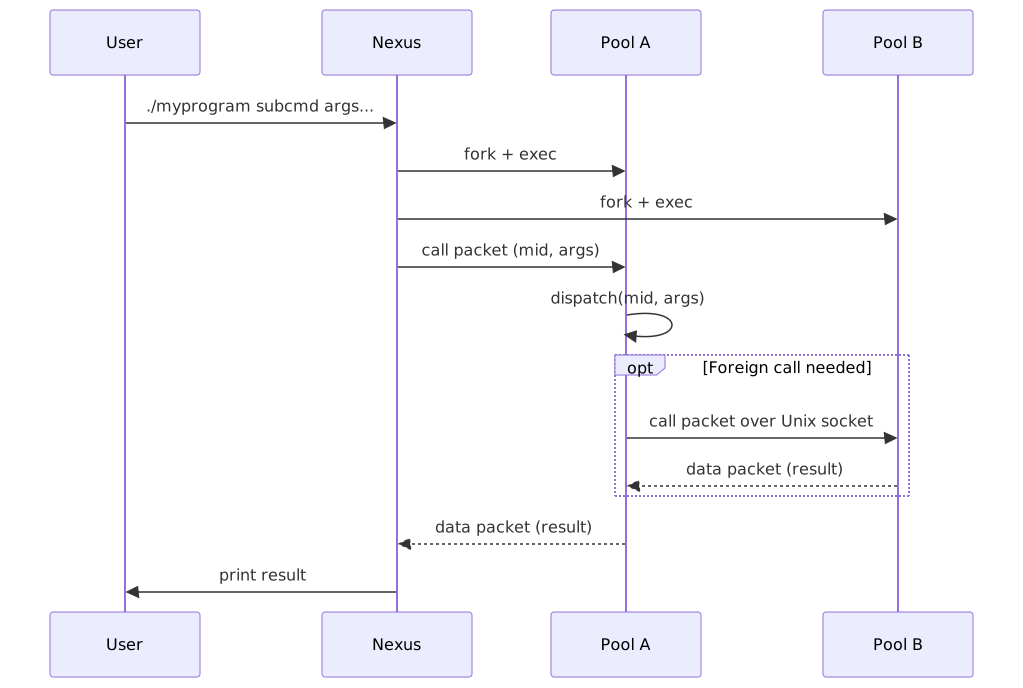
Here are the runtime rules you should be able to count on. Any violations should be considered bugs.
-
STDOUT and STDERR pass through. Any output written to stdout or stderr by user functions is never intercepted or buffered by the Morloc runtime. It passes directly to the terminal.
-
Errors become tracebacks. All exceptions raised by user functions are caught by the pool and returned as error packets. As the error propagates back through foreign calls to the nexus, each layer appends context, building a full cross-language traceback that the user can read.
-
Intra-pool calls are near-native. Calls between functions within the same pool go through a simple dispatch table — there is no serialization, no socket overhead, and no IPC. Performance should be nearly native.
-
Inter-pool calls cost socket time plus marshalling. A call between pools (or between the nexus and a pool) pays only the few microseconds of Unix socket round-trip plus the cost of data marshalling. In the best case, the data in shared memory can be directly used between programs and marshalling cost is zero. In practice, copies are often needed — for example, Python demands ownership of its strings even when the data could in principle be shared directly.
13.2. Cross-language function calls
When a Morloc program composes functions from different languages, the compiler must bridge the language boundary. A key design principle is that Morloc never serializes functions. Functions cannot be meaningfully transmitted between language runtimes — there is no way to pickle a C++ template instantiation into something Python can call directly. Instead, Morloc generates wrapper functions that make IPC calls to the foreign language pool.
13.2.1. How it works
Each function in a compiled Morloc program is assigned a unique integer identifier called a manifold ID (mid). Every pool maintains a dispatch table mapping manifold IDs to concrete function implementations. When a function needs to call a function in another language, it does not call it directly — it sends a call packet containing the target manifold ID and serialized arguments over a Unix domain socket to the foreign pool, which dispatches the call and returns the result.
The compiler generates all of this automatically. Consider a program where
Python’s pmap calls a C++ sum function:
module foo (sumOfSums)
import root-cpp
import root-py
source Py from "foo.py" ("pmap")
source Cpp from "foo.hpp" ("sum")
pmap :: (a -> b) -> [a] -> [b]
sum :: [Real] -> Real
sumOfSums = sum . pmap sumWhen pmap is compiled in the Python pool, it receives sum not as a C++
function pointer, but as a Python wrapper function generated by the
compiler. This wrapper:
-
Serializes its arguments into the binary wire format
-
Sends a call packet (with the C++
summanifold ID) over the Unix socket to the C++ pool -
Reads the result packet back
-
Deserializes the result into a Python value
From Python’s perspective, this wrapper is an ordinary Python callable. It can
be passed to multiprocessing.Pool.map, stored in a list, or used anywhere a
function is expected — because it is a regular Python function. The
cross-language call is hidden inside it.
13.2.2. What the generated code looks like
The Python pool contains a wrapper like this (simplified):
def m1384(x):
packed = morloc.put_value(x, "<list>a<float>f8")
result = morloc.foreign_call(cpp_socket_path, 1384, [packed])
return morloc.get_value(result, "<float>f8")Here 1384 is the manifold ID assigned to sum, and cpp_socket_path is the
path to the C++ pool’s Unix domain socket. The morloc.foreign_call function
handles the IPC: it sends a call packet, waits for the response, and returns the
raw result packet. The put_value and get_value functions handle
serialization and deserialization using a compact binary schema string.
On the C++ side, the pool’s dispatch table routes the manifold ID to the
actual sum implementation:
// compiler-generated dispatch
uint8_t* local_dispatch(uint32_t mid, const uint8_t** args) {
switch(mid) {
case 1384: return m1384(args[0]); // calls sum
// ...
}
}13.2.3. Performance implications
Intra-pool calls (functions in the same language) are direct native function
calls — no serialization, no sockets, no dispatch table lookup. The only
overhead is that functions may be wrapped in thin wrapper functions, but even
this can be eliminated with the %inline pragma, which inlines the function
body at the call site.
Inter-pool calls (cross-language) pay the cost of:
-
Serializing the arguments (proportional to data size)
-
A Unix socket round-trip (microseconds for small payloads)
-
Deserializing the result
In special cases, serialization can be avoided entirely. When data has the same binary representation in both languages, only a pointer to shared memory needs to cross the socket — no copying or conversion. Currently this zero-copy path is supported for Arrow tables; support for fixed-size numeric vectors and tensors is planned.
For higher-order functions like pmap, each invocation of the wrapped function
is a separate IPC round-trip. If pmap sum is called on a list of 1000
elements, that is 1000 cross-language calls. This is the expected cost of
language interop — the alternative would be to batch the data and send it all
at once, but that would require changing the function’s interface.
When performance matters, the best strategy is to keep hot loops within a single language. The compiler’s implementation selection algorithm already optimizes for this: given multiple implementations of a function, it prefers the one that avoids cross-language calls.
13.3. Protocols
|
|
This section is primarily of interest to users extending the Morloc ecosystem (e.g., adding a new language backend) or debugging at the binary level. |
This section describes the binary formats used for communication between the nexus and pools: the manifest, the packet protocol, the shared memory layout, and the voidstar data format.
13.3.1. The manifest
The manifest is a standalone manifest.json file written into the program’s
<name>-build/ directory. The launcher script that morloc make produces is a
thin wrapper carrying no embedded payload; it execs the shared morloc-nexus
runtime against an absolute path to this file, so the launcher can be freely
moved as long as its build directory stays put. The manifest describes the
program’s structure. Key fields:
| Field | Description |
|---|---|
|
Manifest format version (currently |
|
Program name |
|
Absolute path to the build directory |
|
Array of pool descriptors (see below) |
|
Array of exported commands (see below) |
Each pool entry:
-
lang— Language name (e.g.,"python3","cpp") -
exec— Command-line tokens to launch the pool, with the pool path relative tobuild_dir(e.g.,["python3", "pools/python3/pool.py"]) -
socket— Unix domain socket basename (e.g.,"pipe-python3")
Each command entry:
-
name— CLI subcommand name -
type—"remote"(dispatched to a pool) or"pure"(evaluated in the nexus) -
mid— Manifold index identifying the function in the pool -
pool— Index into thepoolsarray -
needed_pools— Indices of all pools that must be running -
arg_schemas/return_schema— Schema strings describing argument and return types (see Schema strings) -
args— CLI argument descriptors
13.3.2. Packet protocol
All communication uses a binary packet protocol over Unix domain sockets. Every packet starts with a 32-byte packed header:
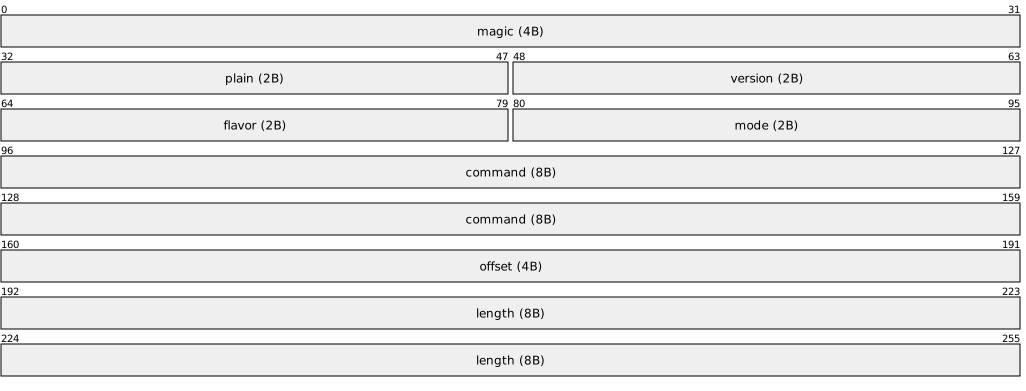
| Field | Type | Width | Description |
|---|---|---|---|
|
uint32_t |
4 |
Constant |
|
uint16_t |
2 |
Plain membership (reserved, always 0) |
|
uint16_t |
2 |
Format version (currently 0) |
|
uint16_t |
2 |
Metadata convention (reserved) |
|
uint16_t |
2 |
Evaluation mode (reserved) |
|
union |
8 |
Type-specific command data (see below) |
|
uint32_t |
4 |
Bytes of metadata between header and payload |
|
uint64_t |
8 |
Payload length in bytes |
Total packet size is always 32 + offset + length.
Packet types
The command field’s first byte is a type tag:
Data packet (0x00) — Carries data or error messages:
| Field | Type | Width | Description |
|---|---|---|---|
|
uint8_t |
1 |
|
|
uint8_t |
1 |
|
|
uint8_t |
1 |
|
|
uint8_t |
1 |
Reserved, always 0 |
|
uint8_t |
1 |
Reserved, always 0 |
|
uint8_t |
1 |
|
|
uint8_t |
2 |
Zero |
For small data (up to 64 KB serialized), the most common combination is
source=MESG, format=VOIDSTAR — the voidstar binary is embedded directly in
the packet payload, avoiding shared memory entirely. For large data, the
combination is source=RPTR, format=VOIDSTAR — only an 8-byte relative
pointer travels over the socket, and the data lives in shared memory.
When status=FAIL, the packet carries a UTF-8 error message (source=MESG,
format=TEXT).
Call packet (0x01) — Instructs a pool to execute a function:
| Field | Type | Width | Description |
|---|---|---|---|
|
uint8_t |
1 |
|
|
uint8_t |
1 |
|
|
uint8_t |
2 |
Zero |
|
uint32_t |
4 |
Manifold index (which function to call) |
The payload is a contiguous sequence of data packets, one per argument.
Ping packet (0x02) — Header-only, no payload. The nexus pings pools to
check readiness; the pool echoes it back as a pong.
13.3.3. Shared memory
Pools share data through POSIX shared memory segments rather than copying over sockets. Only relative pointers (8 bytes) travel over the wire.
Volumes
Shared memory is organized as multiple volumes (/dev/shm/morloc-<hash>_0,
morloc-<hash>_1, etc.). The nexus creates the first volume (64 KB). New
volumes are created automatically when space runs out (up to 32 volumes). If
/dev/shm is too small (common in Docker), volumes fall back to files in the
temporary directory. Under Apptainer/Singularity the host’s /dev/shm is
shared into the container at host size, so this fallback is rarely
triggered.
Pointer types
| Type | Description |
|---|---|
|
Virtual address in the current process. Different per process. |
|
Offset within a single volume (0 = first byte after the header). |
|
Global offset across all volumes. This is the pointer type shared between processes — it appears in data packets and in voidstar data structures. |
volume 0 (size=20) volume 1
---xxxxxx........----xxxxxx............---->
relptr 0 7 8 19
Volume header (shm_t)
| Field | Type | Description |
|---|---|---|
|
unsigned int |
Constant |
|
char[256] |
Volume identifier |
|
int |
Index in the pool (0, 1, 2, …) |
|
size_t |
Usable data capacity (excludes header) |
|
size_t |
Sum of all prior volumes' sizes |
|
pthread_rwlock_t |
Process-shared read-write lock |
|
volptr_t |
Current free block (allocator hint) |
Block header (block_header_t, packed)
| Field | Type | Description |
|---|---|---|
|
unsigned int |
Constant |
|
atomic unsigned int |
Active references (0 = free) |
|
size_t |
Payload size in bytes (excludes header) |
Blocks use reference counting. shmalloc allocates with first-fit and lazy
coalescing. shfree decrements the reference count; blocks are merged during
the next allocation scan.
13.3.4. Schema strings
Schema strings are a compact encoding of a data type’s binary layout. They appear in the manifest and in packet metadata.
Primitives:
| Schema | Type |
|---|---|
|
nil (1 byte) |
|
bool (1 byte) |
|
signed int (1/2/4/8 bytes) |
|
unsigned int (1/2/4/8 bytes) |
|
float (4/8 bytes) |
|
variable-length UTF-8 string |
Compounds:
| Pattern | Description |
|---|---|
|
Array. |
|
Tuple. |
|
Record with length-prefixed keys. |
13.3.5. Voidstar binary format
Every Morloc general type maps unambiguously to a binary form that consists of several fixed-width literal types, a list container, and a tuple container. The literal types include a unit type, a boolean, signed integers (8, 16, 32, and 64 bit), unsigned integers (8, 16, 32, and 64 bit), and IEEE floats (32 and 64 bit). The list container is represented by a 64-bit size integer and a pointer to an unboxed vector. The tuple is represented as a set of values in contiguous memory. These basic types are listed below:
| Type | Domain | Schema | Width (bytes) |
|---|---|---|---|
Unit |
|
z |
1 |
Bool |
|
b |
1 |
U8 |
\([0,2^{8})\) |
u1 |
1 |
U16 |
\([0,2^{16})\) |
u2 |
2 |
U32 |
\([0,2^{32})\) |
u4 |
4 |
U64 |
\([0,2^{64})\) |
u8 |
8 |
I8 |
\([-2^{7},2^{7})\) |
i1 |
1 |
I16 |
\([-2^{15},2^{15})\) |
i2 |
2 |
I32 |
\([-2^{31},2^{31})\) |
i4 |
4 |
I64 |
\([-2^{63},2^{63})\) |
i8 |
8 |
F32 |
IEEE float |
f4 |
4 |
F64 |
IEEE double |
f8 |
8 |
List x |
lists |
a{x} |
\(16 + n \Vert a \Vert \) |
Tuple2 x1 x2 |
2-ples |
t2{x1}{x2} |
\(\Vert a \Vert + \Vert b \Vert\) |
TupleX \(\ t_i\ ...\ t_k\) |
k-ples |
\(tkt_1\ ...\ t_k\) |
\(\sum_i^k \Vert t_i \Vert\) |
\(\{ f_1 :: t_1,\ ... \ , f_k :: t_k \}\) |
records |
\(mk \Vert f_1 \Vert f_1 t_1\ ...\ \Vert f_k \Vert f_k t_k \) |
\(\sum_i^k \Vert t_i \Vert\) |
All basic types may be written to a schema that is used internally to direct
conversions between Morloc binary and native basic types. The schema values
are shown in the table above. For example, the type [(Bool, [I8])] would
have the schema at2bai1. You will not usually have to worry about these
schemas, since they are mostly used internally. They are worth knowing, though,
since they appear in low-level tests, generated source code, and binary data
packets.
Here is an example of how the type ([U8], Bool), with the value
([3,4,5],True), might be laid out in memory:
---
03 00 00 00 00 00 00 00 -- first tuple element, specifies list length (little-endian)
30 00 00 00 00 00 00 00 -- first tuple element, pointer to list
01 00 00 00 00 00 00 00 -- second tuple element, with 0-padding
03 04 05 -- 8-bit values of 3, 4, and 5
---Records and tables (described in detail earlier) are represented as tuples in
voidstar format — field names are stored only in the type schemas. The table
annotation is not just syntactic sugar for a record of lists; it is preserved
through the compiler to the translator, where language-specific serialization
functions may have special handling for tables.
record Person = Person { name :: Str, age :: U8 }
table People = People { name :: Str, age :: Int }
alice = { name = "Alice", age = 27 }
students = { name = ["Alice", "Bob"], age = [27, 25] }The Morloc type signatures can be translated to schema strings that may be parsed by a foundational Morloc C library into a type structure. Every supported language in the Morloc ecosystem must provide a library that wraps this Morloc C library and translates to/from Morloc binary given the Morloc type schema.
13.4. Runtime and Dev Builds
The Morloc runtime — the shared library (libmorloc.so) and the nexus binary
(morloc-nexus) — is written in Rust. Language-specific pools and extensions
still use their own compilers (g++ for C++, etc.), but they link against the
Rust-built libmorloc.so through a stable C ABI defined in a single header
(morloc.h).
13.4.1. Build modes
morloc init -f installs the runtime. It looks for one of two environment
variables to decide how:
| Variable | Purpose |
|---|---|
|
Path to a directory containing pre-built |
|
Path to the |
Exactly one must be set. If both are set, MORLOC_RUST_BIN takes precedence.
Using pre-built binaries (release / CI):
export MORLOC_RUST_BIN=/path/to/binaries
morloc init -fPre-built binaries are published with each release on GitHub Releases.
Building from source (development):
export MORLOC_RUST_DIR=/path/to/compiler/data/rust
morloc init -fThis runs cargo build --release inside the Cargo workspace and copies the
artifacts into place. You need cargo (install via rustup).
13.4.2. What the runtime provides
The Rust workspace produces two artifacts:
libmorloc.so-
Shared library linked by every pool. Provides the IPC layer (Unix domain sockets), shared-memory allocator, packet codec, JSON/MessagePack serialization, and worker-pool concurrency primitives.
morloc-nexus-
Pre-compiled CLI entry point. Reads a program’s
manifest.jsonfile, parses command-line arguments, starts pool daemons, dispatches calls, and prints results.
14. Future Directions
14.1. Planes of libraries

|
The infrastructure for "planes" is not yet constructed, so the following is speculative |
The concept of "planes" is central to the future organization of Morloc and is one of the primary reasons that I created it. A plane is like a namespace for a community’s modules—but instead of organizing by category or programming language, modules in a plane share a common philosophy about quality, trustworthiness, software design and the review process.
Currently, the universe of functions is separated first by language and then by subject area. Morloc, being polyglot, allows the first mode of separation to be lifted, so language does not need to separate communities. Instead, communities can organize around values.
-
Levels of review & trust: Code may be wild and experimental; tightly reviewed and trusted in production; or formally verified.
-
Design philosophy: Groups may prioritize safety, raw performance, or elegance by some metric.
-
Use case: Planes may focus on production, pedagogy, competition or experimentation.
Making these differences explicit (and easy to navigate) lets the community set and find their own standards.
Real-World Analogs
Within the R community, you could define three planes:
-
CRAN: Has stringent requirements for acceptance and manual application process focused on adherence to well-defined (mostly automated) requirements
-
rOpenSci: Focuses on a formal peer review process that considers motivation, documentation, and good software design
-
GitHub: Wild west. Anything goes.
You could probably find more "planes" in R, but these three capture the idea of what a plane is. It is a design philosophy and set of protocols that define admission.
Possible examples of Morloc planes
-
default: Official libraries used in sandboxes and demos (not necessarily efficient).
-
unstable: For newly submitted or unvetted modules, e.g., loaded straight from GitHub.
-
safe: Modules that passed manual review, rigorous automated tests, and have strong test suites.
-
true: Formally verified modules, strict on what languages are allowed (e.g., dependently typed languages).
-
prod: Production ready modules, combining safety and performance.
-
comp: Modules suited for competitive programming; all performance, no safety checks or focus on software design principles.
-
red: Adversarial modules—written to give the Morloc bot problems. Probably don’t want to import these.
-
weird: Esoteric code. For silly implementations that abuse languages in fun ways.
-
demo: Prototypes, examples, and proof-of-concept modules. More pedagogical than practical.
Planes aren’t rigid categories, but cultures: each has its own ground rules, review process, and ideas about what makes code "good". Anyone can propose a new plane, but we don’t want too many; a bit of consensus is required before adding one.
How Does a Module Join a Plane?
Again, the architecture is in development. But here is the basic process:
-
Register: Authors register their module (e.g., import code from GitHub and authenticate).
-
AI Vetting: Our AI (Weena) checks code for basic standards.
-
Acceptance: After being accepted, the module defaults to the
unstableplane. -
Level Up: Module authors can then apply to join other planes. Getting accepted depends on the plane’s review process (could be peer review, automated testing, thumbs up from community members, or nothing at all).
-
Multiple Planes: Modules can exist in multiple planes at once—different communities may trust the same code for different reasons.
This process will eventually be mediated on the website morloc.io (under construction).
Overall, planes help you find code that matches your needs and values—whether you want ultimate safety, bleeding-edge performance, or just something weird that might surprise you. They also provide community and allow relations between different codebases to be specified.
15. Q&A
15.1. I only use one language, is Morloc still useful?
Yes, Morloc remains useful even if you only use one programming language.
While Morloc is designed to allow polyglot development, its core benefits also apply to single-language projects. In the Morloc ecosystem, you may continue working in your preferred language, but focus shifts to writing libraries instead of standalone applications.
Morloc lets you compose these functions and automatically generate applications from them, offering several advantages:
-
Broader usability: Your functions can be easily reused and easily accessed by other language communities.
-
Improved testing and benchmarking: Functions can be integrated into language-agnostic testing and benchmarking frameworks.
-
Future-proofing: If you ever need to migrate to a new language, Morloc’s type annotations and documentation carry over—only the implementation needs to change. And if you want to leave the Morloc ecosystem, your implementation does not need to change.
-
Better workflows: Especially in fields like bioinformatics, Morloc shifts workflows from chaining applications and files to composing typed functions and native data structures, making pipelines more robust and easier to validate.
-
No more format parsing: Morloc data structures replace bespoke file formats and offer efficient serialization.
While language interop is a major feature of Morloc, it is not the main purpose. The very first version of Morloc was not even polyglot at all. The focus originally was to just have a simple composition language that separated pure code from associated effects, conditions, caching, etc.
The primary goal of Morloc is to support the development of composable, typed universal libraries. Support for many languages is required for this goal, since no one language is best for all cases. Most Morloc users would continue to program in their favorite language, but gain the ability to compose, share, and extend functionality more easily.
15.2. Is this just a bioinformatics workflow language?
No. The Morloc paper, is focused on bioinformatics applications. As discussed at length in the paper, Morloc addresses systematic flaws in the traditional approaches to building bioinformatics workflows. Given the need, and also given my personal background, bioinformatics is a good place to start. However, Morloc can be more broadly applied to any functional problem.
15.3. Does Morloc allow function-specific containerized environments?
No, unlike workflow managers such as Snakemake and Nextflow, Morloc does not offer function-specific environments. This is a deliberate design choice.
Dependency resolution is a hard and heavily researched problem. The general goal of dependency solvers is to find one set of dependencies that satisfies the entire program. The bioinformatics community often gives up on finding unified environments and instead runs each function in its independent environment. With every function running in its own container, all dependency issues are encapsulated and all functions may be executed from one manager. But this comes at a heavy cost. Each application must be wrapped in a script, the script must be executed via an expensive system call into the container, and data must be serialized and sent to the container. This approach is reasonable for workflows with a small number of heavy components. But from a programming language perspective, wrapping every function call in its own environment is inefficient and opaque.
Morloc is designed not to hide problems in boxes, but rather to solve the root problem. Conventional workflow languages attempt to simplify workflows design by layering frameworks over the functions. The Morloc approach is the exact opposite. First delete everything unnecessary from all applications and lift their light algorithmic cores into clean, well-typed libraries. Then build upwards through composition of these pure functions—and judicious use of impure ones—to create efficient, reliable, and composable tools.
Now, if you really do need to run something in a container, you can just make a function that wraps a call to a container and then use it just as you would any other function. You could even write a wrapper function that takes a record with all the metadata needed for a conda environment and execute its function within that environment. We can do this through libraries, so there is no need to hardcode this pattern into the Morloc language itself.
The reproducibility of Morloc workflows may be ensured by running the entire Morloc program in an environment or container, with a single set of dependencies. The specific Morloc compiler version can be specified and modules may be imported using their git hashes. This is done in the current Morloc examples (see the Dockerfile in the workflow-comparisons folder of https://github.com/morloc-project/examples).
15.4. What about object-oriented programming?
An "object" is a somewhat loaded term in the programming world. As far as Morloc is concerned, an object is a thing that contains data and possibly other unknown stuff, such as hidden fields and methods. All types in Morloc have must forms that are transferable between languages. Methods do not easily transfer; at least they cannot be written to Morloc binary. However, it is possible to convey class-like APIs through typeclasses. Hidden fields are more challenging since, by design, they are not accessible. So objects cannot generally be directly represented in the Morloc ecosystem.
Objects that have a clear "plain old data" representation can be handled by
Morloc. These objects, and their component types, must have no vital hidden
data, no vital state, and no required methods. Examples of these are all the
basic Python types (int, float, list, dict, etc) and many C++ types such
as the standard vector and tuple types. When these objects are passed between
languages, they are reduced to their pure data.
15.5. Is Morloc still relevant when AI can program and translate?
Maybe. Morloc may serve as a system for functional composition, verification, and automation even when most functions are generated by machines.
I’ll lay out an argument for this below, starting with a few proposition:
-
Adversaries exist. AIs may themselves be adversarial or there might be adversarial code in ecosystem around the AIs (for example, prompt injection). Humans can’t trust humans, humans can’t trust AIs, AIs can’t trust humans, and AIs can’t trust AIs. Depending on their architecture, AIs may not even be able to trust their own memories.
-
Stupid is fast. Narrow intelligence outperforms general intelligence for narrow problems. A vast AGI system with deep understanding of physics and Shakespeare will not be the fastest tool for sorting a list of integers. There will always be a need for programs across the intelligence spectrum — from classical functions, to statistical models, to general intelligences.
-
Creating functions is expensive. Designing high-performance algorithms is not trivial. Even simple functions, like sorting algorithms, require deep thought to optimize for a given use case. But there is a further combinatorial explosion of more complex physical simulations, graphics engines, and statistical algorithms. While simple functions might be created in seconds, others may take years of CPU time to optimize.
-
Reproducibility is important. Future AIs may serve as nearly perfect oracles, but they are complex entities and future AIs will likely be capable of evolving over time as persons. So they will likely not give equivalent answers day to day. It is valuable to be able to crystallize a thought process into something that will behave the same every time it is invoked on a given input. So again, functions are important.
-
Correctness is important. If functions are being composed by AIs to create new programs, any function that does not behave in the way the AI expects can cause cascading errors. It doesn’t matter how intelligent the AI is, if it is building programs from functions that it cannot verify, then the programs may not be safe.
A few things follow from these propositions.
First, AI will benefit from writing functions. Even in a world with no humans, they will need functions for efficiently solving narrow problems. They will likely generate libraries of billions of specialized functions. Some may be classical functions and others may be small statistical models. By caching these functions, compute time can be saved. Rather than generating entire programs from first principles, they can build them logically through composition of prior functions. The same forms of abstractions that help humans reason will also be of value to AIs. Yes, they have far larger working memories than we do, but that does not change the fact that abstraction and composition reduce the costs of re-derivation.
Time can also be saved if different AIs share functions they have written (both with each other and with humans). Since adversaries exist, shared functions must be verified. But verification is hard, especially if a godlike super-intelligence were trying to hide adversarial features in the binary. The problem can be simplified by using a controlled language that can be formally verified by a trusted classical computer program — a compiler. So rather than share functions as binary, it would make sense to share them in strict controlled languages. For this reason, I believe that something resembling current programming languages will exist far into the future. Their main purpose will be as easily verifiable and human readable specifications for languages that can be compiled into high-performance code.
So in this imagined future, there are billions of functions in databases that are written in verifiable languages readable by humans, classical machines, and AIs. But what language is used? Maybe the AIs can converge on one standard. But even for AIs, and perhaps especially for them, I don’t think a single language is optimal. Rather, just as in human mathematics, there will likely be many languages for many domains. Languages make trade-offs. In general, the more complex a language is, the more difficult it is to parse, verify and optimize. So even if we ignore human factors, multi-lingual ecosystems are still likely to appear. Adding in human factors, we are again likely to see a spectrum of languages that accept different trade offs in rigor, ease of use, and domain specificity.
I predict a future where humans and AIs use libraries of functions written in specialized languages. All the functions need to be easily verifiable by an outside actor and verified functions need to be composed to more complex programs using a well-verified composer. Since we don’t trust any agent to verify, we need a classical program. Morloc is a potential candidate for this role. It would serve as a classical composition tool, function verification ecosystem, automation engine, and conceptual framework for organizing and using billions of mostly machine generated functions.
In this world, Morloc could serve as the composition engine that parses AI-generated compositions as Morloc scripts, generates all the artifacts, and manages search over functional libraries. The AI design space could be defined as composition-space of all modules that are available in the ecosystem. This lowers the complexity of design space, likely increasing generation efficiency, and allows more formal reasoning over the side-effects a given AI system can have.
Of course, the future is impossible to predict, especially where AI is concerned. It is possible that AIs will converge on a single universal representation for computation. It is possible that the need for human readability and curation will disappear. It is possible that classical computer functions could be entirely replaced by discrete mathematical constructs that are composable and machine verifiable but entirely incomprehensible to humans.
15.6. I’m not a human, do I still need Morloc?
Yes, you are still a programmer and writing endless glue code to stitch things together takes time and is brittle. Abstraction is universal. With Morloc you can build with confidence using simple components with highly efficient interfaces. You can access a library of functions and freely compose them to build infinite new tools. Morloc is a way to define, access, and explore customizable and efficient toolsets.
15.7. Why is it named after Morlocks, weren’t they, like, bad?
While the Morlocks of Wellian fame are best known for their culinary preferences, I think Wells misrepresented them. And even if he didn’t, we don’t treat our own Eloi any better. Meat choices aside, the Morlocks worked below to maintain the machines that simplified life above. That’s why the Morloc language adapts their name.
16. Environmental Variable List
16.1. Environmental variables
Every environment variable that morloc reads or sets lives in the
MORLOC_ namespace. They fall into two roles:
-
Tunables — read at runtime to override a default. A user (or an orchestrator) sets these; morloc only reads them.
-
Wiring — set by the nexus, the compiler, or
mimand read by the child processes they launch (pools, setup scripts, SLURM re-entry). Users normally do not set these by hand.
The tables below group the variables by topic. The Introduced in
column links to the manual section that introduces the variable; a
(pending) entry marks a variable that is described here but does not
yet have a dedicated home elsewhere in the manual.
16.1.1. Installation and runtime setup
| Variable | Description | Default | Introduced in |
|---|---|---|---|
|
Morloc install root; base for |
|
|
|
Directory of pre-built |
(search) |
|
|
Path to the |
(search) |
|
|
Directory where |
|
(pending) |
|
Explicit path to the |
(resolution chain) |
(pending) |
16.1.2. Module installation (setup-script environment)
Set by the compiler for a module’s setup script child process and
read by that script.
| Variable | Description | Default | Introduced in |
|---|---|---|---|
|
Name of the module being installed. |
(per module) |
|
|
Version of the module being installed. |
(per module) |
|
|
Absolute path to the installed module directory; also the script’s working directory. |
(per module) |
|
|
Active plane name. |
(config) |
|
|
Directory of the active plane’s library path. |
(config) |
|
|
Destination directory a |
(derived from plane/module) |
(pending) |
|
Destination directory a |
(derived from plane/module) |
(pending) |
|
Destination directory a |
(derived from plane/module) |
(pending) |
16.1.3. Run directory, logging, and reporting
| Variable | Description | Default | Introduced in |
|---|---|---|---|
|
Base directory that activates the per-run directory, stderr log
tee, and |
(none; opt-in) |
|
|
Path to write |
(none) |
|
|
Suppress all morloc-emitted log lines at the source. Equivalent to
|
off |
|
|
Current run’s directory. Set by the runtime and inherited by child morloc processes so their logs interleave. |
(only when active) |
|
|
PID that created the rundir; guards against a stale inherited
|
(own PID) |
|
|
Parent directory of the active run directory. Published by the
runtime for child pools; informational only (a child reconstructs
its run from |
(only when active) |
(pending) |
|
Any non-empty value enables per-stage timing trace lines on stderr (ingest, size-estimate, and emit hot paths) for diagnosing where wall time is spent. |
off |
(pending) |
16.1.4. Debugging
| Variable | Description | Default | Introduced in |
|---|---|---|---|
|
Explicit output directory for |
(rundir or |
|
|
Maximum disk writes per dispatch ( |
|
|
|
Per-arg size cap on the dumped payload; larger args recorded by hash
only. Equivalent to |
|
|
|
Per-manifold frame limit in a recorded trace ( |
|
16.1.5. Caching
| Variable | Description | Default | Introduced in |
|---|---|---|---|
|
Override the cache base directory (useful for Docker mounts and shared filesystems). |
|
|
|
zstd level for persisted cache entries. |
|
(pending) |
|
Hex source fingerprint mixed into every cache key so editing the
morloc source (or a |
|
(pending) |
16.1.6. Data transfer (packets and shared memory)
Set by the nexus from the compiled manifest and read once by
libmorloc on the first packet operation.
| Variable | Description | Default | Introduced in |
|---|---|---|---|
|
Maximum flat byte size embedded inline in a packet; larger payloads spill to shared memory (or a temp file). |
|
(pending) |
|
Set to |
off |
(pending) |
|
Temp directory for file-routed packets (used when a payload exceeds the inline threshold and SHM is disabled or unavailable). |
system temp |
(pending) |
16.1.7. Streaming and compression
| Variable | Description | Default | Introduced in |
|---|---|---|---|
|
Concurrent stream handles per nexus invocation (each slot uses 512 bytes of SHM). |
|
|
|
Per- |
16 MiB |
|
|
Per-handle SHM cache for decompressed IFile sub-packets ( |
256 MiB |
|
|
Worker threads for parallel zstd frame compression/decompression (capped at 16). |
|
16.1.8. Nexus and inter-process wiring
Set by the nexus and read by the pools it launches.
| Variable | Description | Default | Introduced in |
|---|---|---|---|
|
Unix-socket path for the SLURM submission bridge; exported by
|
(unset = direct sbatch) |
|
|
Absolute path of the running nexus, exported to every pool so
remote/SLURM dispatch can wrap an |
(from |
(pending) |
|
Absolute (canonicalized) path of the program manifest, exported to pools for tooling that must re-enter the same program. |
(canonical manifest path) |
(pending) |
|
Unix socket the nexus binds for its stdio server; a pool connects to
it to route |
(unset) |
(pending) |
16.1.9. Nexus inspection tools (view / file)
| Variable | Description | Default | Introduced in |
|---|---|---|---|
|
Override the buffered-path size threshold that the |
1 GiB |
|
|
Cap on sub-packets scanned when classifying a footer-less stream file. |
|
|
|
Data rows Arrow scans to infer a CSV schema. |
|
(pending) |
17. Contact
This is a young project and any brave early users are highly valued. Feel free to contact me for any reason!
-
discord: https://discord.gg/dyhKd9sJfF
-
BlueSky: https://bsky.app/profile/morloc-project.bsky.social
-
email: z@morloc.io